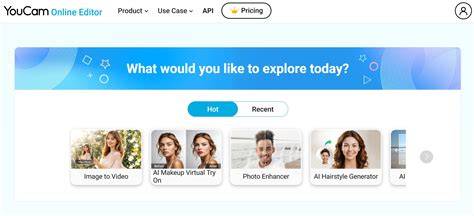
YouCam Enhance is your all-in-one AI photo and video enhancer - instantly restore, denoise, and upscale pixelated visuals, then create stunning AI images and videos from text prompts. Compatibility Requires iOS 16.0 or later, iPhone, iPadOS 16.0 or later, and Apple VisionRequires visionOS 1.0 or later.
Core capabilities: restore, enhance, colorize, and upscale
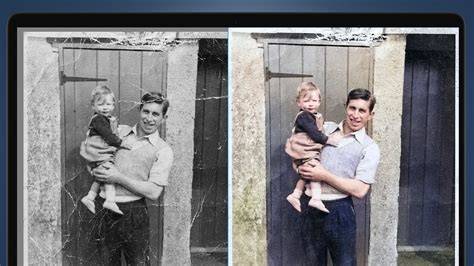
Unblur, sharpen & upscale blurry, grainy or old photos and videos to crystal-clear HD and 4K quality-the fastest way to fix a blur photo in seconds. AI Photo Restoration: erase deep scratches and damage, and restore blurry old photos with rich, true detail. AI Colorize: watch history come alive in color and add vibrant, natural colors to black-and-white photos. AI Photo Repair: all-in-one tool to restore old photos-auto-detects scratches, fixes damage, and restores image quality with one tap. AI Lighting: automatically detects and corrects dark or overexposed shots for flawless exposure and clarity.
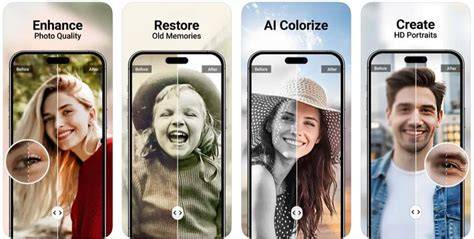
Auto Object Remover: instantly remove objects from photos with smart auto-detect - your go-to photo eraser and cleaner for unwanted people, wires, or distractions in seconds. Background Editor and Extender: remove, change, or extend backgrounds to fit any social post without losing quality. AI Colorize (Essential & Advanced): bring black-and-white memories back to life with incredible accuracy.
Advanced restoration and animation workflows
Upgraded Photo Repair & One-Step Animation: meticulously restore severely damaged, scratched, or faded photos. While Essential mode provides quick, standard fixes, Advanced mode erases deep scratches and reconstructs lost details while keeping faces and backgrounds perfectly true-to-life. New Language Support: Afrikaans for localized experience. AI Photo Enhance: sharpen details, remove noise, and upscale images to 4K in one tap. One-tap AI Photo Enhance includes AI Lighting and AI Color Correction for an automatically polished result.
How Filmmakers Should Actually Be Using AI Video
AI Video Enhancer: sharpen and upscale videos into 4K with real-time previews, supporting MP4, M4V, and MOV formats. AI Video Repair: correct damaged or corrupted video frames with AI precision. AI Image to Video: transform a single photo into a dynamic video using 20+ customizable templates or text prompts for social-ready formats. These features work together to transform both memories and creative ideas into high-quality visuals.
Object removal, background editing, and creative generation
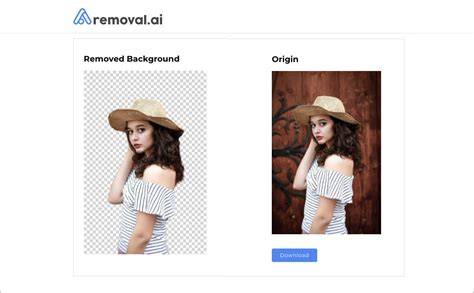
Object Remover: clean up shots by removing unwanted elements or people. Background Generator/Remover/Extender: generate or replace backgrounds and extend images for perfect social posts. Image Extender: resize and expand photos without losing quality. Face Retouch & Reshape: precise portrait editing for professionals and enthusiasts alike.
AI image generation and image-to-video capabilities
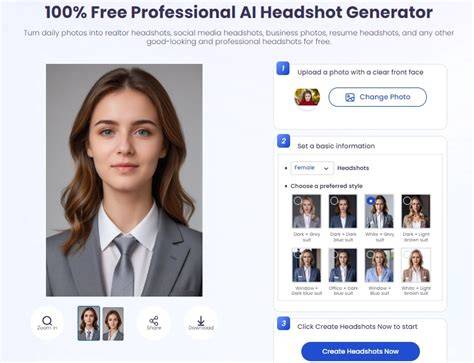
AI Image Generator: create impressive visuals from text prompts with over 30 image styles. AI Image to Image: reimagine existing photos with trending styles. Multi-Model AI Image Generator: powered by Nano Banana Pro, ChatGPT, Seedream 4.0, Imagen 4 Gen, and Flux 1.1 Pro for unmatched creativity and precision. AI Headshot Generator and AI Avatar Generator: produce professional headshots and avatars for profiles.
AI Agent: chat-based editing assistant
With AI Agent, you can enhance or edit via simple chat. This enables turning ideas into professional results through natural language prompts, streamlining the creative process and speeding up workflows.
Usage scenarios: from old photos to social media masterpieces
Whether it’s a selfie, family photo, or video clip, YouCam Enhance’s advanced AI tools bring memories back to life. The app is designed for both beginners and professionals, offering a user-friendly interface and powerful generative AI-powered features. You can edit, restore, colorize, and creatively generate visuals in seconds, all within a single app.
Accessibility, pricing, and safety
YouCam Enhance is freemium - free to download with five free credits for new users to try core tools. Advanced AI tools run on credits or membership plans (Standard, Pro). It works in-browser for some features and is designed to be cross-device, with cloud-based processing to minimize local hardware requirements. Privacy is emphasized, with data encrypted and processed securely, and user content not used to train AI models without consent.
Compatibility: Requires iOS 16.0 or later. iPhone, iPadOS 16.0 or later; Apple VisionRequires visionOS 1.0 or later. YouCam Enhance is designed to be safe and reliable for everyday creators, small businesses, and social media managers seeking professional results without complex software.
Practical tips and best practices
- For best results, start with well-lit, clear source images. The AI can reconstruct detail but works best with good source data.
- Use AI Photo Repair in Advanced mode when dealing with deep scratches or significant damage to preserve facial integrity and background realism.
- When generating AI images from text prompts, experiment with multiple styles to find the most natural look for your subject.
- For videos, begin with shorter clips to preview results quickly before processing longer footage.
- Combine tools in a workflow: enhance a photo, remove an obstruction, then animate the image for engaging social content.
Сontent highlights and real-world use
From transforming blurry vacation footage to restoring vintage family photos, YouCam Enhance offers a spectrum of AI-powered tools designed to save time and elevate quality. The platform emphasizes user privacy, cloud-based processing, and accessibility across devices, enabling users to produce professional-grade visuals without desktop software.