This is one of the most common questions we get, and the answer may surprise you… The place to look to find the answer is the Software License Agreement, also called the terms of use or EULA. This agreement governs the use of your Adobe product, and is translated into 28 languages within each document. So, in general, how many systems can you install Adobe software on, including the Creative Cloud (CC) or older software like CS6?
Two devices for individuals, with usage constraints
The answer for individuals (as opposed to businesses) in most cases is two. The catch is that both computers must be used only by you and the two systems cannot be used at the same time. This policy was designed so that you could run the tools at home on your desktop PC, as well as while traveling with your laptop.
So the primary user may install another copy on a secondary computer for their own use, but the two installations cannot be used simultaneously. However, all Creative Cloud members and single-app CC subscribers (and that includes all customers of the $19.99 Photography Plan) can install and run their tools on up to two machines of either operating system, including both a Mac and a PC.
Another key benefit with Creative Cloud is that it does not use serial numbers like CS did - instead, you activate CC by logging in with your Adobe ID, thereby providing the ability to more flexibly manage your usage.
Activation management and limits
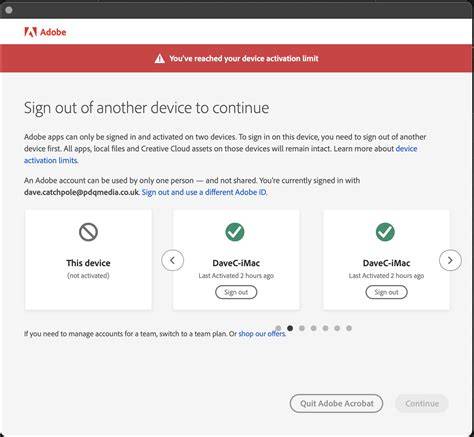
So if you install the CC apps onto a third computer, it will ask you if you want to automatically deactivate the other two… Just hit “Continue” at the Maximum Activations Exceeded box, and it will handle activation of your new system and deactivation of the others for you. Afterwards, you can reactivate again on one additional machine.
Virtual machines and definition of a “computer”
Importantly, Adobe defines a computer as “a virtual or physical device,” not just a CPU - so that includes running on virtualization platforms such as VMware Fusion, Parallels Desktop, Citrix XenApp, and Oracle VM VirtualBox. So each virtual machine you install the software on would count as a single product activation per the rules described in this article.
Creative Cloud for Teams and business licensing
If you’re part of an organization, group, business, or school, and/or need more than one user or computer running the software at the same time, then take a look at the flexibility and ease of maintenance available through Adobe’s Creative Cloud for Teams offering. Creative Cloud for Teams also offers exclusive collaboration features like Frame.io and Team Projects, which enable a group of distributed users to work jointly on a single video project. Learn more about the advantages of Creative Cloud for Teams and how to easily manage multiple people working together as colleagues.
CC for teams vs. Don’t need full Cloud? Do you have any questions about CC licensing?
Anatomy of a CC License
Таблица: кратко о разных сценариях использования
| Сценарий | Макс. устройства | Условия использования |
|---|---|---|
| Individual two-device policy | 2 | Both must be used by you; not simultaneous |
| Creative Cloud on two machines | 2 | Mac and PC, or two Macs, etc.; login-based activation |
| Virtual machines | 1 activation per VM | Each VM counts as a separate activation |
| Creative Cloud for Teams | Multiple per organization | Licensing for multiple users/computers; collaboration features |
In summary, individuals generally may activate on up to two devices, provided the two installations are not used simultaneously and are reserved for the primary user. Creative Cloud shifts the model to login-based activation, allows two active machines, and counts virtual environments as separate activations. For larger teams or educational institutions, Creative Cloud for Teams offers scalable licensing and collaborative tools.