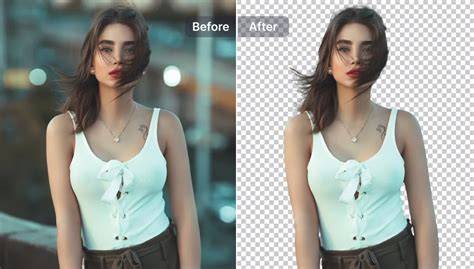
AI Ease Photo Editor offers a robust suite of AI-powered tools designed to simplify professional photo editing while delivering high-fidelity results. With features like seamless object removal, precise background isolation, and advanced image enhancement, it enables creators to produce studio-quality visuals without complex software or subscriptions.
Trusted Performance and Safety for Busy Workflows
4.9/5 from 10,000+ happy creators underscores its reliability for teams and individuals alike. Your data security is prioritized through SSL encryption and automatic permanent deletion of original and edited images after 24 hours, ensuring privacy without compromising convenience.
Effortless Object Removal and Background Control
Whether removing an accidental photobomber or erasing distracting elements, the editor analyzes surrounding textures and lighting to reconstruct the missing area pixel by pixel for a natural result. Background isolation uses smart AI to handle fine hair, transparent glass, and other challenging edges in seconds, making it ideal for high-volume sellers and creators.
Drag and drop your file, type a clear instruction such as "remove background," "erase object," or "upscale quality," and click Generate to review and download your polished image in seconds. The tool supports JPG, PNG, and WebP formats and renders outputs in HD without watermarks or hidden fees.
Generative Fill and 4K-Quality Output
Generative Fill extends vertical portraits to horizontal banners and recovers cropped details by generating high-resolution extensions that blend indistinguishably with the original. The engine recovers lost facial details, reduces compression noise, and sharpens textures to achieve up to 400% clarity improvement compared to standard resizing.
Unlike traditional upscaling, this approach preserves fidelity and minimizes artifacts, ensuring every pixel counts in high-resolution exports suitable for online stores, marketing materials, or social media.
Advanced Features for Professionals and Agencies
Background removal and refinement are complemented by edge-aware masking that handles complex edges with precision. The platform leverages image-to-image technology to refine edges and enhance details, delivering flawless results at scale for professionals seeking a robust free AI photo editor online.
Powerful yet accessible, the editor supports batch-like workflows in a cloud-based environment, enabling teams to produce ads, social content, and ecommerce visuals quickly. It is designed to be fast, flexible, and beginner-friendly, allowing users to achieve studio-quality results without learning intricate software.
Real-Time Prompt-Based Editing and Easy Access
Users simply upload an image, enter a concise instruction, and generate. The interface is fully cloud-based, requiring no installations and supporting mobile browsers for on-the-go edits. A comprehensive FAQ covers topics from licensing for commercial use to privacy protections and technical capabilities.
Examples of prompts include "remove background," "erase object," "upscale quality," "enhance textures," and "adjust lighting." The AI handles the rest, delivering clean edits in seconds and enabling downloads in HD quality.
Versatile Capabilities Across Media and Styles
In addition to still images, AI ease extends to video by generating engaging visuals from text, images, or effects, widening the creative possibilities for campaigns and social content. Generative AI tools support a wide range of output styles-from realistic portraits to stylized graphics-allowing creators to experiment freely and rapidly.
The platform emphasizes accessibility: no login required for immediate editing, free daily credits, and watermark-free downloads, with scalable options for commercial use and ownership of created content.
Format Support and Quality Assurance
Supported formats include JPG, PNG, and WebP, with high-definition exports for personal and commercial projects. The editor emphasizes edge detection, lighting adjustments, and noise reduction to ensure consistent professional results across different image types and use cases.
Practical Use Cases for Different Creators
Online sellers can perfect product photos with a precise background remover and auto-lighting adjustments, while marketers can produce clean visuals for campaigns in minutes. Photographers and digital artists push creative boundaries with style transfers, retouching, and object replacement to craft compelling narratives.
For everyday edits, beginners can rely on ready-made prompts and a streamlined workflow that eliminates the need for traditional design software. The free version provides substantial capabilities, with premium upgrades available for unlimited usage and advanced features.
Privacy, Accessibility, and Community Access
Privacy remains a core priority, with encrypted uploads and processing, no login requirements, and automatic deletion after processing. The platform also fosters a creative community, offering inspiration from other creators and trends while ensuring user rights and commercial usage rights remain clear and flexible.