BeFunky has been leading online photo editing since 2007, and today more than 3 million active users edit over 350,000 photos every day with BeFunky, making it one of the most trusted platforms for creative editing online. Our team of designers and engineers in Portland, Oregon, brings decades of photo editing experience to every tool we create. With BeFunky, it’s easy to create great-looking photos: upload your image, crop, resize, and balance exposure in just a few clicks. Whether you’re making quick adjustments or exploring advanced AI photo editing tools, BeFunky makes every step simple.
Smarter Photo Editing Starts Here
BeFunky’s AI photo editing tools are designed to simplify complex edits and help you achieve professional results in seconds. With just a few clicks, you can remove backgrounds from any image, expand the borders of a photo using smart fill technology, upscale images without losing quality, restore or colorize old photographs, and more. These tools are created by our experienced team of designers and engineers, reflecting more than a decade of innovation in online photo editing. Whether you are a beginner or a seasoned creator, BeFunky gives you the power to edit with confidence and ease.
AI Tools Built for Fast, Flawless Photo Edits
- Instant Background Removal: Remove backgrounds in seconds with clean, accurate results. No manual masking or tedious edits required. Perfect for products, portraits, or creative designs.
- Effortless Photo Expansion: Extend photo borders naturally to fix tight crops, add padding for text, or reframe your shot without starting over.
- High-Quality Upscaling: Make small images print-ready with AI that sharpens detail and preserves clarity. Great for enlargements, presentations, and high-res designs.
- Smart Image Enhancer: Fix dull or underexposed photos instantly. AI balances light, color, and contrast for polished, natural-looking results.
The Original Photo-to-Art Effects beFunky introduced back in 2007 remain at the heart of what we do. Each effect is created by our in-house team of designers and is completely unique to BeFunky. Whether you are creating prints, custom pet portraits, or original content for social media, these one-click effects make it easy to add an artistic touch to any image. No design experience is required.
Effect Tapestry: Oil Painting to Watercolor
- Oil Painting: Turn your images into textured oil paintings with vibrant brushstrokes. Perfect for portraits, landscapes, or gallery-worthy artwork.
- Sketcher: Transform photos into hand-drawn illustrations with natural lines and shading. Great for portraits, pets, or creative design projects.
- Watercolor: Add a soft, expressive watercolor finish that blends colors beautifully. Perfect for greeting cards, keepsakes, and artistic prints.
Powerful Editing on All Your Devices
BeFunky’s Photo Editor is also available as a mobile app, giving you the freedom to edit photos anytime, anywhere. Whether you’re cropping a quick snapshot, applying AI-powered effects, or enhancing image quality, the app makes professional editing easy from your phone or tablet. Available for both iOS and Android devices, the BeFunky mobile app is trusted by over 20 million creators. You can access our free tools directly in the app, or unlock premium features with a BeFunky Plus subscription that works across all your devices when you sign in to your account.
Simplify Your Workflow With Batch Editing
Editing multiple photos one by one can be tedious, but BeFunky’s Batch Photo Editor makes it fast and effortless. With a BeFunky Plus subscription, you can upload hundreds of images and apply essential editing tools or photo effects to all of them at once-without sacrificing image quality. Resize photos in bulk, convert them to black and white, add filters for a consistent look, and more. It’s the easiest way to save time and streamline your workflow with high-quality results.
Batch Editing: Time-Saving, Quality-Preserving
BeFunky Plus gives you access to our full suite of premium photo editing tools, available across desktop and mobile when you sign in to your account. With a Plus subscription, you can unlock advanced features like batch photo editing, AI-powered background removal, photo-to-art effects, and more.
Whether you are creating personal projects or for professional work, BeFunky Plus provides everything you need to bring your vision to life.
Collage Maker and Personalization
BeFunky’s Collage Maker makes it simple to turn photos into a cohesive visual story. Choose from drag-and-drop grid-style layouts or our Collage Wizard's smart templates to create designs for any occasion. BeFunky Plus subscribers can edit each photo right inside the Collage Maker using all the Photo Editor tools, making the collage process faster, more seamless, and more creative.
Turn Any Photo Into a Personalized Design. Use your own photos as backgrounds or focal points for graphic design projects. From our Graphic Designer, you can start with a photo or choose from professionally designed templates, then drag in your photo to instantly replace stock images. With a BeFunky Plus subscription, the Photo Editor is fully integrated into the Designer, so you can edit your photos to match your design aesthetic without leaving your project.
Real-World Use Cases and Tutorials
BeFunky helps transform complex editing tasks into simple workflows. Tutorials cover topics like giving photos a vintage film look, reviving old memories with AI Restorer, swapping colors with Replace Color, and enhancing portraits with AI Touch Up. The AI Background Remover enables quick backdrop changes, while tools like the AI Sky Replacer and AI Object Remover help you craft polished landscapes and portraits with ease.
Batch Editing in Practice
Batch editing is ideal for bloggers, photographers, real estate agents, and online sellers. The Batch Photo Editor lets you apply the same edits across hundreds of images, crop and resize in bulk, and add watermarks with consistency. Organize all your resized images with batch renaming to keep an orderly library. You can crop to the perfect aspect ratio, resize to a specified pixel amount, and export immediately, or continue editing in bulk.
How to Batch Resize Photos in 4 Easy Steps
- Upload Your Photos: Open BeFunky's Batch Photo Editor and drag and drop all the photos you want to edit.
- Choose the Resize Tool: Resize your photos based on a percentage or enter a precise pixel amount.
- Apply Changes: Apply the new size to the entire batch of photos.
- Your All-In-One Creative Solution: Watch BeFunky in action to see how it makes your photo editing, collage making, and graphic design workflow seamless.
Productivity and Creativity for Every Creator
Most popular features include Crop and Resize, Artsy effects, Background Remover, Retouch Portraits, One-Click Collage Maker, Customizable Design Templates, and access to over a million free stock images through partnerships with Pixabay and Pexels. The platform supports working across devices, ensuring you can stay productive whether at home or on the go.
What You Can Create With BeFunky
From blog headers to social media graphics, batch editing helps you maintain consistency across visuals while saving time. The Batch Photo Editor lets you apply same settings to dozens or hundreds of images, aiding in branding and efficient content workflows. The Batch Photo Editor also integrates with the Foto Editor’s expansive toolset, enabling you to crop, adjust lighting and color, apply AI enhancements, and add watermarks in bulk. And because BeFunky emphasizes accessibility, you can start for free and upgrade as your needs grow.
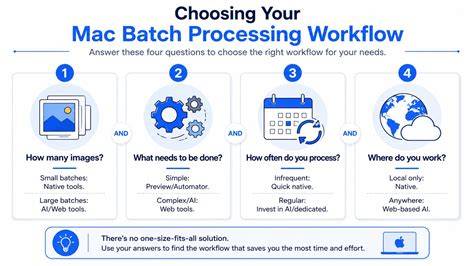
In short, BeFunky makes photo editing easy for everyone-from individuals tweaking personal images to professionals managing large batches for clients. The Batch Photo Editor consolidates essential tools, AI-powered enhancements, and efficient workflows into a single platform, enabling you to resize, crop, watermark, and apply effects across an entire batch with just a few clicks.