Photoshop and Lightroom are mainstays in most photographers’ workflows for a reason. While Photoshop’s manipulation capabilities and Lightroom’s processing and editing power are certainly robust, both offer even more power beyond the software itself in the form of plugins. Plugins are add-ons that allow you to add or tweak the tools, functionality, and features of the base program. Adobe, thankfully, understands the value of third-party add-ons and welcomes them. What We’re Looking For The possibility afforded by plugins is endless. There’s a plugin for that. For the purposes of this article, we are focusing on your images themselves and the plugins that can make achieving them a breeze. The fact is, many plugins come with a cost, and often not a small one. Fumbling around online yourself can unfortunately waste your dollars as easily as your time.
At a Glance: Top Lightroom and Photoshop Plugins
Best Overall Plugin for Photoshop and Lightroom: Nik Collection 4.3. Best Plugin for Photoshop and Lightroom for Upscaling: Topaz Gigapixel AI. Best Plugin for Photoshop and Lightroom for Noise Reduction: DxO PureRAW. Best Plugin for Photoshop and Lightroom for Portraiture: Imagenomic Portraiture 3. Best Plugin for AI Portrait Retouching: Retouch4Me. Best Plugin for General AI-Powered Editing: Skylum Luminar AI. Best Plugin for Photoshop and Lightroom for HDR: Skylum Aurora HDR. Best Plugin for SFX and Composite Photographers: Boris FX Optics. Best Plugin for Photoshop and Lightroom for One-Click Presets: Exposure X7.
While most of the creative tools on this list are meant to aid you with specific tasks in your image editing process, many also exist as components within larger collections. Among them, Nik Collection 4 stands above the crowd. It could almost function as an entire list of the best plugins all on its own. The collection includes Analog Efex Pro 2, Color Efex Pro 4, Dfine 2, HDR Efex Pro 2, Sharpener Pro 3, Viveza 3, and more. The price and the breadth of tools make it a serious value for many photographers.
Nik Collection 4: A Comprehensive Suite
For only $100 (through the end of December before returning to its usual price of $149), you get eight fantastic plugins. The collection’s versatility and the credibility behind the Nik name, now under DxO, make it a compelling starting point for many editors. Analog Efex Pro 2 provides film-emulation aesthetics, Color Efex Pro 4 covers color and tonal adjustments, Dfine 2 handles noise reduction, HDR Efex Pro 2 creates HDR imagery with control, Sharpener Pro 3 pre-sharpens RAW data, and Viveza 3 focuses on precise color and light manipulation. This bundling approach often delivers more value than chasing individual plugins.
Topaz Gigapixel AI: Upscaling Power
Artificial intelligence is now being employed across virtually every available technology, and photo editing is no different. Topaz Gigapixel AI can upscale your photos by up to 600% without sacrificing quality, and in many cases can use the additional pixels to enhance your final image beyond what you might believe possible. If upscaling is a crucial part of your workflow, Gigapixel AI is your best bet. Adobe’s own Super Resolution in Camera RAW is fast and effective, but Gigapixel AI offers more flexible controls and often superior noise reduction on upscaled images.
DxO PureRAW: Advanced RAW Pre-Processing
DxO PhotoLab’s PureRAW feature, available as a separate add-on for Photoshop and Lightroom, is an AI-driven pre-processing application that corrects noise, chromatic aberration, vignetting, and other anomalies during demosaicing. This leads to crisper, cleaner RAW files straight out of the camera. The trade-off is larger file sizes and some users preferring more manual control over denoising and sharpening. Still, for photographers seeking the cleanest RAW images with minimal post-work, PureRAW is unbeatable in its class.
Imagenomic Portraiture 3: Portrait Retouching
Portraiture 3 offers nondestructive skin retouching that preserves fine texture while smoothing imperfections. It provides a balance between one-click usefulness and fine-tuning control, including auto-masking for natural lighting, layering support, and intuitive controls. While no plugin can replace skilled retouching, Portraiture 3 remains a staple for many portrait and beauty editors seeking reliable, repeatable results.
Retouch4Me: AI Portrait Retouching
Retouch4Me’s AI-based retouching plugins for Photoshop aim to reduce the grunt work of portrait editing. The suite offers healing, dodging and burning, skin-tone blending, backdrop cleaning, and eye/teeth enhancements with realistic results. It’s not always perfect and can require masking to clean up overly strong results, but its skin-tone and texture preservation provide a strong baseline for editors to refine further.
Skylum Luminar AI: General AI-Powered Editing
Luminar AI markets itself as the world’s first AI-powered image editor and offers standalone and plugin (for Photoshop and Lightroom) functionality. It provides Templates that analyze content and suggest edits, sky replacement, layered fog, and skin beautification, along with a broad set of standard editing features. The rapid release cycle can be a drawback for some, but its AI-driven workflow remains compelling for quick, high-quality adjustments.
Skylum Aurora HDR: HDR Plugin
Aurora HDR bridges high-dynamic-range photography with powerful editing tools. It streamlines capturing and merging multiple exposures into natural-looking HDR images, with controls for movement and atmosphere. It remains a popular choice for photographers who require robust HDR capabilities without extensive manual tweaking inside Lightroom alone.
Boris FX Optics: SFX and Compositing
For photographers who also do compositing, special effects, or advanced overlays, Boris FX Optics offers a suite of visual effects tools tailored for photographers and videographers. It enables cinematic-grade effects and textures to integrate into stills with professional-grade control.
Exposure X7: One-Click Presets and More
Exposure X7 provides a strong collection of one-click presets and editing tools designed to speed up color correction, tone, and stylistic looks. It can function as a standalone editor or as a plugin within Lightroom and Photoshop, offering a balance between speed and control with a robust preset ecosystem.
Other Notable Plugins and Workflows
ON1 Photo RAW MAX 2026.5 includes a broad suite of plugins (Effects, NoNoise AI, Sky Swap AI, Resize AI, HDR, and Portrait AI) and can work standalone or as a plugin to Photoshop and Lightroom. It’s a comprehensive option for those seeking an all-in-one workflow alongside Lightroom. Additionally, there are a variety of paid and free plugins that cover niche needs, from AI-assisted keywording and catalog management to time-lapse workflows and batch processing enhancements. The right mix depends on your shooting style, storage considerations, and how much you value automation versus granular control.
Practical Tips for Using Plugins
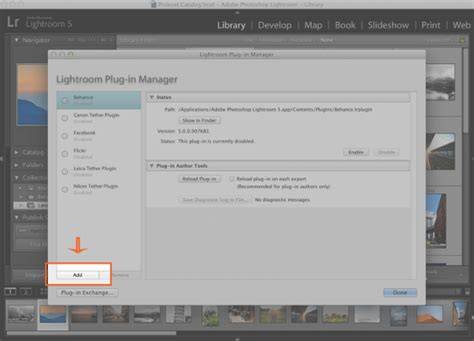
- Install through Lightroom’s Plugin Manager to ensure compatibility and easy updates.
- Test trial versions when available to avoid costly commitments.
- Combine AI-powered tools with traditional editing for best results-let AI handle routine tasks while you refine details manually.
- Be mindful of file sizes and processing time, especially with upscaled or AI-heavy workflows.
How to Pick the Right Plugins for Your Studio
Consider your common editing tasks: do you frequently need noise reduction, upscaling, HDR, or portrait retouching? Where could a one-click preset save you the most time without sacrificing quality? If your catalog management and search speed are pain points, look to AI-based organizational plugins like Excire Search 2026. If your work includes a lot of landscapes or architectural photography, perspective correction plugins like DxO ViewPoint and depth-editing tools in Nik Collection can be game-changers. For those who routinely publish RAW files with the best possible starting quality, DxO PureRAW and Topaz Gigapixel AI can dramatically improve initial image quality and output potential.
How to Use Plugins Within Your Lightroom Workflow
Plugins can be installed via Lightroom’s Plugin Manager, enabling seamless access from within the app. Some plugins operate primarily as standalone editors that send results back to Lightroom, while others extend Lightroom’s internal editing capabilities directly. When using multiple plugins, consider a workflow that starts with RAW pre-processing (e.g., DxO PureRAW), moves through upscaling or HDR (Topaz Gigapixel AI or Aurora HDR), and finishes with portrait or general editing (Portraiture 3, Retouch4Me, Luminar AI). This layered approach helps preserve image fidelity while leveraging the strengths of each tool.
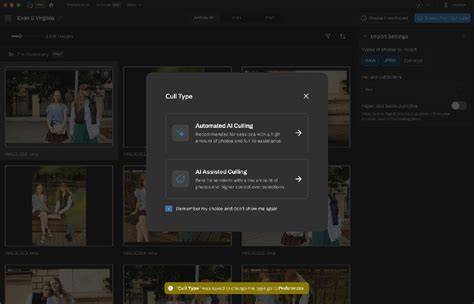
Images and metadata management can also benefit from dedicated plugins. Excire Search 2026 integrates natively with Lightroom to speed up catalog navigation, facial searches, and AI-based culling. The combination of Excribe’s AI features with Luminar AI’s templates can deliver fast, high-quality results without sacrificing the photographer’s personal editing voice.
To keep your system balanced, avoid overreliance on any single plugin. Use a few trusted tools for core tasks-noise reduction, upscaling, and portrait retouching-while keeping others in reserve for specific projects. Always monitor processing times and storage requirements, especially with PureRAW’s larger DNG outputs and Gigapixel AI’s heavy upscaling operations.