Getting the best results from your EOS camera doesn't have to mean spending extra money on software. There's a very capable program you get for nothing when you buy your camera - your only investment is a little time to get to know it. When searching around for your current EOS camera or latest lens purchase, you might have spent some time looking to save a few pounds. You could now go and put that money you saved towards some new image processing software.
So what about what's included with your EOS camera? As part of your camera gear you get some free software from Canon, called Digital Photo Professional (DPP). The Canon software is free, so that means it can't be all that good. Can it? Think again - DPP has been designed to work seamlessly with your Canon EOS camera and is the only software capable of utilising your camera's sophisticated built-in features - like Auto Lighting Optimizer and Picture Styles - to enhance your images.
Shooting JPEGs and Shooting RAW
Shooting JPEGs: If you shoot JPEG images you are assured of the best quality from your EOS camera. Why?
Shooting RAW: If you shoot RAW the process is different. The camera saves the RAW image file without applying any corrections, but instead saves the settings you have chosen as data within the image file. These settings are then applied automatically when the RAW conversion is done, but only if using DPP.
If you use third party software, there is an option to process the RAW file using the camera settings. However, the software can only apply generic settings. Much of the data saved with the file are algorithms that are patented by Canon. No great surprise there... after all Coca Cola is patented - you cannot make the same recipe - and other brands simply do not taste the same.
So if the ‘recipe’ is patented, when it comes to camera algorithms, how can you possibly get the same results with a third-party brand imitating what the original does?
The DPP Difference
Here are five key settings and Canon features which will be stripped out or substituted with generic processes by third party RAW converters. Picture Style settings affect the saturation, contrast, colour tone and sharpness of the image. With this daffodil image, the colours are clearly richer and slightly more saturated when the RAW image is opened in DPP. It will also match perfectly what you saw on the back of your camera if you checked it after shooting, as Canon uses the Picture Style information to produce your in-camera image for playback.
When it comes to white balance - namely the colour temperature of the image - the in-camera setting is often replaced by a generic white balance. ABOVE: ISO 32000. RAW image converted in Adobe Photoshop. ABOVE: ISO 32000. High ISO noise reduction is actually relevant at all ISO settings. Noise can show up to a much greater degree when it's not Canon’s noise reduction being used.
Auto Lighting Optimizer is a camera setting which prevents backlit or sidelit portraits from going too dark, and works with ambient as well as flash light. This Canon-developed feature gets stripped out by third-party software, as demonstrated by the two images above. Your EOS camera will automatically correct for common lens aberrations if you use Canon lenses. These corrections are applied automatically to JPEG images but they will only be used on RAW files by Canon’s DPP software. In third party software, they are discarded. The example shown above is Peripheral illumination correction, but on the latest models there are additional corrections applied automatically - Chromatic aberration correction and Diffusion correction. A further setting - Distortion correction - can also be turned on within the camera.
Can't I do all this in other software?
Now of course, all these settings and their effect on the image can be replicated in other RAW converter software, but you have to make the corrections manually. And that takes time, regardless of how proficient you may be. Open the images in DPP and those corrections are done for you. And, just as usefully, those settings can be undone, or altered as needed. Did you have the wrong white balance set when shooting? No problem - just change the white balance setting in DPP and it's instantly put right.
So why use DPP 4? Well the images speak for themselves, and out of preference here at EOS magazine we would rather have the camera and computer doing all the work rather than spending hours correcting substitute settings added by non-Canon RAW converters. Of course, the ultimate aim is to get the image right in-camera.
Mobile and Express Workflows
For portable and wireless digital photography workflows, Canon's Digital Photo Professional Express (DPP Express) brings the powerful features of Canon's DPP software to your compatible iPad. Working with Canon's Camera Connect app, DPP Express streamlines the processing of JPEGs and .CR3 RAW files with an intuitive and powerful interface. View images and adjust settings right on your mobile device, and save files to the cloud, a computer or your camera. With the Camera Connect app installed on your compatible iPad, it's simple to connect wirelessly to your camera to download images, operate remotely and more. Images stored on the camera's memory card can be downloaded instantly and automatically for review, sharing or use in DPP Express. DPP Express is designed for fast and intuitive operation on your iPad.
To create and compare different versions of the same image, DPP Express enables Multiple Editing Histories. Helpful in differentiating and comparing effects or setting changes on the same image, this feature creates up to four editing histories to view and save. Data charges may apply with the download of the free Canon Camera Connect app. This app helps enable you to upload images to social media services. Please note that image files may contain personally identifiable information that may implicate privacy laws. Canon disclaims and has no responsibility for your use of such images.
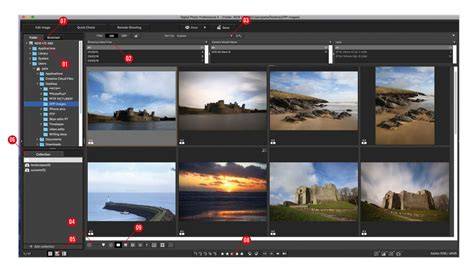
CANON CAMERA & PRINTER APPS Process your images from your camera with this dedicated Canon editing software that lets you import, browse and edit Canon .CR3 RAW, HEIF or JPEG files. Create. Adjust. Enhance. Digital Photo Professional is a high-performance RAW image processing, viewing and editing software for EOS digital cameras and PowerShot models with RAW capability. Using DPP you can easily perform basic and advanced editing and printing of RAW images including adjustment of white balance, dynamic-range and colour and much more. Achieve the maximum quality possible. Perform a variety of lens corrections using Diffraction Correction and Digital Lens Optimizer to help you arrive at the perfect image. Speed up your editing. Use Recipes for shortcuts and the Rename tool to organise your photos with star ratings for faster editing and selection. Neural network image processing tool The tool includes a new digital lens optimizer, noise reduction, and demosaicing for improving image quality. Improve exposure and recover shadow detail Adjust image brightness and recover shadows in your RAW images before you save and share. Remove colour casts and perform selective colour adjustments Adjust the white balance in your images and fine tune colour and hue levels. Picture Styles Improve your composition and framing and use Picture Styles to help you get the look you want in a fraction of the time. Reduce image noise and sharpen details Deliver stunning images full of clarity and sharpness using the Compositing tool and Depth Compositing function. All data is based on Canon standard testing methods except where indicated. Subject to change without notice.
- Save adjusted images to your Camera Roll in JPEG format. CR3/HEIF (10bit) images can now be displayed and saved in HDR PQ. * Image data is saved in the app. *RAW burst files cannot be imported to smart devices. Payment will be charged to your Apple ID account at the time of purchase confirmation. If you do not cancel at least 24 hours before the end of the current period, the subscription will automatically renew, and charges will continue. Added support for new Canon cameras.
Remote Shooting using EOS Utility | Canon DPP 4 | Digital Photography Professional 4 | TUTORIAL |
Data Not Linked to You The following data may be collected but it is not linked to your identity: Usage Data Information Compatibility Requires iOS 17.0 or later. iPhoneRequires iOS 17.0 or later. iPadRequires iPadOS 17.0 or later.
2018-2026
tags: #canon #digital #photo #professional #software