Graphics formats are standardized forms of computer files used to transfer, display, store, or print reproductions of digital images. Digital image files are divided into two major families: vector and raster files. They can be compressed or uncompressed for storage. A digital image is a mathematical representation of an image that can be displayed, manipulated, and modified with a computer or other digital device. It can also be compressed. Compression uses algorithms to reduce the size of the image file to facilitate sharing, displaying, or storing images.
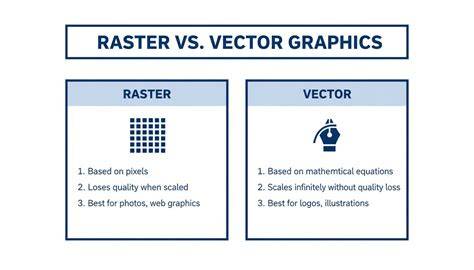
Digital images may be stored and manipulated as raster or vector images. The quality and resolution (clarity) of an image depend on the digital file's size and complexity. In raster graphics, images are stored as a set of squares called "pixels." Each pixel has a color value and a color depth. This is defined by the number of "bits" allocated to each pixel. Pixels can range from 1 bit per pixel, which has a monochrome (two-color) depth, to 32-bit, or "true color." 32-bit color allows for more than four billion colors through various combinations. Raster graphics have the highest level of color detail because each pixel in the image can have its own color depth. For this reason, raster formats are used for photographs and in image programs like Adobe Photoshop.
However, the resolution of a raster image depends on size because the image has the same number of pixels at any magnification. For this reason, raster images cannot be magnified past a certain point without losing resolution. Vector graphics store images as sets of polygons that are not size-dependent and look the same at any magnification. For relatively simple graphics, like logos, vector files are smaller and more precise than raster images. Two basic color models are used to digitally display various colors. The RGB color model, also called "additive color," combines red, green, and blue to create colors.
Image compression reduces the size of an image to enable easier storage and processing. Lossless compression uses a modeling algorithm that identifies repeated or redundant information contained within an image. It stores this information as a set of instructions that can be used to reconstruct the image without any loss of data or resolution. One form of lossless compression commonly used is the Lempel-Ziv-Welch (LZW) compression algorithm developed in the 1980s. The LZW algorithm uses a "code table" or "dictionary" for compression. It scans data for repeated sequences and then adds these sequences to a "dictionary" within the compressed file. By replacing repeated data with references to the dictionary file, space is saved, but no data is lost. Lossless compression is of benefit when image quality is essential but is less efficient at reducing image size.
Lossy compression algorithms reduce file size by removing less "valuable" information. However, images compressed with lossy algorithms continue to lose resolution each time the image is compressed and decompressed. Despite the loss of image quality, lossy compression creates smaller files and is useful when image quality is less important or when computing resources are in high demand. JPEG is a type of lossy image compression format developed in the early 1990s. JPEGs are automatically compressed using a lossy algorithm.
GIF (Graphics Interchange Format) files have a limited color palette and use LZW compression so that they can be compressed without losing quality. Unlike JPEG, GIF supports "transparency" within an image by ignoring certain colors when displaying or printing. GIF files are open source and can be used in a wide variety of programs and applications. However, most GIF formats support only limited color because the embedded LZW compression is most effective when an image contains a limited color palette.
PNGs (Portable Network Graphics) are open-source alternatives to GIFs that support transparency and 24-bit color. SVGs (Scalable Vector Graphics) are an open-source format used to store and transfer vector images. SVG files lack built-in compression but can be compressed using external programs. In addition, there are "metafile" formats that can be used to share images combining both vector and raster elements.
Into the twenty-first century, new graphics formats emerged. AV1 Image File Format (AVIF) gained prominence due to its superior compression efficiency. WebP, developed by Google, remained widely used with approximately 96-97 percent browser support and 25-35 percent smaller files than JPEG. AVIF then had approximately 93-95 percent browser coverage and was recommended as the primary web format (with WebP/JPEG fallback).
“AVIF File Format: The Evolution in Web Image Compression.” CodeParrot AI, 7 Aug. 2026, codeparrot.ai/blogs/avif-file-format-the-evolution-in-web-image-compression. Accessed 14 Aug.
What are Vector and Raster Graphics?
Lossless compression is beneficial when image fidelity is critical, while lossy compression is often preferred for web delivery where bandwidth is a concern. PNG and GIF are prominent raster formats with lossless and limited-color capabilities, respectively, while JPEG remains the dominant lossy standard for photographs. AVIF and WebP represent modern web-focused formats that balance high compression efficiency with broad compatibility, sometimes at different times recommended as primary web formats depending on context and tooling.
| Format | Type | Color Support | Compression | Notes |
|---|---|---|---|---|
| JPEG | Raster | Full color (true color) | Lossy | Widely supported for photographs |
| GIF | Raster | 256 colors | Lossless (LZW) | Supports transparency; limited color |
| PNG | Raster | 24-bit color with alpha | Lossless | Transparency support |
| SVG | Vector | Scalable | Uncompressed by default | Great for logos and scalable graphics |
| AVIF | Raster | High color depth | Lossy and lossless variants | High compression efficiency |
| WebP | Raster | 24-bit color with alpha | Lossy and lossless variants | Broad web support |
Beyond raster and vector formats, metafile formats can share images that combine both raster and vector elements. As formats evolve, modern web usage increasingly favors formats like AVIF and WebP for efficient compression, while JPEG remains a baseline for compatibility and quality, especially in traditional workflows. The choice of format depends on factors such as fidelity needs, color depth, transparency, browser support, and performance constraints.