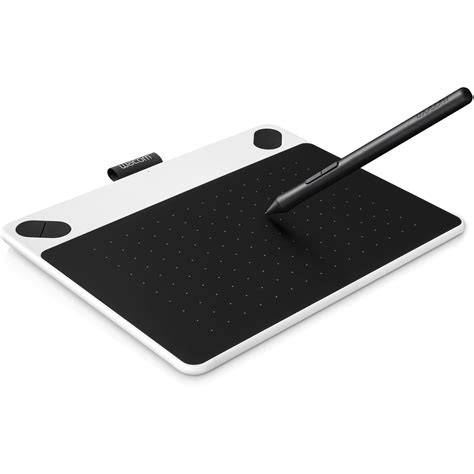
Digital drawing, painting, or photo editing? Whatever you love to create, Wacom Intuos has everything you need to make it happen. The first thing you’ll experience is how natural the pen feels. Wacom Intuos also works with Chromebook. Simple to setup and with natural pressure sensitivity, there’s nothing holding your creativity back.
Digital drawing on an infinite canvas app includes a minimal interface that's easy to learn so you can focus on your creativity. This infinite canvas app includes features like vector-based editing, playful color wheels, intuitive gestures, and a speedy performance. Sketch, plan, edit, and share all your big ideas with your Wacom product and a 3 month trial of Concepts. The Wacom Intuos is primed and ready; simply connect the pen tablet to your Mac, PC or Chromebook via USB, download and install the driver, complete the easy registration and you’re good to go.
Hardware and Pen Experience
The first thing you’ll notice when using Wacom Intuos is how natural it feels. Thanks to EMR (Electro-Magnetic Resonance) technology, the battery free pen with 4,096 levels of pressure sensitivity provides a natural drawing experience that can keep going as long as you do. Whatever drawing style you use there are a variety of Felt and Flex Nibs to choose from, all of them cleverly stored inside the pen itself. Standard nibs are included.
The Wacom Intuos is designed to make your creative process hassle-free. Tailor the Wacom Intuos to enhance your style by downloading a range of free creative applications. To get your complimentary software you need to sign-in or create a Wacom ID with your personal data and register your Intuos. The Wacom Intuos is primed and ready. Simply connect the pen tablet to your Mac, PC or Chromebook via USB, download and install the driver, complete the easy registration and you’re good to go.
Software Trials and Registrations
To begin 2-year complimentary trial of Clip Studio Paint Pro, registration with Celsys is required. To begin 90-day complimentary trial of Corel Painter Essentials 8, registration with Corel is required. To begin 90-day complimentary trial of Corel Aftershot Pro 3, registration with Corel is required. Luminar Neo is the ultimate companion for Wacom users looking to streamline their creative process. By providing tools to easily identify subjects and depth, it allows you to apply professional-grade adjustments in seconds. To begin 3-month complimentary trial of Luminar Neo, registration with Skylum is required. To begin 12-month complimentary trial of Boris FX Optics, registration with Boris FX is required. Magma is a collaborative drawing platform for global artists, featuring a user-friendly interface for beginners. Join a community of over 4 million users, connect with fellow artists, and enhance your skills. To begin 3-month complimentary trial of Magma, registration with Magma is required. Sketch, plan, edit, and share all your big ideas with your Wacom product and a 3 month trial of Concepts. This infinite canvas app includes a minimal interface that's easy to learn so you can focus on your creativity.
Additionally, the first thing you’ll experience is how natural the pen feels. The drawing glove helps eliminate smudges and reduce friction between screen and hand. The Wacom Drawing Glove is designed to be eco-friendly, made with recycled materials. Recycled Polyester and Spandex offer breathability, stretch and durability for a comfortable fit. Say goodbye to unnecessary smudges, fingerprints and minimize friction from hand to screen or pen tablet. The glove’s unique fingerless design and seamless edge allows for a natural working experience, whether you’re left or right-handed. Bluetooth models offer 4 customizable application-specific settings.
Compatibility and Ecosystem
The Wacom Intuos is designed to work with devices capable of running the latest version of ChromeOS and has been certified to meet Google's compatibility standards. Google is not responsible for the operation of this product or its compliance with safety requirements. Android, Chromebook, and the Works With Chromebook badge are trademarks of Google LLC. Pen must be used with the tablet to function with ChromeOS.
The first thing you’ll notice when using Wacom Intuos is how natural it feels. Eliminate smudges and reduce friction between screen and hand. The drawing experience never felt so good with the Wacom Drawing Glove. Designed to work perfectly whether you're left or right-handed, it provides a natural drawing experience while keeping your workflow smooth and clean.
Product Registration and Access
To get your complimentary software you need to sign-in or create a Wacom ID with your personal data and register your Intuos. Wacom ID and product registration are required for many of the trials and services mentioned, ensuring you can access the resources and updates that accompany your device.
Wacom INTUOS PRO Tutorial - Features & Specs [Part 1/4]
From studio to study, bedroom to beyond, Wacom Intuos is available in a range of striking colors to suit any surrounding. The super slim and compact design means that this pen tablet is at home anywhere.
In summary, the Wacom Intuos offers a natural pen experience, broad compatibility, and access to a variety of trials and tools that can accelerate your creative workflow. By signing in and registering, users unlock a suite of complimentary software and community resources designed to enhance skills and streamline the creative process.