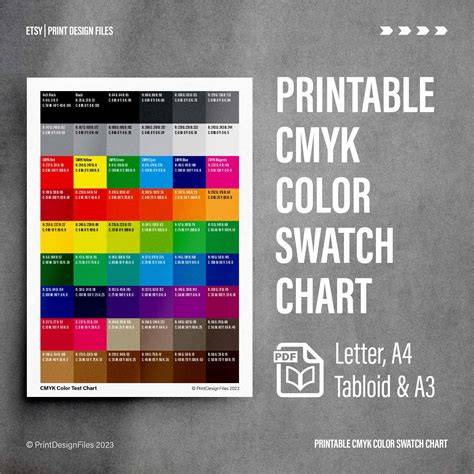
Some colors are more challenging to reproduce than others. While we cannot offer exact color matching, we can recommend these options for your designs. We displayed a base color on the left of each row. As you progress to the right, the color values gradually decrease. Please note your monitor settings may affect what you see on your screen compared to your physical prints. We make Standard Black (the K in CMYK) from shades of grey. Rich black is created by blending all the CMYK colors, resulting in a richer, more saturated tone.
Red can often appear orange or rusty when printing. When this happens, you need to look at your levels of magenta and yellow. If your red looks too pinkish, you have mixed in too much magenta. Cyan and yellow will produce a green color. Set the values to equal parts and make them dense for vibrant results. As for yellow, be careful when making it darker. It can become easily more of a sage or mustard color. In CMYK, blue is one of the most challenging colors to reproduce accurately. We suggest you use even and balanced mixtures, like 100-50-0-0. Regal purple tones are CMYK friendly. Pinks in CMYK printing are all about the magenta. For stand out pink colors - the magenta levels should be high, and the yellow, cyan, and black low.
We cannot provide a realistic metallic gold finish in CMYK printing, but we can produce a flat or NMM (non-metallic metal) representation of gold. Similar to CMYK golds, you cannot also obtain a metallic silver finish in CMYK printing. Want your colors to pop off the page? Since launching in 2009, PrintNinja has printed over 6 million comic books, tabletop games, children’s books, art books, photo books and graphic novels for thousands of independent creators, publishers, and businesses. As the premier offset printer, we’re here to help you through every step of the process.
This guide contains a series of colors that are known to be able to be reliably produced using CMYK offset printing. While no color matching can be guaranteed, including the colors shown here, without ordering a spot of Pantone color, the colors and color values shown here are good choices to ensure accurate color reproduction. The color charts are organized starting with the dark “base” color on the top left and decreasing color values gradually while progressing around the color wheel. Please note that depending on your monitor settings, the colors may appear different on your screen than they print on an offset press. Colors will also vary if this guide is printed on an inkjet or laser printer.
What is the CMYK Color Model and Why is it Important for Printing?
The CMYK color model plays a crucial role in the world of printing. Unlike the RGB model, which is used for digital screens, CMYK stands for Cyan, Magenta, Yellow, and Key (Black) - the four ink colors used in most color printing processes. Whether you're printing business cards, booklets, or brochures, understanding how CMYK works helps ensure your designs come to life as expected when printed.
The CMYK color model is essential for printing, as it relies on four key colors: Cyan, Magenta, Yellow, and Key (Black). These colors are combined in various proportions to create a wide range of shades and hues in printed materials. The CMYK model is designed specifically for print, allowing for accurate color reproduction in physical mediums. The CMYK color palette is essential for achieving consistent and accurate print results. Each color is created by mixing different percentages of Cyan, Magenta, Yellow, and Black (Key).
By understanding and using the CMYK color palette correctly, you can achieve more precise, professional-looking print results. To achieve the best possible print quality, it's crucial to understand how to effectively use the CMYK color model. Accurate color matching starts with selecting the right CMYK values that correspond to the desired outcome. Color discrepancies in printing can lead to unexpected results. These issues often arise from differences in monitor displays, printer calibration, or color profiles.
The CMYK model is a color model used in color printing. Black (K) is included because mixing Cyan, Magenta, and Yellow doesn’t produce true black, but rather a dark brown. CMYK is used for print, while RGB (Red, Green, Blue) is used for screens. Different paper types absorb ink differently. Yes, converting RGB to CMYK is possible but not always perfect due to the difference in how colors are created.
Colour is one of the most misunderstood and error-prone areas in printing. Certain colours pose a greater challenge to replicate perfectly in print. Although exact colour matching is beyond what we can offer, we do suggest these relatively safe options for your designs. The 'base' colour is shown on the left side of each row, with the colour values decreasing gradually as you move to the right. Be aware that the settings of your monitor might influence how colours appear on your screen compared to their appearance in the final printed product. Differences can also arise from using inkjet or laser printers, depending on their configurations.
Rich black is achieved by mixing all the CMYK colours together, yielding a deeper and more saturated shade. It's important to avoid overloading the paper by maxing out all colours to 100. Red may sometimes come out looking orange or rusty in print. In such cases, it's crucial to adjust the magenta and yellow levels. Achieving a vibrant orange is straightforward: mix two parts yellow with one part magenta (0-50-100-0).
Combining cyan and yellow yields beautiful green shades. Darkening yellow requires careful handling-it can swiftly shift towards a mustard hue. Cyan and yellow together create a beautiful green shade. For the brightest and most vivid green, use them in equal quantities and make them dense. However, exercise caution when attempting to darken yellow; it can quickly shift towards a sage or mustard shade. In the CMYK colour spectrum, achieving a precise shade of blue can be challenging. For the most accurate representation of blue, it's advisable to use balanced and even mixtures, such as 100-50-0-0.
Regal shades of purple work well with CMYK printing. In CMYK printing, vibrant pinks are all about the magenta. For your pinks to truly stand out, ensure a high magenta level while keeping yellow, cyan, and black to a minimum. Similar to gold shades, achieving a metallic silver effect isn’t possible with CMYK printing. Looking for colours that pop from the page? Since launching in 2009, PrintNinja has printed over 6 million comic books, tabletop games, children’s books, art books, photo books and graphic novels for thousands of independent creators, publishers, and businesses. As the premier offset printer, we’re here to help you through every step of the process.
This guide contains a series of colors that are known to be able to be reliably produced using CMYK offset printing. While no color matching can be guaranteed, including the colors shown here, without ordering a spot of Pantone color, the colors and color values shown here are good choices to ensure accurate color reproduction. The color charts are organized starting with the dark “base” color on the top left and decreasing color values gradually while progressing around the color wheel. Please note that depending on your monitor settings, the colors may appear different on your screen than they print on an offset press. Colors will also vary if this guide is printed on an inkjet or laser printer.
CMYK Fundamentals and Practical Tips
Pairwise combinations of cyan, magenta, and yellow inks produce red, green, and blue. The CMYK color model is a subtractive color model used in color printing as well as describing the printing process. In subtractive models, inks reduce the amount of light reflected from a white or light background. White is the color of the substrate, and black results from the combination of inks. This contrasts with additive color models (e.g., RGB color model), where colors are produced by emitting light, white results from combining all primary colors, and black represents the absence of light. Diagram showing color halftoning with CMYK separations. Halftoning (or screening) allows a printer to produce continuous tones by varying the size and spacing of small ink dots. This creates the perception of intermediate colors between the primary inks.
CMYK is an extension of the CMY model, which omits black ink. CMYK contrasts with spot color printing, where specific inks produce fixed colors. Some presses can combine process and spot colors. RGB and CMYK are device-dependent; no universal formula converts between them. Color management systems using ICC profiles are required to map between devices accurately.
↑ Mixam Print Support: CMYK colour charts and values. ↑ Kang, Henry R. (1999). Digital Color Halftoning. SPIE Press.
Color Models Explained (Additive & Subtractive) | Digital Color
This includes references to foundational texts and practical considerations for designers navigating color in print, and emphasizes that while exact matches are unattainable, well-chosen CMYK values can yield reliable results across different printing processes.
| Aspect | Notes |
|---|---|
| Base color position | Top-left of each row; values decrease to the right |
| Rich black | Blend of all CMYK for depth |
| Blue accuracy | Balanced mixes, e.g., 100-50-0-0 |
| Yellow caution | Darkening yellow may yield sage/mustard |
| Pink emphasis | High magenta, low yellow/cyan/black |
Looking for reliable CMYK color guidance across printing contexts? This article consolidates practical rules, common pitfalls, and tested color relationships to help designers optimize for offset printing, while acknowledging the inherent variability across substrates, inks, and devices.