You're staring at the ComfyUI node graph, Nano Banana Pro installed but nothing seems to fire right-sound familiar? Picture this: a clean install, all key nodes placed just right, and best defaults already solving your first inference run without tweaks. I’m your friend, Dora. I reach for ComfyUI when I need control that doesn’t fight me later, prompt routing, seeds, resolutions, and a clean way to repeat a result. Text-to-image in a single box is fast, but small changes get muddy. Keeping a record of how an image was made. ComfyUI writes the graph into PNG metadata by default. I don’t open ComfyUI for quick moodboard fodder or throwaway thumbnails. It shines when the path from prompt to output should be legible.
I pared the graph down until removing one more node made it worse. The quiet win here is one KSampler per render. I tried chaining fancy refiners and schedulers, but the graph got noisy and the outputs got less predictable. Field note: I keep the prompt nodes close to the sampler and push the image nodes to the right. Defaults are where I save my future self the most time. SD1.5: 768×768 for square. SDXL: 1024×1024 when I actually need SDXL: otherwise I stick to 832×1216 or 1216×832 for portraits/scenes. Keep a small, stable set. Batch size 2-4 when exploring, batch count 1. These defaults produce results that are “good enough” and predictable. Consistency is mostly about not letting small drifts compound. Lock the seed once you see a direction you like. Short prompts stabilize faster. If I catch myself writing a paragraph, I split it: subject, style hint, lighting. Too high and you stamp out the model’s learned structure: too low and you get mush.
If I upscale latents by 1.5-2×, I keep the same seed and sampler. I tested this in January 2026 with current ComfyUI builds and common SD1.5/SDXL checkpoints. In practice, these habits cut re-renders. If I’m delivering a poster-sized image, I’ll sometimes do a hybrid: 1.5× latent upscale, decode, then a small image resize to hit exact dimensions. Model/CLIP mismatch: If outputs look “off” in a way that isn’t stylistic, check the checkpoint, CLIP, and VAE are aligned. Size not divisible by 64: Latents like clean multiples. CUDA OOM: Lower batch size first. Seeds not actually fixed: Some graphs reinitialize seeds quietly. Negative prompt not connected: When I forget, I get “louder” images. I don’t want to hunt for settings later.
File naming: In Save Image, I set a pattern with seed and model name in the filename. Embedded workflow: ComfyUI writes the graph into PNG metadata. If I need to share or revisit, I load the PNG back into ComfyUI and the graph reconstructs. JSON backups: I still export the workflow JSON when I change something structural. Small detail: I keep outputs in dated folders. I’ve been thinking about sharing a single ComfyUI Nano Banana Pro Workflow template with two tabs inside the graph: one sized for SD1.5, one for SDXL, same node order, same sane defaults. It’s basically the graph I use now, quiet, labeled, and light enough to understand at a glance. And if you prefer heavier graphs with stylizers and refiners, that’s fair. I’ll keep trimming it.
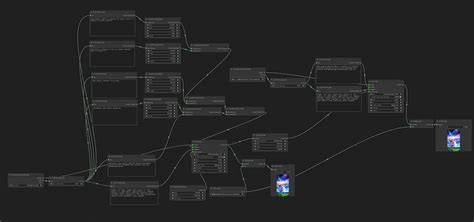
Foundational defaults that keep work predictable
- One KSampler per render keeps the signal clean and reduces cross-node drift.
- Keep prompt nodes near the sampler; push image nodes to the right to reflect data flow.
- SD1.5 at 768×768 for square crops; SDXL at 1024×1024 when needed, otherwise 832×1216 or 1216×832 for portraits or scenes.
- Batch size 2-4 for exploration; batch count 1 for stable, repeatable results.
- Lock the seed once a favorable direction is found; short prompts stabilize faster.
- If the prompt grows long, split into subject, style hint, lighting to preserve the model’s learned structure.
- Upscale latents by 1.5-2× while keeping the same seed and sampler to preserve coherence.
Common pitfalls and quick fixes
- Model/CLIP/VAE mismatch: ensure alignment if outputs look off beyond mere style.
- Size not divisible by 64: use latents that respect divisibility for stability.
- CUDA OOM: lower batch size first to fit memory constraints.
- Seeds reinitialize quietly in some graphs: verify seed control is active and persistent.
- Negative prompts not connected: wire them into the workflow to prevent overbearing results.
Workflow habits that aid sharing and reproducibility
File naming: in Save Image, pattern includes seed and model name for traceability. Embedded workflow: ComfyUI writes the graph into PNG metadata; reloading the PNG reconstructs the graph for sharing or revisiting. JSON backups: export the workflow JSON when structural changes occur. Small detail: keep outputs in dated folders to track progress over time.
I’ve been thinking about sharing a single ComfyUI Nano Banana Pro Workflow template with two tabs inside the graph: one sized for SD1.5, one for SDXL, same node order, same sane defaults. It’s basically the graph I use now-quiet, labeled, and light enough to understand at a glance. And if you prefer heavier graphs with stylizers and refiners, that’s fair. I’ll keep trimming it.