Make every shot your best shot with PaintShop® Pro 2023, an advanced photo editor delivering a versatile range of pro-level editing and graphic design tools along with time-saving AI-based solutions. You’ll find it easy to navigate and accomplish whatever photo task you need. Complete your visual story with a collection of graphic design tools to paint, draw, add text or build composites with layers and masks. Real. Intelligent. From hobbyists to photo enthusiasts, every photographer needs tools that help them achieve their creative vision.
With layers, vector tools, and painting and drawing tools, PaintShop Pro is an ideal solution at home or at work. Graphic designers use PaintShop Pro to make a variety of compositions, including posters, brochures, web graphics and more. Creative consumers produce content to share with friends and family. For businesses of all sizes, PaintShop Pro is enormously valuable at work for everything from in-house graphic designing and creating stunning slideshows, to using screenshot and annotation tools to communicate with clarity.
Easily crop and resize photos using composition guides, Golden Ratio or Rule of Thirds. Isolate the area you want to select with a variety of Selection tools and enhance it with the Refine Brush. Automatically correct distortions, vignetting and chromatic aberrations in your photos with Lens Correction tools. Enjoy powerful and complete editing of RAW files with a great variety of pro-level tools available in new AfterShot Lab, now inside PaintShop Pro. Combine several photos of the same scene with different exposures to create one stunning HDR photo. PaintShop Pro’s HDR tools let you access a broader tonal range for a breathtaking final image.
Layers and masks are essential for advanced image editing, compositing and graphic design. Use multiple, non-destructive layers when editing images to create photo composites with ease. Add text to images to create interesting projects, like a meme or a picture quote. Paint with new built-in brushes, or import Adobe Photoshop brushes to bring your digital designs to life. Create frames based on symmetrical and Preset Shapes or vector text objects-or convert existing ones-all with an enhanced Frame Tool. Quickly bring out the best in your photo!
Let One Step Photo Fix automatically apply color and sharpening corrections for you. Preview a variety of preset photo effects such as Film Styles, Black & White, Landscape, Retro, Traditional, and Artistic or stack multiple effects for even more impact. Eliminate red-eye, blemished and unwanted lines or smooth wrinkles, whiten teeth and even out skin tones. Add a blur, play with depth of field in your photos or apply bokeh effects to keep parts of the image in focus and the rest blurred. Our expert reviewers spend hours testing and comparing products and services so you can choose the best for you.
Designed as an image editing software for beginners or hobbyists, Corel Paintshop Pro 2022 actually packs quite the technological punch when it comes to editing photos. As well as basic tools such as exposure, contrast, color, and tonal editing tools you’d expect with this kind of software, it also expands into graphic design work by operating fluidly with raster images and providing templates.
What’s new and features across versions
The 2022 version of Paintshop Pro is packed with new features, some of which are powered by machine learning AI. The Frame tool allows quick masking of raster images to fit in specific shapes, great for graphic design work. AI Background Replacement intelligently scans photos to cut out subjects automatically, allowing replacement backgrounds to be added with no manual cuts. The AI Portrait mode works in a similar way by placing a bokeh blur effect on portraits to make it look like images were shot with a shallow depth of field. The new AI Style Transfer takes the style from a piece of art and effects photos to mimic this look.
Corel Paintshop Pro 2022 can’t quite compete with the big names of Phase One Capture One Pro 2021 and Adobe Photoshop when it comes to compatibility, synchronization, and professional-grade editing tools, but nor does it pretend to. Paintshop Pro 2022 performs well at the basics and lifts itself up from other comparable software by introducing user-friendly Artificial Intelligence features to give photos a boost with the click of a button. The software is let down a little by its performance, even on faster laptops and desktop computers. It’s sluggish to open and struggles to work with files when compared to other image editing software, which feels precarious to established editors who are used to working at a fast pace. However, the speed is something beginners, or those new to image editing, could get used to and doesn’t make much difference on a casual usage basis.
Three workspaces allocate easy-to-navigate working windows that help workflow by restricting tool windows on the interface upon startup. PaintShop Pro 2022 splits the editing software into three distinct workspaces: Photography, Essentials, and Complete. The Photography workspace focuses on a full-screen, touch-compatible environment and includes AI denoise, Tonal, and Color HSL controls. The Essentials workspace gives a visually stripped-back view of the software that is perfect for beginners, with access via a drop-down menu in the toolbar. AI-powered tools such as AI Denoise can scan images automatically and make adjustments without requiring user input.
The software comes with a good list of standard photo editing tools such as Brightness and Contrast, Fill Light and Clarity, Fade Correction, Hue and Saturation, Vibrancy, White Balance, Noise Removal, Sharpening, Color Balancing, Tonal Levels and Curves. It also supports raw file formats, can combine several bracketed images to produce High Dynamic Range photos, and supports editing of 360-degree images including the removal of tripods, leveling horizons, and editing shots into a round, planet-like effect. Other smart selection tools such as Selection, Freehand Selection, Magic Wand, and Refine Brush make selecting shapes and subjects in photographs a cinch.
With Corel Paintshop Pro 2022, you can either make a new project from scratch, use one of the many pre-designed templates to build upon, or simply open an existing project to get started. Templates provide a launchpad of graphics from which to create bespoke work for publication. Templates make it easy for users to fill pre-made designs with images and other graphical assets for quick results. The software is compatible with Windows 10 (64-bit editions) and supports brushes from Photoshop, Jasc brushes, and PSP brushes. Additional file support includes HEIF and HEIF iPhone photos, and there’s a more inclusive welcome screen experience and access to a wealth of new creative content built into the software.
Compatibility and plugins: Corel Paintshop Pro 2022 runs on Windows 10 (64-bit) and requires an internet connection to access tutorials and download extra content via the store. The price is typically a one-time fee with upgrade options. It supports a wide range of third-party plugins, including Adobe plugins, Topaz Labs, and Nik Collection by DXO. It also introduces AI-powered features like AI Background Replacement, AI Portrait, and AI Style Transfer to enhance editing with a click.
Beyond photo editing, PaintShop Pro offers tools for graphic design and layout, such as text tools, cloning tools like SmartClone, quick selection tools, RAW Lab non-destructive adjustments, focus stacking, and 360° camera support. The software includes new features like Focus Stacking, more brushes and color palettes, and enhanced templates. It supports a range of input devices, including graphics tablets and Windows Ink, for drawing and painting activities, and it enables content migration from previous versions for a smoother upgrade experience.
- Photoshop-compatible brushes and extensive layering capabilities support advanced composites.
- AI-driven tools assist with denoise, background replacement, portrait effects, and style transfer.
- Three workspaces tailor the interface for beginners, standard users, and advanced editors.
- RAW editing, HDR construction, and 360° image handling expand photographic workflows.
- Templates, frames, vector tools, text and typography options boost design versatility.
New features and improvements for 2023 and beyond include integrated AfterShot Lab RAW processing, Real-Time Blend Mode previews, Snap to Objects alignment, enhanced New from Template layout, precise rotation controls in vector editing, and upgrades in AI-powered effects and background handling. Focus on efficiency with One Step Photo Fix and Smart Photo Fix, enhanced red-eye and blemish removal, depth of field adjustments, and bokeh effects to keep key subjects in focus.
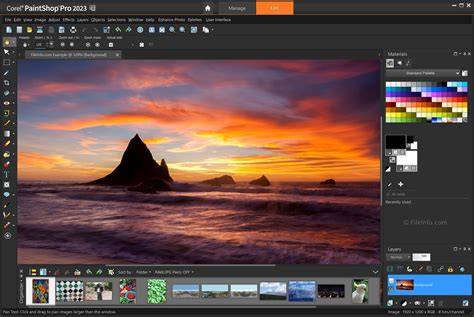
In summary, PaintShop Pro combines robust photo editing with accessible graphic design tools, powered by AI features that streamline routine tasks while offering advanced capabilities for professionals and enthusiasts alike. Its focus on three distinct workspaces, strong RAW processing via AfterShot Lab integration, and extensive plugin support position it as a versatile all-in-one solution for editing, composing, and designing visuals.