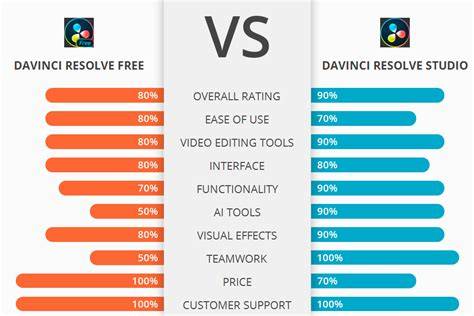
DaVinci Resolve has evolved from a high-end color grading tool to an all-in-one post-production suite, and the Studio 19 edition adds a wealth of professional features that go beyond the free version. This article compiles information from the provided draft to offer a comprehensive, tightly structured comparison of DaVinci Resolve 19 and DaVinci Resolve Studio 19, focusing on differences, capabilities, and use-case guidance for editors, colorists, and sound engineers.
Overview: free version versus Studio version
DaVinci Resolve free version provides a robust set of tools for professional editing, color grading, Fusion visual effects, and Fairlight audio, with exports up to 4K UHD at 60fps. Studio 19 expands functionality with HDR workflows, multi-GPU support, advanced AI tools, improved noise reduction, full-featured Fairlight capabilities, and an expanded Fusion toolset, among many other enhancements. The Studio edition is a one-time purchase, offering lifetime updates, whereas the free version remains available at no cost.
Core differentiators by workflow area
Media and delivery
The Studio version supports higher-end delivery formats, including up to 32K resolution at 120fps with advanced HDR delivery, and it enables hardware-accelerated encoding/decoding for H.264 and H.265. Frame.io integration and other workflow plugins are also available in Studio, enabling more seamless collaboration and delivery pipelines. The free version exports up to 4K Ultra HD at 60fps and has limited HDR delivery options.
Color grading and correction
The free version offers extensive color grading tools; the Studio edition adds HDR workflows (HDR10, HDR10+, Dolby Vision), Dolby Vision scopes, and professional HDR monitoring. Studio also includes DCTL import, Re-light for virtual lighting, Depth Map for foreground/background separation, Film Halation, Speed Warp for advanced slow motion, and a broad suite of Film Grain, Lens Flare, and other film-emulation effects. Studio’s Neural Engine-powered tools such as Magic Mask and Face Refinement deliver more powerful object isolation, skin-tone improvements, and rapid masking for complex shots.
Performance and hardware acceleration
Studio enables multi-GPU support and accelerated encoding/decoding, delivering faster renders and smoother playback for large, complex projects. The free version relies on GPU acceleration but is limited in multi-GPU support, which can impact performance on demanding workflows.
Color page and effects
Both versions share a comprehensive color page, but Studio unlocks a significantly larger toolbox: Magic Mask (v2 improvements), Face Refinement with advanced tracking, and additional tools like CineFocus, Chroma Warp, and Depth Map-based grading for stereoscopic or depth-based effects. Fusion in Studio gains access to Fusion Camera Tracker, VR Toolset, and additional control scripts. OpenFX plugins are supported in both, with some filters restricted in the free edition.
Fairlight and audio
Fairlight on the free version provides professional audio editing, mixing, and mastering capabilities; Studio enhances this with Voice Isolation, Dolby Atmos support, MPEG-H import and rendering, SMPTE ST.2098 support, B-chain monitoring, and object-based immersive formats. Studio’s audio tools also include more advanced AI-assisted features such as Audio Classification, Audio Transcription improvements, Dialogue Matcher, and advanced audio-to-clip management with smart bins.
AI and automation features
Studio’s Neural Engine powers a broad set of AI tools, including IntelliTrack (multi-point tracking for stabilization and audio panning), Multicam SmartSwitch (auto camera angle selection), Auto Subtitle animation, Music Editor and Music Remixer, Beat Detector, and various face detection and reshaping tools. These AI features help speed up editing, color grading, and audio post-production, and many tools work offline on the workstation without cloud processing.
Templates, templates, and workflow integration
Video templates and Autograph live link-like assets help speed up editing workflows. Studio supports remote collaboration features such as remote grading and remote monitoring, along with Frame.io integration, and custom workflow scripting via Python and LUA. The free version supports basic workflow collaboration but lacks many of these advanced integration features.
Practical guidance: which version should you choose?
- Assess your needs: if you require 32K/120fps exports, advanced HDR (Dolby Vision, HDR10+), multi-GPU acceleration, robust AI-assisted tools, and enhanced audio capabilities, Studio 19 is the clear choice.
- If your projects are primarily 4K or below, you work solo or in small teams, and you don’t need the most advanced HDR, multi-GPU, or high-end AI tools, the free version may suffice.
- Consider budget and upgrade strategy: Studio is a one-time purchase (~$295) with lifetime updates, whereas ongoing subscriptions from competitors may be higher, but Resolve Studio provides a comprehensive, all-in-one post-production workflow.
- Evaluate hardware: if you have a single powerful GPU, you may gain more from Studio’s accelerated encoding and decoding. If you have limited hardware, you might prioritize features that improve efficiency without relying on multi-GPU setups.
Table: key differences at a glance
| Aspect | DaVinci Resolve (Free) | DaVinci Resolve Studio 19 |
|---|---|---|
| Export resolutions | Up to 4K Ultra HD @ 60fps | Up to 32K @ 120fps; advanced HDR delivery |
| HDR support | Limited | Full HDR with Dolby Vision, HDR10+, HDR scopes |
| GPU acceleration | Single GPU support | Multi-GPU support |
| AI tools | Core tools available | Advanced AI tools (Magic Mask, Face Refinement, IntelliTrack, etc.) |
| Fairlight (audio) | Professional editing and mixing | Dolby Atmos, MPEG-H, Atmos Mastering, advanced noise reduction |
| Fusion tools | Comprehensive | Expanded USD tools, multiply rotoscoping |
| Color tools | Robust | Expanded HDR workflows, DCTL, Depth Map, advanced masks |
| Delivery and collaboration | Basic collaboration | Frame.io, remote grading/monitoring, advanced workflow plugins |
| Price | Free | One-time purchase (approx. $295) |
Video features and templates: speeding up workflows
DaVinci Resolve’s video templates can speed up editing by providing ready-made cinematic titles, logo reveals, social media templates, and smooth transitions. The Studio edition enables greater template flexibility within Fusion and AI-driven template generation, while the free version offers a wide range of templates with some limitations. Autograph-like live-link assets and templates from Artlist and other providers can be integrated to accelerate production timelines.
Additional notes and considerations
The Studio edition unlocks features that are especially valuable for professionals working on high-end productions, complex color pipelines, or multi-user collaboration environments. If your work involves stereoscopic 3D, immersive audio, IMF deliverables, or advanced color transforms, Studio provides essential capabilities. For beginners or hobbyists, the free version offers a robust foundation to learn editing, color, and audio post-production, with the option to upgrade later as needs grow.
In summary, both versions offer a powerful toolset, but DaVinci Resolve Studio 19 delivers a more complete professional package with expanded HDR, AI, audio, and workflow capabilities. The choice depends on your target output, required features, hardware, and budget.