Blackmagic Design today announced two new portable hardware control panels for DaVinci Resolve, its professional editing and color correction software. With professional editing becoming extremely popular in DaVinci Resolve, these new control panels are designed to allow color correction workflows to be mixed in with editing workflows, while introducing new levels of quality in affordable hardware control panels.
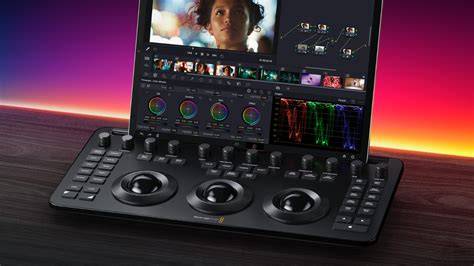
The new DaVinci Resolve Micro Panel and the DaVinci Resolve Mini Panel are true professional grade hardware control panels that feature three exceptional quality high resolutions trackballs, precision machined control knobs, illuminated buttons and much more. Hardware control panels are critically important for professional color correction because the colorist needs to “hold the image in their hands” as they manipulate multiple parameters at once to create new and highly stylized looks, or even make very subtle natural changes.
The incredibly small USB powered DaVinci Resolve Micro Panel is available now for $995, while the larger but compact and portable DaVinci Resolve Mini Panel with built in LCD screens and dozens in instantly accessible menus is available now for $2,995. When it came to developing these new control panels, the two overriding problems the design team had to solve were workflow and quality.
First, there are three workflows that require support. The first workflow is for professional colorists in dedicated color correction suites, the second is for editing systems that change between editing and color, and the third is for editors that need to edit and color at the same time. The first workflow for dedicated color correction suites is already handled by the large DaVinci Resolve Advanced Panel, so the two editing based workflows are the problems the development team needed to solve. The second issue the design team needed to solve was quality. No customer wants a “cheap” low quality panel because they’re going to spend hours working on it every day. While there are cheap panels on the market, what customers need is an extremely high quality panel that’s smaller in size that they can use on these workflows. Also, smaller panels are easy to move between locations and allow freelance colorists to take their own panel as they move between systems and jobs at different companies. This means that quality and durability are one of the most important aspects for these new DaVinci Resolve control panels.
The smaller DaVinci Resolve Micro Panel is not much larger than a computer keyboard and is powered from the USB connection. It’s perfect for placement next to a computer keyboard so the editor or colorist can easily move between the keyboard and control panel as they edit, allowing simultaneous grading and color correction. The larger DaVinci Resolve Mini Panel includes the same powerful features but also adds LCD screens with dozens of menus allowing fast access to most of the advanced color grading features of DaVinci Resolve. This makes the panel more suitable for workstations that switch between editing and color correction, but it is still portable enough to be easily moved between workstations around a facility. The mini panel has enough features that a colorist will be able to do professional work on any DaVinci workstation that it’s plugged into.
Both the DaVinci Resolve Micro Panel and the DaVinci Resolve Mini Panel provide fluid, hands-on control that allows colorists to be more creative because they can adjust multiple parameters at the same time, allowing them to quickly create looks that are simply impossible with a standard mouse and keyboard. In addition, many clients and DOPs have complained about not being able to achieve “film looks” from digital film cameras. By increasing the access to features in the primary color correction it greatly enhances the subtle creativity that achieving film looks requires. So with the design of these new panels, enhancing the control over the primary color corrector tools was critical.
Both panels include a row of 12 knobs that provide access to the most powerful primary correction features, making it easy to experiment and try new combinations. The primary knobs can be used to control Y Lift, Y Gamma, Y Gain, Contrast, Pivot, Mid-tone Detail, Color Boost, Shadow, Highlight, Saturation, Hue Rotation and Luminance Mix. With direct access to dedicated knobs on the control panel for these primary color correction controls, we hope to inspire a new creative revolution in the look of images for film and television.
Additionally, the new panels have a range of transport and grading control buttons on the right side of the panel that put the most important and commonly used commands at the colorist’s fingertips, so they can work faster without hunting through menus or palettes to change a setting. All of the DaVinci Resolve hardware control panels feature a consistent layout that makes it easy for professional colorists to move between the new panels and our traditional DaVinci Resolve Advanced Panel. Many of the controls are in the same position and the trackballs are large and designed with a similar professional feel so any existing DaVinci Resolve colorist should feel completely at home on the new panels.
The new control panels feature an elegant and durable machined aluminum body with professional, high resolution balanced trackballs. The trackballs provide RGB balance adjustments for lift, gamma and gain, each with a master level control set via a movable outer trackball ring. The other control knobs are custom designed and precision machined to provide super fine control over adjustments. They can also be pressed to quickly reset a parameter. Illuminated buttons make it easy to see which controls are active, even in a darkened room. The DaVinci Resolve Mini Panel model adds two high resolution screens that display information and parameter settings for the currently selected tool and additional control buttons for DaVinci Resolve features.
- The Micro Panel is USB-powered, ultra-compact, and ideal for on-set grading and quick edits next to a keyboard.
- The Mini Panel adds LCD screens, more menus, and built-in Ethernet with PoE to power and network it across a facility.
Product summaries
- The DaVinci Resolve Micro Panel is a super small hardware control panel that’s perfect for editing workstations and on-location use. It includes 3 high resolution weighted trackballs, 12 control knobs for advanced primary color correction, 18 dedicated navigation and transport keys, and more.
- The DaVinci Resolve Mini Panel is a compact hardware control panel that’s ideal for adding color grading to any workstation, and for freelancers that need to take their panel with them when traveling between facilities. The DaVinci Resolve Mini Panel features 3 high resolution weighted trackballs, 12 control knobs dedicated to the powerful primary color correction tools, 18 dedicated navigation and transport keys, and an upper deck with two 5” screens, 8 soft knobs and 8 soft buttons, dedicated keys for switching tools, working with nodes, grabbing stills, navigating the timeline and more.
Both panels use USB-C for modern computers, with USB 3 to USB-C cables included for older ports. The Micro Panel is fully USB-powered, enabling field work on laptops, while the Mini Panel includes AC power and Ethernet with PoE support, allowing operation over a network without a separate power supply. “There is a massive, growing number of DaVinci Resolve users working on all different kinds of productions,” said Grant Petty, CEO of Blackmagic Design. “These new control panels give editors and colorists a completely new way to add emotion and impact to their images.”
Designed in collaboration with world’s leading colorists, all panels share a logical layout that places the most important controls under natural hand positions. With three panels to choose from, it’s easy to find one that fits your job. The Micro Color Panel is incredibly compact and ideal for on-set grading with a laptop, while the Mini Panel is perfect for freelancers needing a portable yet fully featured solution. The Advanced Panel remains the go-to for professional color suites on feature films, television, and commercials, offering powerful color control and advanced features like windowing. The trackballs allow simultaneous multi-parameter adjustments to create distinctive looks and dynamic color relationships.
Grading is often performed in low light to ensure accurate monitor representation; thus, the illuminated keys and backlighting on all panels help maintain visibility. Navigation keys on the right side of the panels enable quick timeline and node navigation, reducing reliance on the mouse. The Advanced Panel adds a jog/shuttle for precise scrubbing, while the Micro and Mini panels emphasize fast primary corrections and creative flexibility. These features collectively support a broad range of workflows-from on-set quick grading to high-end color correction in post.
Workflow, quality, and practical use cases
Three core workflows drive the design decisions: dedicated color correction suites, editing systems that switch between editing and color, and editors who need to edit and color at the same time. The Advanced Panel already handles the dedicated color correction workflow, so the Micro and Mini Panels focus on editing-forward workflows and mixed workflows to streamline color work alongside editing.
For editors who frequently move between workstations or operate on-location, the Micro Panel’s USB-powered simplicity enables immediate grading without complex setup. The Mini Panel’s built-in LCDs and network capabilities make it ideal for studios where multiple machines share resources and where on-site grading benefits from quick access to tools and presets.
Ultimately, these panels aim to improve efficiency and creative freedom. By offering primary correction knobs for lift, gamma, gain, contrast, pivot, mid-tone detail, color boost, shadow, highlight, saturation, hue rotation, and luminance mix-along with transport and node navigation controls-they reduce the friction of tool-switching and allow colorists to experiment with more complex looks with confidence.
The panels also support Power Windows, Qualifier, tracking, still stores, and color palettes with dedicated keys and soft controls, enabling precise, repeatable corrections and quick recall of looks across clips and timelines. The integrated backlit keys and high-contrast displays ensure usability in typical grading environments.
In practice, editors can leverage the panel’s hands-on control to craft cinematic looks more rapidly, whether grading a single shot or building a cohesive color language across a feature. The combination of physical controls, fast access to primary tools, and streamlined navigation makes the panels a compelling addition to any Resolve workflow, from post houses to freelance colorists on location.
As Blackmagic Design highlights, these panels are designed to be compatible with the DaVinci Resolve ecosystem and to provide a natural progression from keyboard-and-mouse workflows to tactile color control that mirrors traditional film-centric color grading. The responsive trackballs, precision knobs, and illuminated keys create an intuitive bridge between editing and color, enabling a more immersive and productive creative process.
Key features at a glance
- Three high-resolution trackballs with RGB balance adjustments for lift, gamma, and gain
- 12 primary color correction knobs for quick access to major tonal and color controls
- Illuminated buttons and backlit keys for operation in low light
- USB-C connectivity for Micro Panel; AC power and Ethernet with PoE for Mini Panel
- Two 5" LCD screens on Mini Panel for tool information and parameter settings
- Dedicated navigation and transport keys; quick access to color page palettes
- Power Windows, Qualifier, tracking, stills, and node controls integrated into panels