You’ve got your workflow, your tools, your muscle memory. You live and die by your ability to execute your vision, and the software you use is a massive part of that. For years, the conversation in post-production has been dominated by a few key players. You know the names. You’ve probably heard of it. Maybe you know it as a pro-level color grading tool used on Hollywood films. Maybe you’ve heard it’s a free video editor. Both are true, but neither tells the whole story. The real story is that DaVinci Resolve has evolved into a fully-integrated post-production powerhouse that aims to replace not one, but four or five of the apps in your current workflow. DaVinci Resolve is a non-linear editing (NLE) and post-production application from Blackmagic Design.
Let’s be clear about what that means. It’s not just a video editor. It’s an all-in-one suite that combines video editing, color correction and grading, visual effects (VFX) and motion graphics, and audio post-production into a single piece of software. It started its life as a dedicated, high-end color grading system, the absolute standard in the film industry. Crucially, there are two versions: a powerful free version that is remarkably capable for most users, and a paid Studio version that adds more advanced features like specific AI tools, noise reduction, and support for higher resolutions and frame rates.
This is where the rubber meets the road. An all-in-one solution sounds great, but only if the individual components are strong enough to replace the dedicated tools you already master. If you’re coming from Premiere Pro or Final Cut Pro, the Edit Page will feel familiar. The trimming tools are precise and versatile, offering slip, slide, roll, and ripple edits. The keyboard-driven workflow is fast and customizable, which is critical for professionals who spend hours a day in their NLE. It handles a massive range of codecs and formats natively, from RED RAW to Blackmagic RAW to ProRes and H.265.
One of the standout features is its performance. Resolve is built to leverage modern GPUs, making playback of high-resolution, effects-heavy timelines smoother than many competitors, even on moderately-specced machines. This is DaVinci Resolve’s home turf. No other NLE comes close to the power and precision of the Color Page. For photographers, this is the tool that will feel the most intuitive and powerful. The workflow is node-based. Instead of stacking adjustment layers, you build a tree of nodes, where each node performs a specific operation (e.g., exposure correction, a color LUT application, a sharpening pass). This modular approach offers incredible flexibility.
Actionable Tip for Photographers: Think of the first node as your “Camera Raw” adjustment. Use it to balance the shot-correct exposure, set white balance, and manage contrast using the Log wheels or HDR palettes. Power Windows: These are essentially masks that you can track to any object in your frame. You can brighten a face, desaturate a distracting background, or change the color of a moving car with incredible precision. Qualifiers: Isolate parts of your image based on hue, saturation, or luminance. Want to make the blues in the sky deeper without affecting the blue in the talent’s shirt? Fusion is Resolve’s answer to Adobe After Effects, but it operates on a completely different paradigm: a node-based workflow. This is a steeper learning curve, period. For creatives used to the layer stack in Photoshop and After Effects, it can feel alien at first. However, for complex composites, a node-based workflow is arguably more powerful and organized.
Fusion is capable of high-end visual effects-think green screen keying, 3D compositing, and complex particle systems. For the average creative professional, it’s a powerful tool for creating sophisticated motion graphics, title sequences, and animated logos directly within your editing timeline. You can create a complex graphic in Fusion, save it as a template, and then access and modify it directly from the Edit Page timeline. Audio is often an afterthought for visually-focused creatives, but it’s half the experience. The Fairlight Page is a full-fledged Digital Audio Workstation (DAW) baked right into Resolve. You get a professional multi-track mixer with equalization (EQ), dynamics (compression, gating, limiting), and panning for every track.
Voice Isolation: An AI-powered tool (Studio version) that is shockingly good at removing background noise from dialogue. Got a great interview take ruined by an air conditioner or street traffic? Blackmagic has been aggressively integrating AI-powered features (they call it the DaVinci Neural Engine) into the Studio version. Tools like Magic Mask allow you to create a mask around a person or object with a single click, which is a massive timesaver for secondary color corrections or VFX. The recent introduction of Blackmagic Cloud has also been a game-changer for collaboration. It allows multiple users-an editor, a colorist, a VFX artist, a sound designer-to work on the same project timeline, from anywhere in the world, simultaneously. Changes one user makes are reflected in the project for everyone else.
So, the bottom line. You’re a multidisciplinary creative. If you shoot photos, edit videos, and dabble in motion graphics and sound, the value of an integrated, all-in-one suite cannot be overstated. You are serious about color. If you want the most powerful color grading tools available in an NLE, the decision is simple. Resolve is the industry standard for a reason. You’re budget-conscious but demand professional tools. The free version of DaVinci Resolve is more powerful than many paid NLEs. The one-time cost for the Studio version ($295, with lifetime updates included) is a stark contrast to the subscription model of Adobe Creative Cloud. You work collaboratively. You are deeply embedded in the Adobe ecosystem. If your entire workflow relies on Dynamic Link between Premiere Pro, After Effects, Photoshop, and Illustrator, and you collaborate with others who are standardized on Adobe, switching can be disruptive. You primarily do complex motion graphics. While Fusion is incredibly powerful, After Effects still has a larger community, more third-party plugins and templates, and a lower barrier to entry for many motion graphics tasks. You have older or underpowered hardware. Resolve is a resource-hungry application. It demands a strong GPU. The learning curve is real, but the power and workflow efficiency waiting on the other side are undeniable.
For any creative professional looking to streamline their process and elevate their work, ignoring DaVinci Resolve is no longer an option. Download the free version. For a long while, video editors such as Adobe Premiere Pro, Apple’s Final Cut Pro, and Avid were the most common NLEs on the market. But, an unlikely video editing software has come out of the woodwork in the last few years, establishing itself as a heavy hitter in the industry. Blackmagic Design’s DaVinci Resolve originally started out as a color-grading application and is now one of the best post-production software out there. Unlike many of its competitors, Blackmagic’s DaVinci Resolve offers a free version in a world of high-cost subscription services. The free version of DaVinci Resolve offers very similar features to the paid version (simply called DaVinci Resolve Studio).
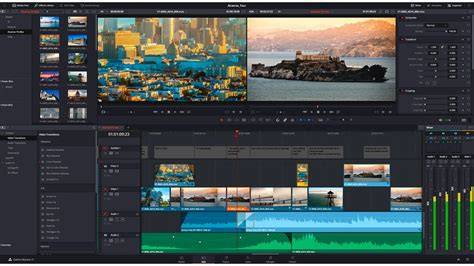
This tutorial for Mac, Windows, and Linux devices will go over the free vs Studio version of DaVinci Resolve 18 and answer the question: which one is right for your workflow? Note: No matter which version of Resolve you choose, the Simon Says extension will allow you to seamlessly caption, translate, and transcribe your videos directly in the platform. The history of DaVinci Resolve: DaVinci Resolve used to be an incredibly high-end NLE when it was initially conceived, costing thousands of dollars. While DaVinci Resolve was primarily synonymous with color grading and color correction at first, Blackmagic Designs quickly made it an incredibly capable video editing software upon purchasing the software in 2009. Blackmagic quickly put their investment to work, packaging DaVinci Resolve in for free with their line of cinema cameras. In 2011, Blackmagic released both a paid and free version of DaVinci Resolve, reducing the cost to a one-time payment that provides users a lifetime license. The interface started to become more user-friendly as well, making it great for not only professional video creators but beginners as well.
When Blackmagic released DaVinci Resolve 14, the software became more than just a basic NLE - it became a full-out post-production suite. New features such as Fairlightfx and Fusion let DaVinci Resolve compete with programs such as After Effects (with help of the DaVinci Neural Engine). With each new version of DaVinci Resolve, Blackmagic released more and more advanced features. How much does DaVinci Studio cost? DaVinci Resolve Studio costs a flat fee of $295 and provides users with a lifetime of updates. Compared to the subscription service of something like Adobe Premiere Pro, DaVinci Resolve provides excellent value to content creators. While the free version can do many things the studio version can do, there are still some limitations. The free version retains core functionality but lacks some high-end features like certain AI tools and advanced HDR capabilities.
Integration is a standout strength. Resolve’s biggest strength is the integration of its industry-leading color correction tools. Edits made in Premiere, Final Cut Pro, and Avid are regularly imported into Resolve for grading. The learning curve exists, but the node-based color grading and compositing tools offer unmatched flexibility. It’s innovative with the Cut page and remains open enough to integrate with other workflows. Resolve’s collaboration features, multi-user workflows, and real-time updates are a game changer for teams. Resolve is divided into pages-Edit, Cut, Color, Fusion, Fairlight, Media, and Deliver-each dedicated to a stage of the workflow, with the Photo page adding Hollywood’s color tools to still photography. It supports native RAW from major brands and tethering for live capture, while Blackmagic Cloud enables cross-location collaboration. The result is a tool that scales from solo projects to large, distributed post-production pipelines.
From a practical standpoint, the free version works with virtually all 8-bit formats up to 60fps, while Studio unlocks higher-end features including HDR, Dolby color, and remote grading. The Color Page remains Hollywood’s most advanced color corrector, approachable for beginners yet powerful for seasoned colorists. Fusion’s node-based approach enables sophisticated VFX and motion graphics directly in the timeline, while Fairlight provides a complete DAW experience with advanced ADR, Foley, and AI-assisted tools. The Media and Deliver pages handle ingest, organization, output, and export with robust metadata management and fast render options. In sum, Resolve can be used as a comprehensive all-in-one studio-editing, color, VFX, motion graphics, audio, and even photo editing-without leaving the environment.
9 EPIC Davinci Resolve Effects in 100 Seconds
The bottom line remains: Resolve is a versatile, growing platform that can replace multiple tools in many workflows, with a strong emphasis on collaboration and color accuracy. It’s the only solution that lets editors, colorists, VFX artists, and sound designers work together in parallel on the same project, across the same timelines. The result is a cohesive and efficient production pipeline that scales with your needs and budget-from a free version to a feature-rich Studio edition.
DaVinci Resolve is the world’s only all-in-one solution for editing, color, VFX, motion graphics and audio post production and now photo editing all in one software tool. Its interface is elegant, modern, and fast to learn, yet powerful for professionals. For many, Resolve has become the standard for color grading and now stands as a capable, integrated alternative to traditional multi-application workflows.
tags: #davinci #resolve #advantages