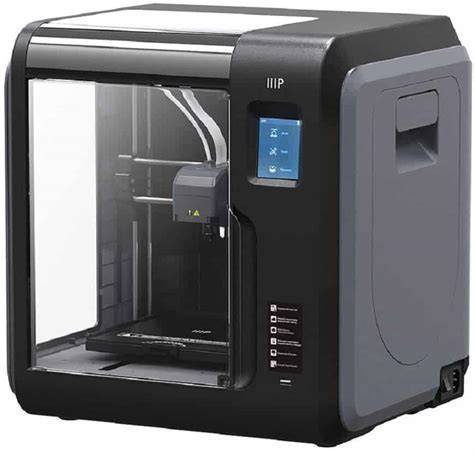
XYZ Printing introduced what appeared to be a real mini 3D printer at CES, and while the new model for Battle of the Minis was not yet available for review, XYZ sent the daVinci Jr. for evaluation. At first glance, the Jr. doesn’t look like a small form factor device, yet the build plate is in the mini-printer class. The printer is very well packed, which results in a large box, but the protection helps ensure it withstands shipping wear and tear.
There is a full-color setup manual, and after removing packing materials you install a white Bowden tube between the filament feed and the extruder and load filament. The spool sits inside the housing, contributing to the overall large size, and the build plate moves forward and back during printing. The build plate is factory-calibrated, and packaging did a good job preserving calibration in transit. Completing hardware setup involves connecting power and USB and loading filament.
The daVinci Jr. uses a proprietary filament feed system that relies on a sensor chip shipped with each filament spool. If the printer does not detect the sensor chip, it will not work. This system adds steps to loading and unloading filament, and the need to remove a hub from the spool by unscrewing a screw, which some users find less friendly. Once the sensor chip is in place, loading filament is straightforward with visual graphics and a guided end-stop trigger to feed the filament into the correct hole, then the onboard menu instructs the printer to heat the extruder and feed the filament.
Externally, the daVinci Jr. presents a polished look with an enclosed design, translucent side panels, and a large front window. The front panel lifts on hinges and can stay up when needed. Bright LED lighting illuminates the interior, though the default settings may turn off lights before a print finishes. Before printing, you must download and install XYZWare software from the included SD card, which contains the setup utility and firmware updates. After software installation, the printer firmware updates quickly, and you can begin printing by importing STL files, selecting print settings, and sending to the printer.
The first print-the collapsible coffee sleeve-printed well, but the raft created by XYZWare differed from typical raft designs. XYZWare produced a square raft larger than the part rather than the donut-shaped raft common in other slicers, which wasted plastic and made raft removal difficult. Printing without rafts is feasible, though the software’s raft algorithm makes this less convenient. A lack of an air-gap layer in XYZWare’s raft generation was noted after testing several models. In practice, the daVinci Jr. performed well once rafts were removed for non-raft prints, though the software isn’t ideal for raft-free printing. Simplify3D profiles for the daVinci Jr. reportedly do not exist, limiting advanced slicer options for some users.
In usage, the printer’s appearance suggests professional intent, with a robust build and enclosure that hides internal components. The overall package feels sturdy, designed to handle the rigors of everyday use, and XYZ emphasizes visible contact details on the device for support access. When printing, users can expect good print quality for a $399 price point, especially for entrance-level or hobbyist projects, but some caveats exist around filament loading, raft handling, and software limitations.
The daVinci Jr.’s interior is notably well-organized for serviceability. The filament path includes a dedicated hub with the sensor chip, a safeguard against unauthorized filament use, and modular motor drivers for easy replacement. The motherboard houses an Amtel ATSAM3X8E-AU ARM Cortex-M3 based SoC, providing the printer’s control and processing capabilities, and Allegro A4988 boards handle the X, Y, and Z axes. A dedicated SD card in the board provides demo prints and a backdoor option to print directly from code if the user replaces the g-code, effectively giving the printer a level of open-access functionality, though the approach has caveats about hard-to-remove SD cards and warranty implications.
The printer’s display is a small, backlit monochrome LCD that shows temperatures, print progress, and life-cycle statistics. It can run a demo print without a computer, and the menu allows basic maintenance tasks, bed calibration checks, and cartridge status reviews. When unloading or removing filament, the printer actively pushes filament out, which is a practical feature some competitors lack. The stock cartridge provides 120 meters of filament, while replacement cartridges extend to 240 meters, and the cartridge chips help track usage to estimate future consumption. The included XYZware software is straightforward to use, supports STL files, and allows multiple objects to be arranged on the bed, with simple scaling and positioning controls after import. The software slices the model and transmits it to the printer, after which you can disconnect the computer and print wirelessly or via USB, depending on your setup.
Uses for the daVinci Jr. span educational projects, hobbyist prototyping, and simple parts production. The enclosure design helps confine fumes and maintain a stable printing environment for ABS-like materials and PLA, though some materials may require adjustments in bed adhesion and enclosure temperature. The printer’s user experience is approachable for beginners, and with careful filament management and post-processing, the daVinci Jr. can deliver consistent results for basic to intermediate tasks.
In terms of troubleshooting, common issues include difficulties with filament loading due to sensor chip detection, raft adhesion and removal problems, and occasional printer “busy” messages in XYZWare requiring a power reset. The support structure from XYZ is a notable benefit, with technicians guiding users through filament extraction blockages and other common problems. If bed adhesion fails, solutions range from glue sticks to adhesion substrates, though such fixes may be necessary for certain print jobs or material types. As with many consumer-grade 3D printers, calibration and maintenance-especially nozzle cleaning and bed leveling-are important for reliable performance over time.
For broader context, the review references other XYZ models like the da Vinci 1.0 Pro, notable for its larger footprint, dual-extruder possibilities, and more professional feature set at a higher price point. The 1.0 Pro supports multiple filaments and connectivity options, including USB and Wi-Fi, and has a more robust calibration and maintenance regimen. In comparison, the Jr. emphasizes compactness and accessibility, with a focus on a user-friendly setup and straightforward printing workflow, suitable for newcomers and casual makers seeking reliable, budget-friendly 3D printing.
Key specifications and features
- Enclosed, fully printable design with translucent side panels and a front window
- Proprietary filament feed system with sensor chip embedded in each spool
- Integrated filament hub and an easy-to-use loading process via onboard controls
- Factory-calibrated build plate with forward/backward motion during printing
- Power and USB connectivity with included XYZware software
- Easy raft-based printing (with noted limitations) and capability to print without rafts
- Basic LCD interface for monitoring temperatures, progress, and cartridge status
- SD card-based software and firmware updates via included card
- Affordable price point around $399, designed for entry-level users
Practical uses and workflow
Typical uses include quick prototyping, hobbyist projects, and educational models. The workflow consists of unboxing, setting up the filament loading system, installing XYZware, updating firmware, importing STL files, arranging multiple objects on the build bed, selecting print settings, and transmitting to the printer for execution. Results are generally reliable for simple parts, with raft-based prints offering robust bed adhesion when needed. For advanced users wishing to utilize other slicers, there is currently limited support for third-party profiles, which means exploring alternative software may require compromises or additional workarounds.
Troubleshooting tips
- If the printer reports "busy" after a print, power cycle the printer to reset the state.
- Ensure the sensor chip on the filament spool is detected; otherwise, loading will not proceed.
- When rafts are difficult to remove, try printing without rafts or adjust raft dimensions in the slicer (note that XYZWare’s raft may differ from standard raft shapes).
- For adhesion failures, use a glue stick or adhesion surface, and verify bed level and temperature settings.
- If firmware or software fails to connect, run updates from the SD card and verify USB connectivity through XYZware.
Overall, at its price point, the daVinci Jr. offers a surprisingly robust design and a solid printing experience for beginners, with some caveats around proprietary filament usage and raft behavior. For users seeking a more open ecosystem or higher-end features, upgrading to a larger XYZ model like the 1.0 Pro may be a logical step, but the Jr. remains a compelling entry-level option for those prioritizing enclosure safety, ease of use, and a strong out-of-the-box experience.