DaVinci Resolve 18 is a major release that combines editing, color correction, visual effects, motion graphics, and audio post production in a single software tool. This guide walks through what you need to know to download and use DaVinci Resolve Studio 18, including its cloud collaboration features, proxy workflows, and the powerful toolsets that distinguish Studio from the free version.
What is DaVinci Resolve Studio 18?
DaVinci Resolve Studio 18 is the premium edition of the world’s only all-in-one post production solution for editing, color, VFX, motion graphics, and audio. It includes over 100 GPU and CPU accelerated Resolve FX and advanced features such as Dolby Vision and HDR10+ grading, Neural Engine AI tools, and enhanced collaboration capabilities. Studio adds extensive tools for color, audio, and effects that are not present in the free version, making it suitable for professional workflows and high-end projects.
Key capabilities that matter for creators
DaVinci Resolve Studio 18 supports Blackmagic Cloud to host and manage cloud-based project libraries, enabling real-time collaboration across multiple editors, colorists, VFX artists, and audio engineers on the same timeline. The new Blackmagic Proxy Generator automatically creates proxies linked to camera originals, speeding up editing workflows. The software also offers a full suite of immersive audio tools with Fairlight, including AI-powered features like Voice Isolation and Music Remixer, and supports formats like Dolby Atmos and IMF for professional post production workflows.
Fusion provides a node-based workflow for visual effects and motion graphics, offering hundreds of 2D and 3D tools, camera tracking, rotoscope, keying, and advanced animation capabilities. The color page remains Hollywood’s most advanced color corrector, with primary and advanced controls designed to be approachable for newcomers while powerful enough for professionals. The edit page, cut page, Fusion, Fairlight, and media/delivery pages are organized into dedicated workspaces, enabling efficient, task-focused workflows.
DaVinci Resolve Studio also introduces improvements for collaboration and project management, including faster project library performance, intelligent path mapping to relink files, and new workflow integration APIs for custom encoding and asset management. There is extensive support for high-resolution and high-dynamic-range content, multi-GPU acceleration, and remote grading capabilities for distributed teams.
System requirements and performance considerations
The Studio edition is designed to run on Windows, macOS, and Linux and benefits from powerful GPUs and ample RAM. Free and Studio versions differ in capabilities such as stereoscopic 3D content support, noise reduction options, remote grading, and networked multi-station workflows-Studio unlocks many of these advanced features and higher-end formats. For production-grade editing and high-end color work, a capable GPU and sufficient memory are essential, especially when using Fusion and Fairlight tools for complex timelines and large-scale projects.
With GPU acceleration, paint, color grading, and many Resolve FX effects render in real time or near real time. Users with mid-range GPUs can still work, but performance improvements will be most noticeable on machines with robust GPUs, multiple GPUs supported by the software, and ample RAM.
Workflow highlights for collaborators and studios
DaVinci Resolve Studio’s collaboration tools allow editors, colorists, VFX artists, and sound designers to work simultaneously on the same project and timeline, across different locations. Blackmagic Cloud hosts project libraries in the cloud, while the new Proxy Generator creates easy-to-manage proxies for smoother editing on networks and remote setups. These features facilitate remote grading, review, and approval processes without the burden of constant file transfers.
The Proxied workflow is complemented by a flexible media management system, dynamic relinking, and a robust media delivery pipeline. The update brings a 5x5 multicam viewer option to handle up to 25 angles simultaneously, which is especially valuable for complex multicam productions and live broadcasts.
What’s new in DaVinci Resolve Studio 18
New features include:
- Blackmagic Cloud hosting and collaboration enhancements
- Proxy Generator app and improved proxy workflows
- Object mask in Magic Mask and new depth map effects for 3D-based grading
- Ultra Beauty tools for advanced beauty work
- Expanded subtitle support (TTML, XML, MXF/IMF)
- Subtitles region support and regional editing enhancements
- 5x5 multicam viewer with up to 25 angles
- GPU-accelerated painting and faster Fusion performance
- New Resolve FX such as Depth Map, Fast Noise, Despill, and more
- Dolby Vision, HDR10+ upgrades, and expanded Dolby Atmos integration
- Advanced scripting and API access for workflow integrations
There are extensive enhancements in Fairlight (audio) with FlexBus, immersive audio support, and improved ADR/footage handling. The Fusion page gains new tools and faster GPU-accelerated painting, while the color page continues to offer industry-leading grading capabilities with improved performance for large projects.
How to get DaVinci Resolve Studio 18
DaVinci Resolve Studio is available for purchase on the Blackmagic Design website. The free version of DaVinci Resolve remains a powerful option for basic editing and color grading, but Studio opens up the full feature set, including advanced collaboration, 3D, and HDR tools. A dongle or activation code is required to run Studio beyond the free feature set. For those on a budget, the free version can suffice for many projects, but professional workflows typically benefit from the Studio edition.
Workspace considerations: Resolve users can tailor the interface by reorganizing panels and creating custom keyboard shortcuts to speed up their editing processes. Studio’s workflow integration and asset management features help teams collaborate more efficiently, reducing the need for file transfers and version chaos in multi-user environments.
Notes on compatibility and tips for optimal performance
DaVinci Resolve 18 supports Windows, macOS, and Linux, and requires compatible hardware to maximize performance. For best results, ensure GPU drivers are up to date and confirm that your system meets the recommended specifications for Fusion, Fairlight, and multi-GPU workflows. Regular backups of project libraries are recommended before upgrading to major new versions to avoid potential compatibility issues with existing projects.
Frequently Asked Questions
- May I use DaVinci Resolve free forever? Yes. The program is absolutely free, with Studio available on a paid basis.
- How do these versions differ? The free version lacks certain features such as stereoscopic 3D content support, broader noise reduction, and multi-station collaboration; Studio unlocks these advanced capabilities and higher-end formats.
- Can this DaVinci version work on macOS and Windows? Yes, and Linux owners can use the free video editor too; Studio brings additional compatibility for professional workflows.
- Where can I buy a license? The best option is to visit the Blackmagic DaVinci Resolve site and make a purchase there.
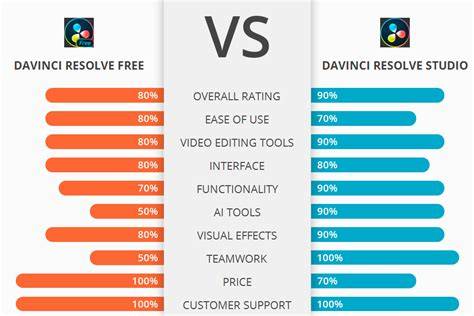
For newcomers, the free version provides a solid introduction to DaVinci Resolve’s core tools, including editing, color, and audio. As skills grow, upgrading to Studio unlocks advanced features that benefit professional projects and team workflows.
DaVinci Resolve Beginners Tutorial: Edit like a PRO for FREE!
DaVinci Resolve Studio is designed to meet the needs of professionals who require integrated tools for editing, color, VFX, motion graphics, and audio, all within a single application. It’s a powerful platform for collaborative post production, enabling teams to work in parallel without the friction of moving files between different software tools.
| Feature | Studio 18 | Free Version | Notes |
|---|---|---|---|
| Cloud collaboration | Yes | No | Real-time multi-user collaboration |
| Proxy workflow | Yes (Proxy Generator) | Limited | Speeds up editing on remote networks |
| Dolby Vision/HDR tools | Advanced | Limited | HDR workflows supported |
| Fairlight audio features | Comprehensive | Basic | Advanced ADR, Foley, AI tools |
| Fusion tools | Full suite | Limited | Node-based compositing |