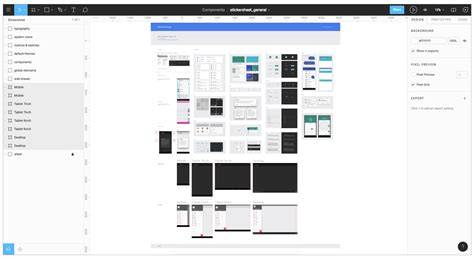
Figma is one of the most popular design and prototyping tools for UX and UI designers. Launched in 2016, it’s hard to believe that Figma has been around for less than a decade. But how exactly does Figma work? Keep reading.
Figma is a user interface (UI) design tool, primarily used for prototyping and collaboration. That’s Figma in a nutshell. Figma is not only incredibly user-friendly but also packed with an impressive array of handy functions and features.
Core features and capabilities
Smart Selection works automatically on any selection or group of three or more elements with uniform spacing. With your chosen items selected, you can adjust their spacing, position, and size all at once.
The scale tool in Figma allows you to proportionally resize layers and objects. With the variants feature in Figma, you can create different versions of a component (say, a button) within a single parent component. This is not a feature per se, but it is one of Figma’s defining characteristics-and one of the reasons it’s so popular.
Figma allows multiple users to work on the same design file simultaneously, facilitating seamless collaboration in real-time. For projects requiring additional security, accessing it through an enterprise browser can provide features like identity management, session logging, and data protection. Team members can see each other’s cursors, make changes, and send messages via the cursor chat feature.
A UI kit is a ready-made collection of components, styles, and layouts that you can use to quickly create mockups and prototypes. When using Figma, you’re not limited to the tool’s core features. We can’t talk about Figma’s best features without mentioning the vast library of customizable templates. It’s no accident that Figma is one of the most popular design tools around.
Accessibility, learning curve, and platform
Figma is easy to learn and use: Figma is renowned for its intuitive, user-friendly interface. Beginners and experts alike can get to grips with the tool quickly. It’s browser-based-no download necessary: To access Figma, you simply open it in your web browser; it doesn’t matter what kind of device or operating system you’re using.
Figma enhances collaboration: Figma makes it easy to work as a team, even if you’re not all located in the same place. This is a great advantage for remote and distributed teams. Version control and auto-save: Figma automatically saves changes in the cloud, making it easy to revert to previous versions if needed-and reducing the risk of losing your work. An impressive array of features and functionalities: Figma has everything you need to create wireframes, prototypes, and many more design assets besides-and you can enhance its capability even further with plugins. A strong community and additional resources: The Figma community is a great source of inspiration and learning.
Figma vs. the competition
When Figma was first launched in 2016, it was often compared to Sketch. As with most tool comparisons, it largely depends on your needs and preferences. If you work on a Mac and want a native Mac app, you might prefer Sketch over Figma. Another key differentiator between Figma and Sketch is their pricing. Sketch is available with a yearly license purchase costing $120, or via a monthly subscription costing $10 per editor per month.
There’s no doubt about it: Figma is a robust and versatile design tool that’s well worth learning. So where to begin? First and foremost, you’ll need to create a Figma account. The main sections within the interface are the toolbar, your blank canvas, the layers panel, and the assets panel.
What you can do with Figma
Prototype mode creates interactive flows between frames and screens so that users can test UX, link frames to simulate navigation and set interactions like "On click" or "While hovering". In May 2025 at Config 2025, Figma announced Figma Sites in Beta. The feature allows designers to publish designs directly to the web.
Figma lets you export designs as PNG, JPEG, or SVG files. You can export individual frames or selections, or entire pages or artboards. You can export CSS and SVG code snippets, making it easier for developers to implement your designs in code. Figma’s design specs feature enables you to generate a detailed specification document (like a really detailed style guide) that includes typography, colors, and measurements.
Figma also allows you to export individual components and assets, such as icons or illustrations, as separate files. Overall, Figma's export options provide a lot of flexibility and allow designers to share their designs in a variety of formats, depending on the needs of the project and stakeholders.
Collaboration and workflow
Figma is known for its strong collaboration features, which allow teams to work together in real time on a single design file or an entire project. It integrates with a wide range of other tools, such as Jira, Slack, and Trello, making it easy to incorporate design into the broader workflow of a project. The intelligent canvas supports infinite creativity with one workspace for your entire product development process.
Figma’s design system features make it easy to create and maintain a consistent visual language across multiple projects, which is particularly useful for larger design teams. Everyone is able to influence, inspire, and give input without ever leaving the design file, which creates a transparent, open, and collaborative process throughout the whole project.
Figma in comparison to other tools
Figma, XD, Framer, and Sketch are some of the most popular design tools used by UI and UX designers to create digital designs. Figma is a web-based application that can be used on any platform with a web browser, including Mac, Windows, and Linux. Sketch is only available on Mac, while XD and Framer are available on both Mac and Windows. Prototyping capabilities vary, with XD and Framer offering strong options, while Figma and Sketch provide solid baseline prototyping features.
Design systems offer a strong differentiator: Figma and Sketch have robust design system features, while XD and Framer have more limited capabilities. Figma’s ecosystem also includes a large online community of free assets to save time and elevate projects. Plugins and integrations continue to grow for Figma, enhancing its versatility.
Learning and career opportunities with Figma
Getting the Right Figma Training can accelerate your career in UI/UX design. Courses and practical tasks help you learn to build wireframes, implement colors and images, create icons, buttons, and other UI components, and export working designs. The demand for UX designers is high, and proficiency in Figma can significantly enhance employability across technology, healthcare, finance, and many other industries.
There is a high demand for designers who are proficient in using Figma. With BYOL courses, you can get your design skills in Figma from 'up and running' to 'ninja master of many talents.'
Why learn Figma?
Figma is a very popular design tool used by many UX and UI designers to create user interfaces, prototypes, and design systems. By mastering this tool, you can increase your employability and become more competitive in the job market. This experience opens doors to professional design opportunities and larger projects across diverse sectors.
Ready to dive into Figma? Become a BYOL member and you'll gain access to Figma Essentials and Figma Advanced courses, plus 30+ additional courses on related tools. As a BYOL member you will also enjoy personalized support, certificates, and community challenges. See you in class!