Figma’s product launches represent a carefully choreographed progression from new capabilities to broader adoption across teams and platforms. The company emphasizes real-time collaboration, AI-assisted workflows, and design-to-development parity as core pillars of each release. As with prior launches, the narrative centers on empowering teams to move from idea to shipped product with speed, quality, and governance.
Strategic goals behind a launch
Design has evolved beyond pixels; it now encompasses motion, code, and scalable systems. Figma positions launches as opportunities to close the gap between ideation and production, enabling simultaneous client and internal collaboration. A successful launch aligns with a company-wide push toward integrated tooling-Design, Dev, and Operations-so that teams can work in a single source of truth.
Key features driving contemporary launches
Responsive spacing across design and CSS introduces two new auto spacing options, “Around” and “Evenly,” alongside the existing “Between.” These options mirror CSS spacing patterns and improve control over text and layout distribution. The updates also include how “Balance” distributes text across lines, “Pretty” avoids orphan words, and “Between” keeps even gaps without edges.
Figma MCP and Weave tools enable running Weave workflows directly from agents, keeping conversations in flow and preserving brand context. Users can describe what they need, let the agent locate and run the appropriate tool, and receive results within the same dialogue. This reduces context switching and accelerates prototyping and iteration cycles.
The launch cadence also highlights nested folders as a major organizational improvement, replacing Projects with folders that can be nested up to ten layers deep and colorized for hierarchy. Sharing becomes simpler as access inherits from parent folders, with options to restrict access to specific people.
Figma Draw debuts as a refined vector editing suite with enhanced boolean operations, multi-select across vectors, and a richer toolset for stroke, texture, and pattern work. This expansion aims to bridge free-form creation and production-ready assets, enabling designers to push ideas from concept to production with fewer handoffs.
Figma Buzz introduces a dedicated space for asset creation and brand consistency, offering templates and focused editing experiences for teams producing social assets, event materials, and more. This complements the broader motion and code-oriented tools by ensuring brand artifacts stay cohesive across channels.
Figma Motion and the agent-enabled plugin ecosystem provide a pathway from design to interactive prototypes through natural language prompts and code generation. The promise is to reduce the friction between designing and implementing interactions, animations, and UI behaviors while preserving fidelity to the original design intent.
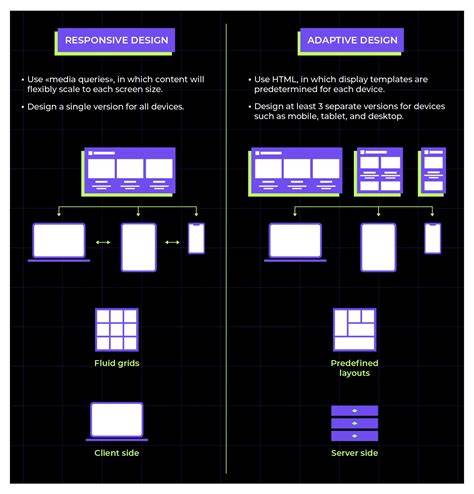
Grid brings a modern approach to responsive layouts, enabling precise track sizing, multi-cell spanning, and real-time layout adjustments as frames resize. Dev Mode’s CSS translation aligns with production-ready outputs, allowing designers to verify implementation details directly in Figma. These capabilities together strengthen design-to-code fidelity and collaboration with developers.
In addition, Figma Sites enables publishing designs to the web with a single click, supporting end-to-end workflows from concept to web-ready experiences. The framework allows direct creation of code from design using Figma Make’s AI prompt-to-code capabilities to generate animations and interactions, expanding storytelling possibilities for web assets.
Process and roles in a launch
Launches begin with a clear communication of availability status, beta programs, and target plans (Professional, Team, or Enterprise). Admins play a crucial role in governing AI credits and usage, ensuring that teams operate within defined limits. Releases also emphasize compatibility and migration paths, such as reorganizing existing projects into folders and communicating changes through help centers and release notes.
Internal teams and the community collaborate on new skills, variants, and workflows for the Figma agent. Authors can publish skills to the Figma Community, enabling others to adopt and remix these workflows. This community-driven expansion accelerates adoption by providing ready-made solutions for research, design systems, and design-to-code pipelines.
Implementation and adoption considerations
Adoption hinges on a balance between new capabilities and the ability to scale responsibly. Governance features, such as nested folder structures and color coding, help teams maintain consistency as projects proliferate. Conversely, the agent-enabled ecosystem introduces new complexities around AI credit usage and access controls, necessitating clear policies for automation and compliance.
To maximize impact, launches pair feature demonstrations with practical onboarding: hands-on tutorials, help-center guidance, and example workflows that illustrate end-to-end use from ideation in Figma to production-ready output in code or web assets.
What a launch means for product teams
For product teams, launches translate into faster iteration cycles, tighter collaboration between designers and developers, and more reliable handoff processes. The integration of motion, code generation, and adaptable layouts reduces friction at critical handoff points and empowers teams to test and validate experiences earlier in the lifecycle.
As Figma evolves into a broader AI-powered platform, launches emphasize not only new tools but also improved interoperability, security, and governance. The overarching aim remains: help teams turn ideas into shipped products faster, with a cohesive design language and a dependable production workflow.
For teams evaluating a platform transformation, consider how the latest releases address collaboration, production readiness, and brand consistency across channels. If a design tool promises to bring design, code, and content workflows together in a single environment, it has the potential to reduce silos and accelerate time-to-value across the organization.
Overall, Figma’s product launches seek to unify design, motion, and code into a single, iterative loop. By extending capabilities from layout and typography to AI-assisted workflows and web publishing, Figma reinforces its position as a product development platform that grows with teams as their needs evolve.