Wireframing is an essential part of the design process, and Figma is a powerful tool that makes wireframing a breeze. Wireframing plays a crucial role in the design process as it helps establish the foundation of a digital product. Figma wireframing is a design process that leverages Figma’s capabilities to create wireframes for digital products. Figma wireframing allows designers to iterate and test different ideas quickly. This ensures that the product’s structure and user experience are well thought out before investing time and resources into the visual design. Early Usability Testing: Figma enables early usability testing through interactive wireframes. The first step is to set up your Figma account. Creating a Figma account is quick and easy. After verifying your account, you can log in to Figma using your credentials. Once logged into Figma, you’ll be greeted with a clean and intuitive interface. The left sidebar is divided into sections, each representing a specific set of tools. You’ll find options for creating shapes, adding text, importing images, and more. The center canvas is where the magic happens. You’ll design your wireframes by dragging and dropping elements onto the canvas, resizing and rearranging them to create your desired layout. Take some time to familiarize yourself with the different menus and options available. One of Figma’s great features is its collaborative nature. Inviting team members to work on the same project allows real-time collaboration and seamless communication. Furthermore, Figma offers a variety of keyboard shortcuts and customization options to enhance your workflow. As you start exploring Figma’s interface and experimenting with its tools, don’t be afraid to get creative and push the boundaries of your wireframe designs. Frames and shapes are the building blocks of your wireframes. Figma offers various pre-built shapes and frame options to drag and drop onto your canvas. Frames also help you keep your wireframes organized. Text and styles are another crucial aspect of wireframing in Figma. With Figma’s text tool, you can easily add and style text within your wireframes. Figma’s style feature lets you define and apply consistent styles throughout your wireframes. Components and assets are a game-changer when it comes to Figma wireframing. Components are reusable elements that you can create and reuse throughout your designs. Assets, however, are pre-designed icons, images, and illustrations that you can import into your wireframes. Upload your Figma screens or prototype for quick feedback. One of the most powerful features of Figma is its ability to create interactive prototypes. Creating interactive prototypes allows you to validate your design decisions and gather user feedback before proceeding to the development stage. Figma’s real-time collaboration feature allows you to work simultaneously with other designers and stakeholders. Establishing an organized workflow is essential when working on complex wireframes. Consider using Figma’s naming conventions for layers and frames. This will make it easier for you and your team to understand and update your wireframes later on. Figma offers a wide range of keyboard shortcuts that can help speed up your wireframing process. Take the time to learn these shortcuts and incorporate them into your workflow. With these tips and techniques, you’re on your way to becoming a Figma wireframing pro. Remember, practice makes perfect, so don’t be afraid to experiment and try different approaches. Yes, Figma’s interactive prototypes, which can be derived from wireframes, are ideal for conducting user tests. Designers should start by setting up a Figma account, familiarizing themselves with the interface, and using the essential tools to create frames and layouts. Effective Figma wireframes should emphasize simplicity, emphasizing structure and user flow without getting caught up in design details.
Introduction to wireframing concepts and Figma interface
In this module, you will be introduced to fundamental wireframing techniques using Figma, covering essential tools, workflows, and design principles. You will also explore the Figma interface, core wireframing concepts (paper, low-fi, and mid-fi), and practical applications of Gestalt principles in UX design. Through hands-on labs, you will create and refine wireframes while developing efficient Figma workflows.
Key tools and workflows in Figma
Frames and shapes are the building blocks of your wireframes. Figma offers various pre-built shapes and frame options to drag and drop onto your canvas. Text and styles are another crucial aspect of wireframing in Figma. With Figma’s text tool, you can easily add and style text within your wireframes. Figma’s style feature lets you define and apply consistent styles throughout your wireframes. Components and assets are a game-changer when it comes to Figma wireframing. Components are reusable elements that you can create and reuse throughout your designs. Assets, however, are pre-designed icons, images, and illustrations that you can import into your wireframes. Upload your Figma screens or prototype for quick feedback. One of the most powerful features of Figma is its ability to create interactive prototypes. Creating interactive prototypes allows you to validate your design decisions and gather user feedback before proceeding to the development stage. Figma’s real-time collaboration feature allows you to work simultaneously with other designers and stakeholders. Establishing an organized workflow is essential when working on complex wireframes. Consider using Figma’s naming conventions for layers and frames. This will make it easier for you and your team to understand and update your wireframes later on. Figma offers a wide range of keyboard shortcuts that can help speed up your wireframing process. Take the time to learn these shortcuts and incorporate them into your workflow.
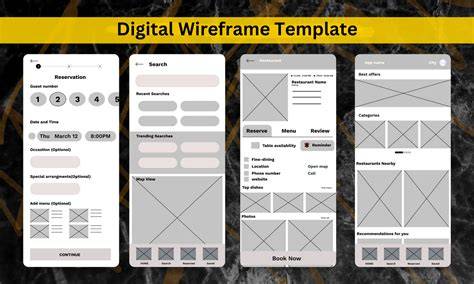
Design principles and Gestalt in wireframing
Through hands-on labs, you will create and refine wireframes while developing efficient Figma workflows. The module emphasizes best practices for structuring layouts, using grids, and applying psychological design principles to create effective low-fidelity prototypes. Gestalt principles provide practical guidance for arranging elements, ensuring consistency, and guiding user perception in UX design. Wireframes serve as a blueprint for your design, allowing you to quickly iterate and test different ideas without getting caught up in the details.
What are the Gestalt Principles? | UX/UI Design | Figma
Low-fi and mid-fi wireframes
Wireframing focuses on structure and user flow, avoiding unnecessary visual design details. Early usability testing is facilitated by Figma, enabling interactive wireframes to simulate user interactions and collect feedback before coding. The left sidebar, center canvas, and keyboard shortcuts collectively support an efficient low-fi to mid-fi prototyping workflow. By iterating on layout structure and interactions, teams can validate usability and information architecture early in the process.
Practical applications and best practices
Effective wireframes should emphasize simplicity, structure, and user flow. Establishing an organized workflow with naming conventions, grids, and consistent text styles helps maintain clarity as projects scale. Collaboration and real-time feedback reduce miscommunication between designers, developers, and stakeholders.
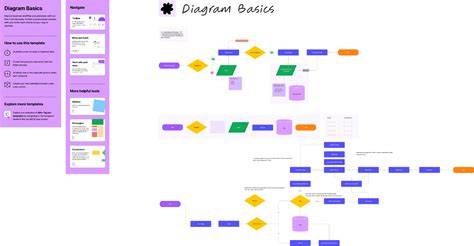
Wireframing is a powerful tool that allows designers to create low-fidelity visual representations of a digital product’s layout and functionality. By leveraging Figma’s features, designers can quickly iterate, collaborate, and test their designs before moving on to the visual design phase. The center canvas is where the wireframe magic happens, with frames and shapes forming the core structure you manipulate to represent content hierarchy and user tasks.
| Aspect | Description |
|---|---|
| Paper vs. Low-fi vs. Mid-fi | Different fidelity levels guiding complexity and feedback needs |
| Prototype interactivity | Interactive prototypes enable usability testing before development |
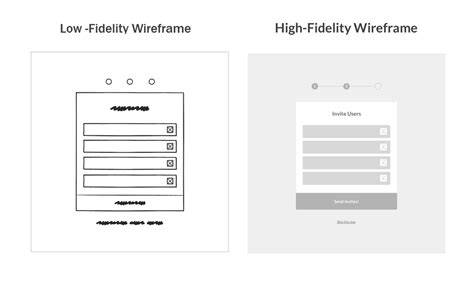
Figma’s interface supports a seamless real-time platform to create, collaborate, and prototype designs. The module also highlights the importance of grids and layout structure, ensuring scalable and accessible wireframes. With practice, designers can build efficient workflows, leverage components and assets, and apply Gestalt-driven patterns to improve usability even at low fidelity.
tags: #figma #prototyping #wireframing #features #review