Typically, for a full day wedding, and especially between May and September, I’ll advise allowing up to 6-8 weeks before it’s all ready for you. So why does it take that long? Well, from start to finish the actual work is probably 2-3 full working days, including all the bits and pieces in between the ‘editing’ parts. This gets done on the night of your wedding. If I’m coming straight home everything gets downloaded to my Mac Mini’s huge internal SSD. Then I use Carbon Copy Cloner to make a second copy of the whole shoot on an external ‘Archive’ drive. The new files on my Mac Mini also start uploading to my cloud backup service, Backblaze. So within a day or two I have a fifth copy available off-site.
It’ll usually be several weeks before I get to this stage, for a few reasons. I also really want to get this stage done in as close to one go as possible, so I typically wait until I’ve got at least a full half-day free to dedicate.
Photographers - are you still using Photo Mechanic for culling and Lightroom Classic for editing? Unless you’ve got a really slow computer it’s perfectly possible to cull at high speed in LRC these days! The alternative is to give everything a rating, or to select what you want to chuck out. However, I find it’s much easier and quicker to decide if something is any level of ‘good’ than if something is ‘bad’. This first pass through will typically take a couple of hours to do properly, with occasional breaks to stretch my legs and rest my eyes and brain! And I’ll usually end up having selected a fifth to a quarter of however many I shot. (Photographers - wondering if I use AI-powered culling tools? I’ve tried a couple and I really, really don’t like them. I just think the selection needs to be done by a human being who was there, and knows what stories were important, and which photos best capture the emotions.)
At this point I either take a break and go and do something else for a bit, or if I’m In The Zone then I dive right back in. After this process I’m almost always down to around 700-900 photos, depending on the day. This is my starting point, applying general colouring and toning to everything to get me in the ‘ballpark’, and make it start looking like one of my edited weddings. With this simple first step done I usually step away from the computer and I may not come back to them to start proper editing for several days or even a couple of weeks. (Photographers - unlike with culling, I have started to use AI tools to apply my basic ‘look’; I like Imagen AI, which I’ve trained on thousands of my own edited raw files. I don’t have a problem using AI to apply the basic look as all it’s really doing that a preset can’t is adjusting exposure and white balance based on how it knows I like my images to look, saving me a few extra seconds per image.)
So it’s usually been at least a day or two since I culled everything and applied my basic ‘look’ in Lightroom Classic. As soon as I’ve got ideally a full clear day available with no shoots or other edits it’s time to get cracking on the ‘final’ edit. This is where the real ‘editing’ work happens. I’ll go through everything one by one and make individual edits to each one. I don’t tend to ‘retouch’ people with heavy skin smoothing and teeth whitening and ‘slimming’ techniques as I prefer to depict reality as much as possible. Here and there I’ll be able to skip through a series of photos quickly with no tweaks, such as the confetti moment where I shoot dozens of photos over just a few seconds and I can copy and paste the settings from the first one to all of them. And once I get to the very end… job done, right?
First I go back through and filter for any images with high-ISO noise I want to clean up. Lightroom Classic has decent enough settings for this but they also have a new AI De-noising tool that works like magic! Once that’s finished working, job done, right? Now I like to sleep on it and see if I still love what I’ve made the next day. Sometimes I see something obvious I missed the first time, or I might decide to tone down some of my more dramatic creative tweaks when I view them in the context of the whole set. The trick is not to get too carried away second-guessing my own work.
Recently I answered a question on Quora titled “How long does it usually take a photographer to edit photos?” and the response to MY response was a bit overwhelming. After about a week the response went viral with nearly 100,000 views. It was published on many user’s “Quora Digest” and the response to it was extremely positive. This took me by surprise because my answer was relatively straightforward. This is what I said: “The short answer to this: it depends. On average, I return photos to clients within three days, and for personal projects, it can take up to a month.”
Editing takes about two months for a wedding gallery, not because the editor is slow, but because multiple galleries are being worked on at once and each image is looked at, adjusted, and fine-tuned until delivering something cohesive and true to the mood of the day. The process includes culling, organizing, and applying a consistent look before the final touches are added. The final gallery is exported and uploaded to the chosen hosting platform, then delivered to the client with a carefully planned release schedule.
Step by step, I back up every single photo from your wedding to external drives and the cloud, then I deliver sneak peeks within 48 hours to 1 week, followed by a larger sneak peek within a week. Culling is done to select the best shots, import and organize into Lightroom, and then a first round of edits is performed with the aid of AI-powered tools, followed by hand-editing to ensure cohesion. The art of editing requires time, patience, and attention to storytelling, not just speed. Finally, the full gallery is delivered in a structured online gallery with options to order prints or albums.
If you’ve ever wondered what happens after your wedding day and how long it takes for your gallery to land in your inbox, here’s a peek behind the scenes of what really goes down once I get home from a wedding. And if you’re considering your own photography workflow, remember that the time spent is a reflection of care, organization, and the desire to preserve memories in a way that feels authentic and enduring.
What affects editing time
The time invested varies based on: image complexity, genre, editing software used, and the desired outcome. Simple stills may require just a few tweaks, while portraits and product photography often demand more advanced editing. The choice of software-Lightroom, Photoshop, Luminar Neo, or DXO Photolab-also influences speed and capability. The more close-up the image, the more retouching is typically needed. The overall outcome and whether extensive creative edits are requested will lengthen the timeline.
Practical timelines
- Sneak peeks: within 48 hours or, at the latest, within one week.
- Full gallery: typically within 60 days, with some projects delivered sooner depending on workflow load.
All images are carefully backed up in multiple places, edited by hand, and refined to feel cohesive and heirloom-worthy. The goal is to deliver photos that preserve the emotion and storytelling of your day, not just technically perfect images.
Examples from industry experience
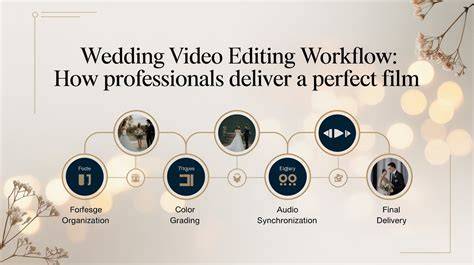
Photographers often report that the most time-consuming parts are culling and retouching, particularly for weddings with many guests or extended family sessions. A common workflow includes culling in batches, organizing by wedding segment, applying a basic look, then performing a detailed edit pass on each image to ensure consistency across the gallery.
From the photographer’s perspective, the delivery of a full gallery is a culmination of meticulous steps: backup, sneak peeks, culling, importation and organization, initial AI-assisted edits, hand refinement, noise reduction, final tonal adjustments, export, and gallery hosting. Each step is essential to ensure longevity and emotional impact of the photographs.
- Back up all wedding photos to external drives and cloud storage.
- Provide 9-12 sneak peek images within 48 hours, then 50-100 images within a week.
- Cull thoroughly, import into Lightroom, and begin first-round edits with AI-assisted tools.
- Hand-edit remaining images for consistency and storytelling.
- Deliver through a structured online gallery with print options.
In the end, while the wait can feel long, the result is a carefully curated collection that reflects the day as it happened, with a touch of artistry that enhances the memories for years to come.