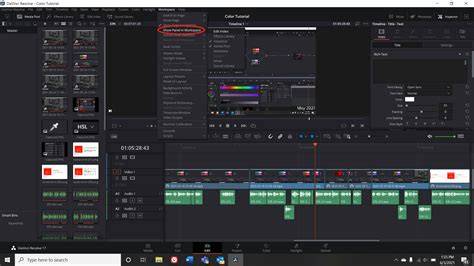
Resetting the UI layout in DaVinci Resolve is a quick and easy way to restore the original interface or to troubleshoot layout issues caused by customizations. This method is especially useful if you want to experiment with the user interface and then revert to the default setup after an adjustment you don’t like.
In this guide, you’ll learn how to reset the UI layout, what happens when you reset, and how to proceed with further adjustments after restoring the original layout.
Open the Workspace menu
To reset the UI layout, first open the "Workspace" menu in DaVinci Resolve. You can find the "Workspace" label in the menu bar at the top of the window. Clicking on it will open a dropdown list with various options.
- Open the Workspace menu.
- Navigate to the Reset UI Layout option.
Select Reset UI Layout
After opening the Workspace menu, you will see several options. Look for the "Reset UI Layout" option. This is the function we need to reset the user interface back to the default view.
Confirm and reset
Once you have selected "Reset UI Layout," the layout will be reset immediately. This means that any adjustments you may have made will be lost, and the user interface will look as it did when you first started the program.
Check the reset layout
To ensure that your UI layout has been successfully reset, take a look at the user interface. It should now display all standard components in their original arrangement.
Make further adjustments
If you wish to make additional adjustments after the layout has been reset, you can do so now. Try out different layouts and settings until you are satisfied with the user interface.
Summary
Resetting the UI layout in DaVinci Resolve is a simple process that helps you restore the user interface to its original state. By opening the "Workspace" menu and selecting the "Reset UI Layout" option, you can troubleshoot issues and redesign your workspace as needed.
Frequently Asked Questions
- How can I reset the UI layout in DaVinci Resolve?
- Go to "Workspace" and select "Reset UI Layout".
- What happens when I reset the layout?
- Your customizations will be cleared, and the user interface will be reverted to the default view.
- Can I readjust the layout later?
- Yes, after resetting the layout, you can continue to make adjustments.