VSCO is a connected system for photographers that combines editing tools, a global community, and business-oriented features. This guide walks you through creating a VSCO account, understanding profile customization, exploring core features, and leveraging tools to grow your photography presence.
Setting up your VSCO account
VSCO is a community-driven platform that equips photographers to expand creatively and professionally. Join today to build authentic connections that foster professional growth and to edit photos with our full suite of tools.
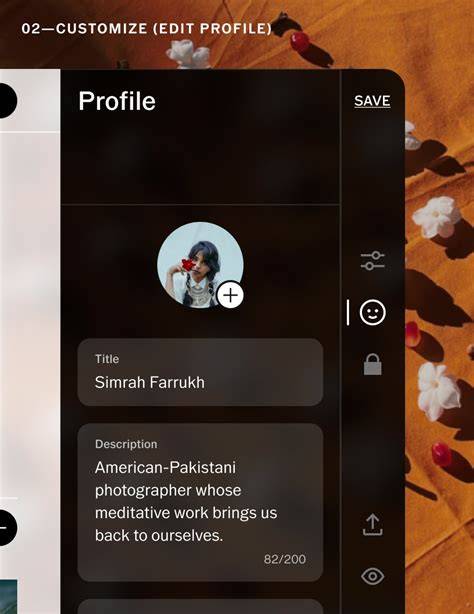
To customize your profile, sign in on desktop at vsco.co. Navigate to your profile and tap Edit Profile. From the editor, you can update your bio, tag your experience, add social links, and more. VSCO profiles are public, and we don’t offer private accounts, so anyone with your profile link can view your content.
Your profile lets others know who you are and where you’re going. Share your experience and show up on VSCO Hub, organize your portfolio with Albums, and publish photos your way-from stories that say more with Blogs to sharing your daily dose of inspiration with Reposts.
Key components of the VSCO ecosystem
VSCO is a community-driven platform that blends a professional toolkit with social discovery. Build a profile designed for photographers, share and repost inspiring photos, organize images into albums, and get discovered for your unique skills.
Members gain access to a suite of tools including batch editing, client galleries, moodboarding, booking, and a standalone camera app with live presets. The Studio is your private workspace to gather and edit the images you want to work on, while AI Lab provides AI-powered editing capabilities like Remove, Upscale, Denoise, and Dehaze.
In addition, you can publish to VSCO Galleries, join Spaces for collaborative groups, and connect with the broader community through Blogs and Reposts. The VSCO Hub and Sites features help you showcase portfolios and connect with potential clients or collaborators.
Editing and organizing photos on VSCO
Editing photos in the VSCO app begins by importing images into the Studio. Tap the import button, select photos or videos from your camera roll, and add them to your VSCO Studio workspace. Drafts are private until you publish.
Presets are a core starting point for most edits. Access the Presets tab, and you’ll find over 200 presets categorized for various looks, including Film-inspired stock and collaboration presets like We the Creators. Tapping a preset reveals a description and community examples, helping you decide how to apply and adjust strength.
Tools in the VSCO photo editor cover everything from basic crops and exposure to advanced color adjustments. Adjust, Exposure, Contrast, Tone, and a robust set of color controls (HSL, White Balance, Skin Tone, Split Tone) enable precise editing to achieve your desired aesthetic.
For batch workflows and high-volume editing, VSCO Studio Pro supports applying presets across dozens of photos at once and features Style Match for consistency. Studio Pro works with a VSCO One or Pro membership and currently runs on iOS, with a Mac version anticipated.
Working with AI, film effects, and video
AI Lab introduces prompts to edit photos with natural language, Remove distractions, Upscale resolution, Simplify clutter, and Restore old images. Each AI edit creates a new version while preserving the original image.
FX overlays include distressed textures, film frame overlays, light effects, texture, grain, vignette, and halation to evoke analog film aesthetics. The FX tools apply to both photos and videos for consistent mood and atmosphere.
VSCO is also a video editing app. You can trim clips, adjust speed, reverse playback, control volume, and apply video-specific effects such as VHS filters or chroma split. Sharing options include posting to VSCO, saving to Camera Roll, or syncing to the cloud for Pro members.
Creating collages, montages, and using VSCO Capture
The Studio offers a collage feature with templates or blank canvases. You can drag and drop photos, apply filters to individual elements, and add backgrounds, shapes, and text for a customized layout suitable for portfolios or social sharing.
Montages let you sequence photos, videos, shapes, and color onto a canvas to tell a visual story beyond a single image.
VSCO Capture is a standalone camera app designed for more precise mobile photography with manual controls. Shoot with VSCO presets applied or use effects like Bloom and Halation, then import into VSCO for editing and sharing.
Sharing, insights, and profile management
When ready to publish, use the top-right share icon. Options include sharing to other apps, posting to VSCO, saving to Camera Roll, or sharing your recipe with the community. Pro members can also sync to the cloud to continue editing on the web.
Insights provide data-driven feedback about performance, helping you engage with your audience more effectively. You can access insights by tapping the profile icon and selecting Share profile or viewing in-app analytics for Pro members.
Albums organize images by theme, project, or style. You can create a new album, name it, select photos, and publish it to your profile. Albums may be seen by businesses browsing VSCO Hub, so curate thoughtfully.
Memberships and monetization
VSCO Membership opens opportunities for exposure, community growth, and professional development. It enables access to advanced tools, analytics, and additional features that support running a photography business.
VSCO Sites provides a customizable web portfolio to showcase your work beyond the app, while VSCO Canvas and Spaces help you plan shoots and collaborate with others. For photographers aiming to turn pro, VSCO’s ecosystem offers mentorships, workshops, and business-focused resources.
Practical steps to get started
- Visit vsco.co and sign in or create an account.
- Open Profile > Edit Profile to customize your bio, experience tags, and social links.
- Tap Add or Create to build Albums and publish your work to VSCO Hub.
- Explore the Presets and begin with a starter edit to understand how your images respond to different looks.
- Experiment with AI Lab, FX overlays, and video tools to expand your editing toolkit.
- Consider VSCO Studio Pro for batch edits if you regularly process large sets of photos.
- Use Insights to measure engagement and refine your content strategy.
- Utilize VSCO Capture for more precise on-the-go shooting and import into VSCO for editing.
Создание связок и взаимодействие в сообществе
Fostering authentic connections is a core aspect of VSCO. Build your network by following photographers, reposting inspiring work, and participating in Spaces or Blogs. Attend membership events, photo walks, and workshops to deepen skills and create real opportunities that grow your career.
Технические особенности для профессионалов
Studio Pro offers batch workflows, color matching with Style Match, and direct publishing to VSCO Galleries. Desktop web editing and cloud syncing ensure your edits stay consistent across devices, which is especially useful when integrating with Adobe Lightroom workflows or managing multiple client projects.
customize your profile with brand-consistent visuals, portfolio structure, and easily shareable links to attract clients and collaborators. VSCO Sites allows you to present your portfolio in a professional web format, while VSCO Hub connects you with a broader photography community for exposure and growth.
With the VSCO ecosystem, you can define your style with a photographer-focused profile, share and repost inspiring photos, organize images into albums, and get discovered for your unique skills. Create, edit, share, and grow within a platform designed for serious photographers.