What is Inkscape? It is a digital image-editing program that is used to create and modify vector images. Due to its capabilities and tools, it is often considered a free alternative to Adobe Illustrator. Is Inkscape free? Yes, as an open-source program, it is completely free, with no hidden payments or paid upgrades. The design community has also developed a number of free extensions for the program, which enhance its functionality.
Is Inkscape safe? As a reputable and widely-used program, it is generally considered to be safe. Moreover, there have been no reports of malicious software being included with the program. If you’re concerned about the integrity of this program, use an online or computer-based virus scanner to scan for malicious activity.
What is Inkscape used for? As a vector-editing program, it is particularly useful in situations where a designer needs the precision and scalability of vectors. For example, commercial printing typically requires the use of vector images to ensure the clarity of the final print. A vector-editing program is also useful for designing logos as these graphical assets often need to be exported at multiple sizes without the loss of quality.
Does Inkscape work on Mac? Yes, the current version of the program can be installed on computers using macOS and some versions of the Mac OS X operating systems. Older versions of Mac operating systems may be able to support previous version of the software. To install the program on a Mac, you will need to download and install the XQuartz package of software.
Can inkscape open AI files? The program can import many vector file formats, including Adobe Illustrator’s proprietary document format - files with the .ai extension. It can also open multiple other vector formats, including EPS, SVG and PDF.
Can Inkscape save as AI? No, the program no longer allows users to export files as Adobe Illustrator (AI) files. If you need to export your work to an Adobe Illustrator compatible file, select the SVG format. This format is compatible with most vector-based programs, so it represents a good choice for document storage.
Can Inkscape open PSD files? As Adobe Photoshop documents are not entirely vector-based, the program cannot open them natively. There is an extension available that allows the program to import PSD files; however, this extension only allows the vector-based shape layers in the file to be imported.
Does Inkscape have layers? Yes, like other graphic-editing software, the program uses layers, which can be added, removed, merged and modified using the Layers panel. Layers also support opacity settings and blending modes. These settings can be used to achieve different looks for your work based on the interaction of overlapping layers.
Does Inkscape have Live Trace? Yes, the program has a feature similar to Adobe Illustrator’s Live Trace, allowing users to convert bitmap images into vector paths. To vectorize an image, simply select it and activate the Trace Bitmap function via the Path menu. From the Trace Bitmap option box, you will be able to adjust the trace settings to achieve a desired result.
Inkscape uses Scalable Vector Graphics (SVGs) as its main file format. Inkscape can render primitive vector shapes and text, which may be filled with colors, gradients, and patterns. Embedding and optional tracing of raster graphics is supported, enabling the editor to create vector graphics from photos and other raster sources.
Inkscape has a long development history with a fork from Sodipodi leading to major architectural shifts, including a move from C to C++, GTK+ adoption, and a redesigned user interface. Since version 0.91, Inkscape fully implemented SVG 1.1 standard, with ongoing work on newer SVG features such as Mesh Gradients. The project participates in open-source initiatives like the Google Summer of Code and has evolved through multiple major releases, with 1.4.x and 1.5 development branches shaping current capabilities.
Inkscape workflow is based on vector objects. Tools allow manipulating primitive vector shapes-rectangles, ellipses, arcs, polygons, and more complex shapes like 3D boxes with adjustable perspectives, stars, and spirals. Objects can be grouped, transformed, and arranged in layers or Z-order. The program supports text editing and text-to-path conversion, enabling precise typographic work and layout control.
Latest improvements and features
Recent development versions add bug fixes, improved filter galleries, modular grids, and better axonometric grids. The Swatches (Palettes) dialog has been improved, and users with CSS knowledge can customize styling of handles. The Shape Builder tool received enhancements, and PDF export now supports internal links. Inkscape's ongoing maintenance releases bring new features and performance refinements to 1.4.x and 1.5-dev branches.
Inkscape remains a robust option for designers seeking a free, cross-platform vector editor with rich features, extensibility through extensions, and strong SVG support. Its open-source nature invites community contributions and continuous improvements, making it a competitive tool for logos, icons, diagrams, and scalable illustrations.
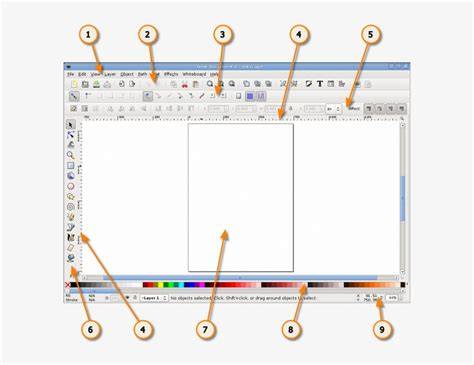
Illustrative overview of Inkscape's vector canvas, layers, and tool icons to help readers visualize typical workflows.
Inkscape Tutorial: Complete Starter Guide for New Users
Short video guide showing how to start a new document, use basic shapes, and manage layers in Inkscape.
Formats and compatibility: Inkscape’s primary format is SVG 1.1, and it can import and export various vector formats by conversion to SVG when needed. The software supports numerous platforms, and the latest development builds can be tested via AppImage on Linux or dedicated installers on Windows and macOS. Users are encouraged to explore the official download page to obtain the latest stable release or development builds.
For new users, primary steps include installing Inkscape from the Download page, choosing the appropriate architecture (64-bit), and starting with basic shapes, stacking, and path editing to build logos and icons for multiple platforms. Regularly saving with Ctrl+S is recommended to prevent data loss, especially on bleeding-edge development versions.
Practical use cases
- Logo design with scalable vectors for multiple sizes without quality loss.
- Icon creation for apps and websites with precise stroke and fill control.
- Diagramming and typography arrangements for technical illustrations.
Inkscape’s feature set continues to expand through community extensions, contributing to its flexibility for both artistic and technical vector work. This makes it a preferred tool for designers seeking a capable, free alternative to proprietary editors.