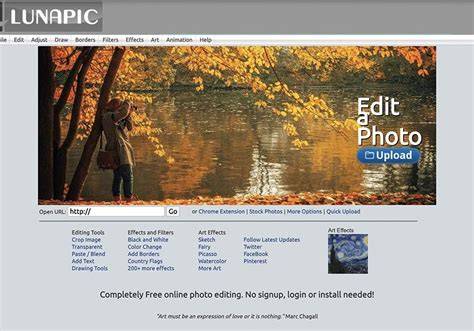
Through this tool, you can save the images in various formats such as PNG, GIF, BMP, TIFF, JPG, and many more. You can also directly save the edited photo on cloud storage platforms like Google Drive. If you have never done photo editing, utilize this article as an ultimate guide to using Lunapic photo editor quickly and through a simpler approach. Read this section to get aware of helpful tips and editing methods that you can utilize while editing any image.
Just with a few clicks and swipes, you can use a single image differently by editing it with smart tricks. Lunapicphotoeditor will provide you with similar extraordinary results with the help of its key features and tools.
1) Perfecting Composition with Cropping and Auto-Crop
In photography, the subject in your image should be aligned perfectly so that it can attach the attention of the audience quickly. That's why cropping the image is required and necessary to make perfect alignments. Every photo editor has a tool to crop the image, but Lunapic photo editor stands out as it offers an exclusive auto-crop feature. If you are not satisfied with the auto-crop feature, you can manually crop the picture according to your preferences. Thus, auto-crop helps in situations where you don't have extra time to manage the ratios and borders of the frame manually.
2) Background Considerations and Transparent Backgrounds
Do you know that a tedious and inappropriate background in the picture can ruin the whole artistic element? Make sure that you capture images by considering an appealing yet appropriate background. Moreover, this tool offers Lunapic transparent background that can make the backgrounds of the images clear and translucent.
3) Quick Face Touch-Ups: Remove Blemishes
Do you feel hesitant to post your selfies on your social media account due to the blemishes or pimples on your face? Just point out the blemish on your face, and this tool will instantly remove it to make your selfie flawless and beautiful.
4) Color Replacement and Tinting
Replacing any particular color from the image seems tough and complicated, but Lunapic online has made it possible for its users. For this, just head to the feature of “Color Picker” and select any color from its displayed options. For a subtle and softer effect on your image, you can also click on the option of "Change Color Tint," and the Lunapic color changer will again display the color options for you. Keep in mind to select a color that goes well with the theme and meaning of your captured photo.
5) Animation Effects for Dynamic Images
Have you ever used animation effects from a photo editor? Lunapic online photo editor brings tons of exciting and lively animation effects that you can implement on your photos. Just click on your preferred animation effect and make your images lively and high-spirited without using an additional animation tool.
6) Borders: Style, Thickness, and 3D Options
Without dazzling borders on your pictures, photo editing is incomplete. Lunapic photo editor consists of multiple options for borders that you can choose while considering the meaning and genre of your picture. You can also manually craft a border for your picture by using its border tool. In this particular tool, you can set the thickness and color of the border by your choice. You can also apply a 3D border to your images for more dimension.
7) Drawing and Painting Tools: Paint Bucket Patterns
Are you interested in drawing and painting tools? Lunapic photo editor enables its users to explore and apply paint bucket features to their images. On the paint bucket option, you can choose various patterns such as flowers, canvas, grass, marble, money, bricks, and many more. Now just tap on your image, and the selected pattern along with the color will be applied to your photo instantly.
8) Watermarks: Personalize and Protect Your Work
Watermarks on the images can prevent the pictures from being copied, but you can also own that image permanently. Lunapic editor offers the option through which people can add customized watermarks to the pictures by deciding the color, font, style, and size manually. You can also adjust the transparency rate of the added watermark, and thus with a few clicks, your own designed watermark will be added to the image. Make sure to choose a unique combination of color and fonts for the watermark to be more peculiar and to get more highlighted.
9) Captions and Embedded Images for Bloggers
Also, bloggers use captions embedded images to post them on their blog sites.
10) Filters and Effects: Shaping Mood and Message
Filters and effects are an integral part of any photo editor as they can change the whole perspective of the image. Lunapic photo editor comprises numerous filters and effects that can define the message and can highlight the meaning behind your picture. You can also check the effects provided by this tool to add more style and artistic elements to your pictures. By combining aesthetic filters and effects, you can make a single image different each time and can use it for various purposes. Lunapic photo editor is no different than any other professional and reliable tool. In fact, you can make use of this tool without buying an expensive subscription and gaining professional experience. Through this article, we have jotted down the tips in a well-structured and descriptive manner to use this tool without facing inconvenience.
Note: The layout emphasizes practical steps, enabling users to access Lunapic’s core features quickly and efficiently.
Practical tips at a glance
- Use auto-crop for quick alignment when time is tight.
- Prefer a clean background or transparent background for versatility.
- Apply blemish removal for flawless selfies.
- Experiment with Color Picker and Change Color Tint for creative color work.
- Explore animation options to add life to your images.
- Leverage borders and 3D effects to frame subjects effectively.
- Try paint bucket patterns to dramatically alter textures and mood.
- Add a watermark to protect your artwork with custom color, font, and transparency.
- Combine captions with embedded images for engaging blog posts.
- Utilize a variety of filters and effects to redefine the visual narrative.
In summary, Lunapic photo editor offers a robust set of tools that allow both beginners and professionals to achieve polished results without expensive subscriptions. By following the tips above, you can edit images quickly while maintaining creativity and control over the final output.