Midjourney is an AI art generator that can help businesses and individuals create any type of visual from a simple text prompt. However, the better at prompting you become, the more Midjourney’s output will look exactly like your vision. Your Midjourney prompt needs to include more than just a description of the image you want to create. Learning how to use Midjourney is just one piece of the puzzle in putting together the best possible Midjourney prompt. To help you craft the perfect AI image prompt, we’ve put together 100+ Midjourney prompt examples from a number of different use cases, art styles, and more.
How Midjourney prompts work. Every Midjourney image generation starts with a prompt. Your prompt should be a phrase or even paragraph depicting exactly what you want the Midjourney bot to create for you. Get the most out of AI Bring your vision to life with professionally AI generated art and custom prompts. But crafting a good Midjourney prompt is an art form all its own. Before we walk you through how you can start writing your own prompts, let’s talk about how a Midjourney prompt works.
Prompt structure and core elements
The structure of your Midjourney prompt should go something like this: /imagine [image subject] [image style] [lighting] [extra details] [parameters]. If you haven’t yet dove into Midjourney’s web app or Discord server, you might be wondering what on earth any of that means. So let’s do a quick runthrough on these prompt elements:
- /imagine is the command you have to use to get the Midjourney bot to start your creation (note: this is already built into the web app, so you only have to type it if you’re using the Discord server).
- Image subject: What will be in your image? An animal? A building? A group of people? Kick off your prompt by describing what you want your image subject(s) to look like so the image generator can match your vision.
- Image style: How do you want your image to look? Do you want it to be a photo, a painting, digital art, a 3D rendering? Include details about the image’s artistic style at the beginning of your prompt. You can also include your art medium here, like if you want it to be an oil painting or a watercolor.
- Lighting: Lighting can pertain to photorealistic renderings by saying you want it to appear like it was a photo taken during golden hour or with cinematic lighting. Or, you can say you want it to be a dark painting versus a bright one with vibrant colors.
- Extra details: Anything else? Environmental details like the skyline, the environment, or the angle the image is taken from, like a drone shot. Any other elements you want in your image need to be included here.
- Parameters: Midjourney-specific settings that give the bot even more information about how to render your image. Some of these include aspect ratio, stylization, weirdness, or image references.
Other aspects to consider include remixing, variations, and personalization. You can remix your prompt to add more detail, ask for variations to control differences in the next output, or rerun the prompt for identical prompts with different results. Personalization profiles can tailor outputs to your preferences over time.
Prompt examples and categories
Below are representative examples across categories to help you craft prompts that yield high-quality, specific results. The prompts are provided as templates you can adapt to your own subject matter and style preferences.
Character and portrait prompts
- 80s anime character, neon lights, dramatic angle, --v 5.2 --ar 2:3
- The figure of a woman standing inside a word of digital code, cinematic still from a David Fincher movie, muted cinematic color grading, --ar 1:1 --v 6.0
- A hyper-realistic portrait of a Disney princess riding a skateboard with a cityscape in the background, --ar 9:16
- A realistic photo of a cheerful young Gen Z woman with orange hair and a dark hoodie, standing and smiling while looking at a digital tablet mounted onto a wooden table, professional portrait style
Product and branding prompts
- Skincare bottle mockup on marble slab, minimalist design, studio lighting, --ar 4:5
- Minimalist product photography of a glass honey jar with schefflera flowers, golden honey dripping from a wooden spoon on a light oak table, hyper-realistic texture, --ar 9:16 --v 6.1
- A graphic t-shirt hanging from a clothing rack in a bright blue, minimalistic room with neon lights, --ar 9:16 --v 7.0
- A modern and fresh ad poster (for social media) about a lemonade can called “Licky Lemon”, --q 2 --v 6.1 --s 250
Nature and landscape prompts
- Foggy forest at dawn, cinematic lighting, hyper-detailed, --v 5.2 --ar 16:9
- Underwater grotto, filled with sea life, bright blue ocean, sun shining down through the water, colorful fish, --ar 5:4 --v 7.0
- Soothing and realistic mountain scenery, --ar 16:9 --v 6.1
- A garden filled with lush flowers, tropical plants, and tall trees, with a winding pathway in the middle and a single person walking through, filled with wonder, --s 200 --v 6.1
Science and futurism prompts
- A futuristic cityscape with flying vehicles, skylights, and neon accents, --v 6.1
- A cyber dragon made of metal and neon lights, with robotic wings and glowing circuitry running along its sleek silver body, hovering over a neon-lit cyberpunk cityscape at night, --ar 9:16 --v 7
- A futuristic portrait filmmaker in the middle of shooting a scene, holding a sleek, high-tech digital camera with holographic controls and glowing interface elements, the set around them blends real-world objects with virtual environments-neon lighting, soft fog, and augmented reality props, --v 6
Whimsical and cute concepts
- Tiny dinosaur baking cupcakes in a cozy kitchen, warm tones, --stylize 1000
- A pack of puppies, cartoon style, running through a meadow and smiling, --v 6.1 --s 300
These examples illustrate how combining subject, style, lighting, and extra details with specific parameters can produce a wide range of outputs. The same structure can be used to craft prompts for branding assets, product mockups, or concept art for campaigns.
Useful tips and conventions
- Versioning: The --v parameter selects the Midjourney model version (e.g., --v 7.0). As new versions release (e.g., 7.x, 6.x), you can choose the one that best matches your needs. Some prompts reference specific versions like --v 6.0 or --v 7.0.
- Aspect ratio: The --ar parameter controls image aspect ratio (e.g., --ar 16:9, --ar 9:16, --ar 4:5). The default is 1:1 in many workflows, but you can specify different sizes to better fit use cases such as social media banners or posters.
- Stylization: The --s or --stylize parameter dictates how much artistic freedom the bot has. Default is 100, with a range up to 1,000 for surreal or highly creative outputs.
- Chaos: The --c parameter influences output variety. Higher values increase differences across the four generated images, enabling broader exploration from a single prompt.
- Image references: You can include a URL to a reference image or upload one to influence the style. The system can utilize the reference image to guide the output.
- Raw mode and personalization: The --raw parameter reduces creative direction to focus on specified details. Personalization profiles can further tailor outputs to your style over time.
Practical workflow for crafting prompts
- Define the core subject and intent: what should the image communicate or represent?
- Choose an image style and medium: photo, painting, digital art, watercolor, or oil.
- Specify lighting and mood: golden hour, cinematic lighting, or dramatic shadows.
- Add environmental context and composition details: location, camera angle, or perspective (drone shot, worm’s-eye view).
- Set parameters to control output: aspect ratio, stylization, chaos, quality, or references.
- Iterate with variations and remixing: request subtler changes or more pronounced differences, or rerun with adjustments to your prompt.
Embedded resources: imagery and video prompts
Infographics, maps, or diagrams can enhance understanding of complex prompt structures. The following are suggested topics to accompany the article, with embedded tags for media integrations when applicable.
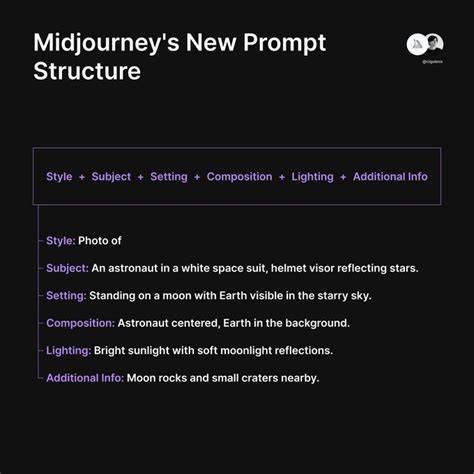
Tables summarizing common prompt components can help readers quickly reference how to assemble effective prompts. The following table is a compact guide you can adapt in practice.
| Element | Purpose | Example |
|---|---|---|
| Subject | What the image depicts | forested valley at dawn |
| Style | Artistic medium or look | oil painting |
| Lighting | Mood and illumination | soft golden hour |
| Extra details | Environment, angle, props | mountain wind, bird’s-eye view |
| Parameters | Model features and sizes | --ar 16:9 --v 7 |
In addition to the core prompts, it can be beneficial to experiment with reference images, personalization, and repeated runs to refine outputs toward your exact vision. The capability to remix, adjust, and iterate makes Midjourney prompts an iterative design practice rather than a one-shot command.
tags: #midjourney #prompts #list