One by Wacom seamlessly blends pen precision with wireless freedom to empower sketches, drawings, photo editing, and PDF annotations-whether you are in a classroom, at home, or collaborating online.
Relentless simplicity and battery-free pen responsiveness
A pen that is responsive, ergonomic, and pressure-sensitive makes sketching, painting, and editing feel natural. The pen doesn’t require a battery, which keeps it light, perfectly balanced, and comfortable for extended use. This combination supports a fluid creative flow during long sessions or collaborative projects.
Compatibility and platform versatility
One by Wacom can be used with most creative software that supports pen input, along with many learning platforms across PC, Mac, and Chromebook. This broad compatibility ensures teachers and students can work with familiar tools while exploring new applications.
Choosing the right size for your desk and workflow
Choose the right format for your space and needs. The Small size occupies little desk space but still provides enough room to create and annotate. The Medium size offers a larger area for broader strokes and more room to express ideas, enabling more precise sketching and painting.
Advanced pen technology and workflow benefits
Our advanced electromagnetic pen technology provides excellent control and precision. The perfect coupling between pen movement and on-screen response helps realize artistic projects you have always dreamed of. The pen’s sensitivity and responsiveness support detailed photo editing tasks, from complex crops to delicate color adjustments.
Enhancing learning and collaboration in education
Google Chrome OS compatibility and the Works With Chromebook certification enable easy use in classrooms and remote learning environments. The digitized pen experience recreates classroom activities anywhere, offering annotation, drawing, and collaboration across students and teachers. The device works with devices capable of running the latest version of Chrome OS and has been certified to meet Google's compatibility standards. Google is not responsible for the operation of this product or its compliance with safety requirements. Chromebook and the badge Works With Chromebook are trademarks of Google LLC.
Access and trial options for creative software
You can access bundled apps and trial periods to explore tools that complement One by Wacom. For example, a 3-month free trial of Foxit PDF Editor requires registration with Foxit, and a 3-month trial of Magma requires registration with Magma. Magma is a collaborative drawing platform with over 4 million users, ideal for beginners to grow skills by connecting with other artists. Clip Studio Paint Pro offers a 6-month free trial, with registration required through the provider. Concepts provides a canvas-free interface for minimal distraction, featuring vector editing, color wheels, intuitive gestures, and fast responsiveness. Registration is required to start these trials, ensuring access to powerful creative suites that integrate with One by Wacom.
All-in-one solution for illustration, painting, manga, and comics
Freeing the artist inside you, this all-in-one solution supports illustration, painting, manga creation, and comics, focusing on drawing and painting while granting access to premier digital painting features. The One by Wacom tablet is designed to meet essential professional needs, offering a straightforward, cost-effective option for photographers, designers, and educators alike. For photographers in particular, the tablet delivers accurate area selection and localized edits, suitable for architectural photography and more. The medium-sized model balances portability with workspace, enabling productive photo editing and digital art creation on varied monitor setups.
Workflow notes for professional photographers
While some features found in higher-end tablets are not present, the One by Wacom tablet delivers core capabilities with exceptional performance for standard professional tasks. The absence of features like rapid brush size changes or an undo button can require workflow adaptations, such as switching between input methods, but the overall experience remains strong for professional use. The tablet’s touchpad capability is an optional enhancement that can improve navigation and zooming when needed, though it is not essential for all workflows.
Product ecosystem and learning integrations
Wacom has become a staple in photography and digital learning ecosystems. Wacom Inkspace complements One by Wacom for e-learning and distance teaching, providing a cohesive environment for creating across devices. The latest driver installations are available for PC Windows and Mac, ensuring smooth setup and operation. To access software bonuses, users must log in or create a Wacom ID and register their device to unlock trials and bundled apps. The One by Wacom continues to evolve with Chromebook compatibility, making digital learning more accessible and consistent with classroom expectations.
In practice, you can plug in and play-no driver download is required for Chromebook devices compatible with the latest Chrome OS. The USB connection powers the pen tablet, turning it on automatically. The top surface serves as the active workspace and is designed for intuitive use, particularly when working with sketches, edits, and annotations. The device is easy to clean with common isopropyl alcohol on soft cloths and should be kept away from moisture and harsh cleaners.
What’s inside the One by Wacom experience
The One by Wacom emphasizes simplicity and essential functionality for professional workflows. It includes a responsive stylus with two programmable buttons, a comfortable design, and a clean surface that supports precise strokes. For photographers and illustrators, this tablet can enhance editing precision and creative output without overwhelming complexity or cost.
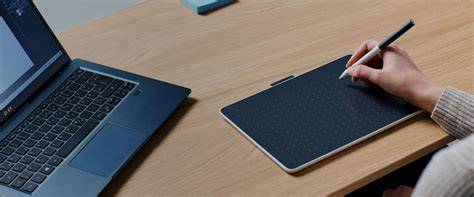
Infographics and setup visuals can illustrate the tablet’s layout, sizes, and compatibility across platforms, helping readers quickly assess fit for their needs.
How to TEACH using the ONE BY WACOM Pen Tablet | Featuring Jamboard, Kami, Explain Everything
A short explainer video demonstrating plug-and-play setup, pen pressure sensitivity, and basic annotation workflows can reinforce the article’s practical guidance for teachers and students.
- Battery-free, ergonomic pen with pressure sensitivity
- Works with PC, Mac, and Chromebook and major creative software
- Three size options (Small, Medium) for desk space and drawing area
- Chrome OS compatibility and Google certification for education
- Trial and bundle options for Foxit PDF Editor, Magma, Clip Studio Paint Pro, and Concepts
Whether for drawing, painting, photo editing, or annotating PDFs, One by Wacom offers a cohesive, accessible path to digital creativity and collaborative learning, helping educators and students alike to explore and create without geographic constraints.