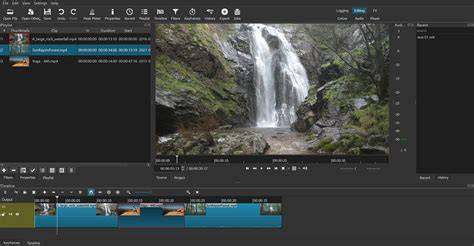
Shotcut is a very interesting and rather powerful video editing suite that can be compared in some ways to Premiere Pro. Though the comparisons with Adobe's product might be the first thought, Shot offers a bunch of really cool options without the need to shell out money for professional video editing software. With that said, Shotcut relies on FFMpeg for its codec and video format support. The main interface of Shotcut is refreshing and nicely designed. From starting the program for the first time, users are greeted with a dark user interface with different layout options including timeline editing, Clip Only, Playlist and Player. All layouts offer different levels of user tools.
The video editing suite provides a bunch of filters and presets like color grading, brightness, contrast, fading audio and video and even HTML overlay. Sharpness, crop, mirror, rotate, saturation and white balance are also options. Cutting, merging and moving different clips of the video is completed with the timeline panel accessible from the timeline view. The program supports various video and audio formats and there's not very much limit in what you can do with the videos you feed it. They include MP4, AVI, OGG, WEBM, FLV, VOB, M4A and some others.
Exporting videos with Shotcut supports many different options however most of the more common formats and resolutions are included as presets; these can be modified of course. To sum it up, Shotcut is a very capable video editing suite that doesn't quite match the power and performance of Adobe Premiere Pro but does offer a free and open source solution to anybody with a digital camera and a little bit of creativity.
Key Features and Capabilities
Audio Mixer: Adjust levels and pan audio. Audio Tools: Includes equalization, normalization and noise reduction. Automation: Create simple scripts to automate tasks. Color Grading: Adjust the brightness and contrast of video. Filters: Apply blur, color correction and more. Keyboard Shortcuts: Create custom shortcuts for faster editing. Multi-Format Support: Open and save many formats. Multi-Track Timeline: Work with multiple video and audio streams. Overlays: Add audio, text and images over video. Real-time Preview: Visualize changes before committing. Transitions: Includes wipes, fades and more. Video Editing: Advanced timeline editing, 3- and 4-point editing, keyframeable effects and support for a large number of video formats. Video Editing: Supports trimming, cropping and resizing. Video Encoding: Supports encoding to and from many formats.
Compatibility and License: Shotcut Video Editor is a free application released under the GPLv3 license on Windows from audio and video editors. The latest version available is 26.8.1. Shotcut offers hundreds of audio and video formats and codecs thanks to FFmpeg, and no import is required which means native editing, plus multi-format timelines, resolutions and frame-rates within a project. Screen, webcam and audio capture and network stream playback are supported. Multiple dockable and undockable panels, including detailed media properties, recent files with search, playlist with thumbnail view, filter panel, history view, encoding panel, jobs queue, and melted server and playlist are provided.
Performance and Formats
Shotcut supports a huge variety of video, audio, and image formats without pre-conversion, allowing you to edit content recorded with cameras, smartphones, or drones directly. It enables projects in HD, Full HD, 4K, and higher resolutions, offering good performance during editing and excellent quality exports for any platform. The software works with FFmpeg to enable extensive codec support and multi-format timelines.
Interface and Usability
Shotcut comes with a simple yet intuitive interface. On first look, it seems to provide one layer, but you can add an infinite number of layers in the timeline. The drag-and-drop mechanism makes it easy to add media, and real-time preview shows progress. The Filters tab provides access to a wide range of effects, from chroma key to color correction and more. The timeline supports multi-track editing, and you can preview each media individually with defined In and Out points.
Editing workflow and Keyframes
Keyframes in Shotcut are straightforward: you can add them to any value and modify them over time. The keyframe function replaces the standard timeline with a chosen clip to view filter evolution as you scrub the playhead. More keyframes can be created by double-clicking the line in the timeline. The export workflow features a robust set of presets, including YouTube, H.264, animation presets, and more, with an Advanced option for fine-tuning.
Transitions and Effects
Adding transitions is straightforward: drag a clip over another in the timeline to extend the transition length. The default transition is a cross dissolve, with other options accessible via the Right-Click -> Properties path. This workflow is simple and effective for typical editing tasks without steep learning curves.
Exporting and Compatibility
Exporting in Shotcut uses a flexible preset system, covering common formats and resolutions, with the ability to tweak advanced options for experienced users. The program is compatible with Windows 10 and Windows 11, and it supports a broad array of audio and video codecs via FFmpeg. No import needed means more direct editing from native files, and you can output to a wide range of platforms, including YouTube.
What People Say and Practical Considerations
Shotcut is a great free alternative to paid editors like Lightworks, HitFilm Express, or OpenShot. Its open-source nature, active community, and continuous updates make it attractive for beginners and hobbyists who want powerful editing tools without financial investment. The interface is accessible after a short familiarization period, though some advanced animations may require workarounds since the program does not support animations in the sense of dynamic text effects. For those who value multi-track editing and broad format support, Shotcut offers a solid, no-cost solution with extensive features for video and audio editing.