Even the best photographs need some editing before they are ready for sale in your online galleries or as standalone pieces. Correcting color, exposure, contrast, and saturation is as much a part of a photographer’s job as setting up and capturing photos in the first place. Thankfully, in our digital age, several software products and tools are specifically designed to simplify and speed up post-processing. Some options are even free. This article discusses the capabilities and specifications you should consider when evaluating photo editing software and highlights popular paid choices.
Considerations for Choosing Photo Editing Software
Experienced photographers know that post-processing is part of where the magic happens. Transforming raw images into keepsake masterpieces is an art form. Volume photographers need photo-editing software to streamline this process on a large scale. Photographers editing individual photos also benefit from freeing up their time to focus on their next session and other aspects of their business.
Every software has varying tools, capabilities, and performance. When selecting the perfect platform for your studio, you must evaluate these things to make the right choice.
Custom Presets
If you find yourself repeatedly adjusting the same settings during post-processing, you will love the capability to create custom presets that repeat the process for you and provide your pictures with a consistent look. Some software will even allow you to import downloaded settings from another creator to adjust to your desired feel. You will be amazed at how much time custom presets can save you. Ensure the software you choose supports this feature in a user-friendly way.
Storage and Performance
Photo editing can be rough on your computer. It takes a lot of resources to post-process a full day of images from a school, sports league, dance studio, or other volume picture day. Before choosing software, you must know your current system can handle its storage requirements. You should also understand how the platform treats your images. Does it save the raw image when outputting an edited file? Can it handle the high volume of files you will be processing without slowing your computer to a crawl? You must answer these questions to ensure a seamless editing experience, especially if working with large image batches.
Paid vs. Free
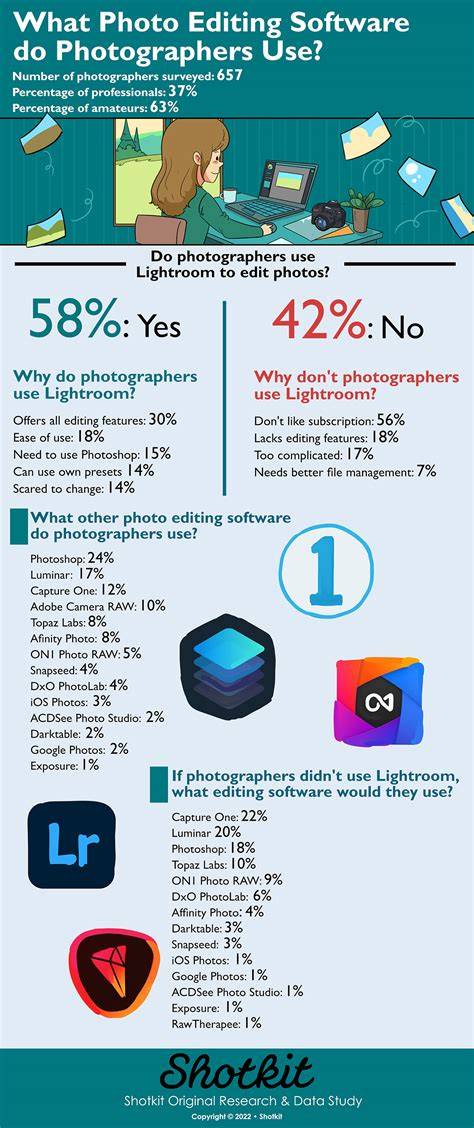
In the past, you would virtually always have to utilize a paid product to access all the tools and features needed to perform effective bulk processing of photographs. Today, many options exist, from subscriptions to software like Lightroom or pay-per-image processing like PhotoDay’s color correction and extraction features. Weigh your needs against your budget to determine what bulk editing process best fits your studio.
PC vs. Mac
The “best” operating system debate is always hot. Ultimately, it comes down to personal preference and comfort. Most photo editing software has one version that will work with either a system or a platform-specific option. If the platform matters for the software you choose, ensure you know the specific version of the operating system you are running to ensure you get the software that will perform best with your computer.
Learning Curve
As a photographer, you will use your editing software often, so choose one that is intuitive and easy to use. Independent product reviews provide great insight into the user-friendliness of the program. The intent of your software is to speed up and simplify the process, not frustrate you. Seamless navigation between tools and functions is a must. Due diligence is critical when selecting an editing software you will use daily. Read reviews, participate in online forums, consult your professional network, and attend webinars if they are available. Choosing the right platform from the start and mastering it is more beneficial to your studio than learning and moving on from multiple systems in your quest to find the perfect tool.
Top Options for Editing Individual Images
Some powerful options are available when trying to get one image just right. Most have similar capabilities, but some are easier to use and more budget-friendly than others. Here is an overview of popular paid choices.
- Adobe Photoshop - Photoshop’s advanced editing capabilities are unsurpassed. The software provides numerous tools and creative possibilities that can be manually adjusted or preset for time-saving automated output. However, the learning curve can be steep, and subscription pricing can be high for infrequent users. It’s ideal for pixel-level control, compositing, and detailed retouching.
- Affinity Photo - A robust alternative with layers, RAW editing, retouching, and professional tools. It offers non-destructive editing and a one-time purchase model, which appeals to those seeking Photoshop-like capabilities without ongoing subscription costs. It can be more complex than Lightroom and less focused on library management.
- DxO PhotoLab - Known for top-tier RAW processing, excellent lens corrections, and DeepPRIME noise reduction. It’s a powerhouse for noise reduction and precise image refining, with strong color management and local adjustment tools. It may feel daunting to beginners and is often used alongside other editors for pre- or post-processing.
- Capture One Pro - A favorite for studio and tethered workflows, renowned for exceptional RAW processing and color grading. It offers professional-grade tools and robust cataloging but has a steeper learning curve and higher cost. It’s a strong contender for photographers who require precise color control and workflows for large shoots.
- Luminar Neo - Combines AI-powered tools with traditional editing, including sky replacement and portrait enhancements. It offers a balance between speed and creative control, with a gradual learning curve and a mix of one-click looks and advanced features. Subscription options exist, but there are also lifetime license pathways.
- Other notable paid options - New AI-assisted tools like Imagen AI and various bulk editors (ON1 Photo RAW, PhotoWorks, BatchPhoto) offer different balances of speed, control, and cost. Each has unique strengths for different workflows and budgets.
For those focused on bulk editing, the following are strong paid contenders:
- Adobe Lightroom Classic - The premier bulk-editing workhorse with strong batch editing, a powerful catalog, and integration with Photoshop. It remains a top choice for photographers handling large volumes, though it operates on a subscription model and can be demanding on hardware with large catalogs.
- ON1 Photo RAW - A one-time purchase option that combines editing, organizing, and effects. It’s appealing for those who want a robust all-in-one tool without ongoing subscriptions.
- DxO PhotoLab/PureRAW family - Excellent RAW processors with high-quality lens corrections and noise reduction, useful as pre-processing steps before a wider editing workflow.
- Zoner Studio - An all-in-one editor with RAW, masks, layers, video, and print-order features. It’s beginner-friendly with a gentle learning curve, though Windows-only in some cases.
Other considerations include software that integrates with your existing workflow, offers a strong preset ecosystem, or provides reliable cloud-sync and collaboration features. For example, Luminar Neo’s ecosystem, Affinity’s free model through Canva, and PhotoDay’s online-first approach illustrate the diversity of paid options designed to fit different studio needs.
Bottom Line for Pros
If you’re a prolific editor handling large batches daily, Lightroom Classic or Capture One combined with selective plugins may be ideal. For pixel-level control, Photoshop remains a staple alongside a robust RAW processor like DxO PhotoLab. If you want a subscription-free approach with strong AI-assisted features, Affinity Photo (via Canva) or Luminar Neo offer compelling pathways. The right choice depends on your workflow, budget, and comfort with learning curves. This guide highlights paid options that balance power, speed, and professional results, helping you select a toolset that aligns with how you work.
editors often enjoy combining tools-for instance, pre-process with a RAW processor, bulk-edit with Lightroom or Capture One, and finish with Photoshop or Affinity Photo for pixel-level refinements. The key is to choose a cohesive workflow that maximizes speed without compromising quality.
90% of Photo Editing Basics in Just 15 Minutes
In practice, many professionals use a mix of paid tools to optimize their post-processing, storage, and output options while maintaining creative control and efficiency. By evaluating presets, performance, platform compatibility, and learning curves, photographers can select paid software that best supports their artistic style and business needs.
Practical Data and Recommendations
For beginners and professionals alike, a practical approach is to start with two core tools-one for bulk processing and one for detailed edits-and expand as needed. The combination of Lightroom Classic for batch workflows and Photoshop for detailed retouching remains a reliable baseline. If you need high-end RAW processing and color control, consider DxO PhotoLab or Capture One. For AI-assisted speed without heavy subscriptions, Luminar Neo or Affinity Photo present strong value propositions.
| Software | Strengths | Typical Use | Pricing Note |
|---|---|---|---|
| Adobe Lightroom Classic | Bulk edits, cataloging, batch presets | Volume editing | Subscription |
| Adobe Photoshop | Pixel-level control, compositing | Detail edits, retouching | Subscription |
| DxO PhotoLab | Lens corrections, DeepPRIME noise reduction | RAW processing | One-time or upgrade options |
| Capture One Pro | Professional RAW processing, color grading | Studio/taethered work | |
| Luminar Neo | AI tools, sky replacement, speed | Quick edits, creative looks | |
| Affinity Photo | Layers, RAW, non-destructive editing | Photo editing without subscription |