Bump mapping, also called a height map, projects 2D textures onto 3D model surfaces to create realistic illusions without altering the mesh geometry. Applying a bump map in Autodesk Maya, for example, can produce the illusion of texture on a 3D model and speed up rendering by avoiding additional geometry.
What is bump mapping?
Bump mapping uses a 2D grayscale image to simulate fine details on a 3D model’s surface. The bump mapping software interprets the grayscale values as apparent depth and height, creating the illusion of texture without the need for additional geometry, leading to much faster render times.
Bump mapping is just one of many texture mapping techniques animators and VFX artists use to create stunning 3D models.
The ups and downs of bump mapping
Animators and 3D visual effects (VFX) artists use bump mapping and other types of texture mapping to simulate realistic details on the surfaces of 3D-modeled objects and characters quickly and effectively. Bump maps are much more efficient than manually building every individual surface crevice, indentation, bump, wrinkle, or blemish into the 3D mesh.
In bump mapping, software projects a 2D grayscale image file onto the surface of a 3D object. This increases the illusion of reality by making 3D objects and characters appear to have bumps and indentations on their surfaces or skin. A bump map does not alter the shape of the 3D mesh. Rather, the degree of grayscale at each point determines the variation in the surface’s apparent depth, from black (down) to white (up).
Many texture mapping techniques within texture mapping software work in a similar way to bump mapping. For example, diffuse mapping applies basic textures, patterns, and colors to surfaces. Specular mapping uses 2D grayscale image maps to apply degrees of shininess/reflectivity to a surface.
Other texture mapping techniques accomplish essentially the same result as bump mapping but in different ways. For instance, normal mapping is like a newer and better version of bump mapping for complex and intricate surface textures. Instead of grayscale, normal maps use RGB data to vary the surface-normal depth information that tells the software how light should interact with the surface and to create the illusion of detailed textures through shading.
Neither normal maps nor bump maps alter the geometry of 3D models; instead, they create illusions. So, for example, their textures will not cast shadows. By contrast, displacement maps do physically displace the meshes they are applied to. That allows them to produce extraordinary results that also show up in silhouettes and shadows. On the other hand, displacement maps can be more difficult to work with and take much more computing power and time to render.
Benefits of bump mapping software
Discover how using bump maps can bump up the quality of CGI textures.
- Aesthetic presence: Bump maps imbue 3D models and materials with a greater sense of 3D depth without the hassle of manually creating many minor texture details.
- More texture for less: Bump mapping grants a similar level of detail as displacement mapping, but is faster to perform and uses fewer resources because it does not change the geometry of the underlying 3D model.
- Versatility: For demanding texture jobs, the same asset could use a displacement map for big changes and combine it with a bump map for fine details. For example, the Autobump feature in Autodesk Arnold will automatically map the displacement details into a bump map, so you won’t need as much subdivision to see the fine details.
Autodesk software for bump mapping
3D animation, modeling, simulation, and rendering software for film, games, and TV include tools that support bump mapping, such as Autodesk Maya and Arnold. These platforms enable artists to apply bump maps efficiently without altering geometry, preserving performance and flexibility in pipelines.
Industry context and workflows
Global illumination rendering software and 3D modeling tools are often used in professional pipelines for games, film, and design visualization. Studios leverage cloud rendering, project management software, and collaborative workflows to handle large volumes of VFX shots and complex textures. Examples of real-world usage include large-scale productions and independent projects where teams rely on Maya, Arnold, and ShotGrid to manage assets and render tasks.
Passion Pictures illustrates how a studio integrates Autodesk tools into a diverse animation pipeline, moving toward cloud rendering and collaborative project management. The Rings of Power demonstrates how cloud-based workflows support massive VFX pipelines across multiple houses. Independent creators also showcase how Maya, Arnold, and ShotGrid enable efficient collaboration on 3D-animated shorts.
Bump mapping resources
While bump mapping is a mature technique, its relationship to other methods-diffuse, specular, normal, and displacement mapping-remains central to choosing the right approach for a given project. For certain tasks, Autodesk’s ecosystem and compatible tools provide a streamlined path from shading to rendering, enabling artists to achieve convincing texture details with manageable resource demands.
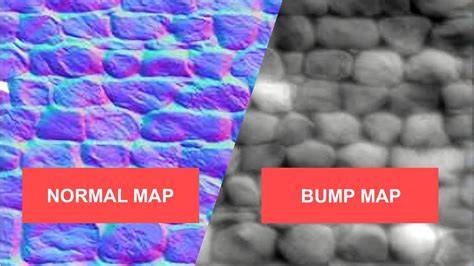
PBR Texture Maps Explained
| Technique | Purpose | Geometry Impact | Typical Use |
|---|---|---|---|
| Bump mapping | Illusion of depth via grayscale height map | Does not alter geometry | Fine surface details |
| Normal mapping | Detailed surface normals via RGB data | Does not alter geometry | Complex textures and shading |
| Displacement mapping | Actual geometry change through height data | Alters geometry | Prominent surface features and silhouettes |
In practice, artists may combine these techniques: a displacement map for large-scale changes and a bump or normal map for fine details, balancing realism and performance.