With Photoshop version 23.2 (released February 2022) Adobe have added full support for the WebP file format. You can open, edit and save WebP files natively in Photoshop. This was previously only available using an optional add-in.
WebP was developed by Google as a replacement for JPG, PNG and GIF. It is not new, having been first announced in September 2010, over that time support for the format has slowly been increasing. WebP supports both transparency and animation, neither of which are available in JPEG, for these features we would normally use PNG or GIF. WebP has a lossless (no compression) option as well as lossy compression options like JPEG. WebP has a bit depth of 8-bits, like JPEG. The WebP compression algorithm creates smaller files than JPEG (or higher quality for the same size).
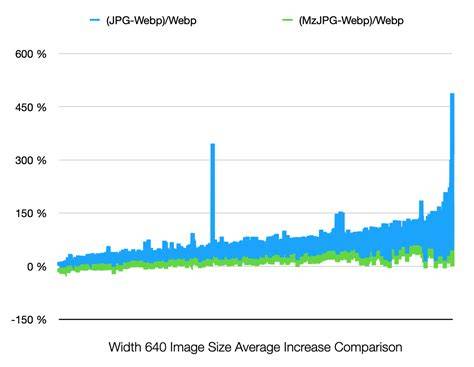
Google claim file size savings of around 25-35% over JPEG, but my tests showed bigger savings than that. I decided to do some tests on four different images of my own (see Figure 1). As with all compression algorithms the amount of compression (and therefore reduction in file size) varies depending on the image content. The more intricate detail and tones in the file the less compression you’ll get. Images with large areas of similar colour (eg a lot of blue sky) will compress a lot more.
You’ll note in Figure 1 that the compression results with WebP do yield some impressive results. Comparing the highest quality JPEG with the highest quality compressed WebP, the results across the four different files were 36%, 53%, 44% & 48% or an average of 45% better compression. Comparing images with slightly more compression, the JPEG 10 vs WebP 80, the results across the four different files were even more impressive at 57%, 71%, 74% & 58% or an average of 65% better compression.
If you’re looking to save images with transparency, and you usually use PNG, you’ll see impressive results too. My file size comparisons showed results of 63%, 67%, 67% and 36%, or an average of 58% better compression (comparing PNG Large to WebP Lossless). The savings would be even greater using WebP at a high-quality lossy setting. If you are someone who uses TIFF files because you want a completely lossless image the results of comparing TIFF to Lossless WebP is even more impressive. My file size comparisons showed results of 81%, 87%, 84% and 96%, or an average of 87% better compression. Please note though these were 16-bit TIFFs, but WebP Lossless files are still significantly smaller than 8-bit TIFFs.
As far as quality goes, at fit-to-screen size I really could not detect any visual image quality difference with any of the WebP Lossless, WebP 100 or WebP 80 files compared to the originals. Even pixel-peeping up to 200-300% there was no visible difference with the WebP at the 100 or 80 quality setting. Just like JPEG, once you push the compression further you will start to see pixel differences and increasing artifacts, this is inevitable with heavy compression. There is no question that WebP will offer you either increased quality (if you don’t want to save file space) or decreased file space at the same quality when compared to JPEG.
If you want to view another detailed look at some image comparisons, I would recommend this YouTube video from Greg Benz. It is worth noting his caveat about images with high colour frequency images like night cityscapes and the loss of colour intensity he notes with WebP at higher compression settings. The vast majority of web browsers now support WebP. Hosting sites usually impose storage limitations (or want more money for more space). I’m sure these things will change over time.
The implementation of WebP into the new version of Photoshop is intuitive. Just open and edit WebP files as you would any other file type. You can easily save your 8-bit RGB Photoshop documents in the WebP file format. Choose between Lossless and Lossy. Use the Quality slider to decide the quality when using lossy compression. Just remember, increasing the quality also increases the file size. To open and save WebP images directly from Photoshop 23.1 and below, you can simply download and install the WebPShop plug-in. You can download the WebPShop plug-in (with universal/ARM support) directly from Google which owns and maintains the WebP format. Additionally, on macOS 10.15 and above, the prompt "WebPShop.plugin cannot be opened because the developer cannot be verified" can be bypassed by quarantining the plug-in.
This format is a raster graphics file format developed by Google and intended as a replacement for the JPEG, PNG, and GIF file formats on the web. It supports image compression (both lossy and lossless), as well as animation and alpha compositing. Google announced the WebP format in September 2010; the company released the first stable version of its supporting library in April 2018. On 3 October 2011, Google added an "Extended File Format" allowing WebP support for animation, ICC profile, XMP and Exif metadata, and tiling (compositing very large images from maximum 16384 × 16384 tiles). In July 2016, Apple added WebP support to early beta versions of macOS Sierra and iOS 10, but support was later removed in the GM seed versions of iOS 10 and macOS Sierra released in September 2016.
WebP is based on block prediction. Each block is predicted on the values from the three blocks above it and from one block to the left of it. There are four basic modes of block prediction: horizontal, vertical, DC (one color), and TrueMotion. Mispredicted data and non-predicted blocks are compressed in a 4×4 pixel sub-block with a discrete cosine transform or a Walsh-Hadamard transform. The reference implementation consists of converter software in the form of a command-line program for Linux (cwebp) and a programming library for the decoding, the same as for WebM. The WebP container (i.e., RIFF container for WebP) allows feature support over and above the basic use case of WebP (i.e., a file containing a single image encoded as a VP8 key frame).
WebP's lossless compression, a newer algorithm unrelated to VP8, was designed by Google software engineer Jyrki Alakuijala. It uses advanced techniques such as dedicated entropy codes for different color channels, exploiting 2D locality of backward reference distances and a color cache of recently used colors. Google has proposed using WebP for animated images as an alternative to the popular GIF format, citing the advantages of 24-bit color with transparency, combining frames with lossy and lossless compression in the same animation, and support for seeking to specific frames. Google actively promotes WebP. Google Chrome and all Chromium-based browsers support WebP. Microsoft Edge versions released after January 2020 are based on the Chromium browser, and have native WebP support.
The vast majority of web browsers now support WebP. FFmpeg can extract VP8 key frames and other workflows integrate with WebP radiantly, while content management systems (CMS) often rely on extensions to automate conversion to WebP for compatible browsers. Like VP8 on which it is based, lossy WebP supports only 8-bit YUV 4:2:0 format, which may cause color loss on images with thin contrast elements. Due to the complexity of their compression method, WebP files take significantly more time to create than other web image formats. In September 2023, two critical vulnerabilities relating to WebP images were discovered by Apple SEAR and the Citizen Lab, potentially affecting libwebp itself, Google Chrome and other Chromium-based browsers. The extensive use of libwebp packages across hundreds of applications posed a major patching challenge to mitigate the vulnerability, highlighting the wide-scale implications of this vulnerability.
In practice, Photoshop’s WebP support makes it straightforward to work with WebP imagery directly, leveraging both lossless and lossy options. The quality remains highly competitive, and the format’s transparency and animation capabilities offer distinct advantages over JPEG for many workflows. For those on older Photoshop builds, WebPShop plug-in provides a pathway to open and save WebP images, while newer releases integrate native support for a streamlined experience.
Generation loss at high quality: FLIF vs WebP vs BPG vs JPEG
Summary: WebP in Photoshop enhances native workflow with efficient compression, transparency, and animation support, while still acknowledging trade-offs in encoding time and color fidelity at extreme compressions.