webp is a modern image format that aims to provide superior compression for photographs and images on the web. To ensure correct handling by browsers and servers, it is essential to understand how MIME types apply to WebP and related content.
What MIME types are and why they matter
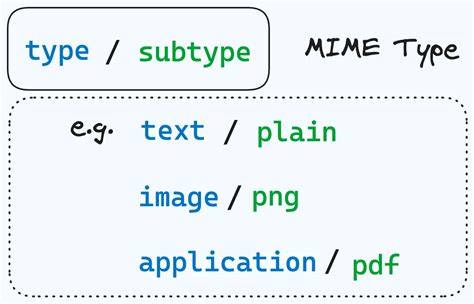
A MIME type usually consists of two parts: a type and a subtype, separated by a slash. The type indicates a general category (like text or video), while the subtype specifies the exact kind of data within that category. Correct Processing of Files: Web servers use the MIME type, not the file extension, to determine how to process a URL. Content Presentation: MIME types allow authors and web administrators to specify how content should be displayed or processed.
Browser Compatibility: Different browsers might handle MIME types in varying ways. If a server or application reports an incorrect MIME type, or a default type for unknown content, browsers might behave unexpectedly. Security: Certain MIME types, like those for executable programs, can pose security risks.
WebP MIME type specifics
The WebP format typically uses the following MIME types: image/webp for WebP images. Servers and content delivery networks should advertise this type so browsers render WebP images correctly and efficiently. When a server serves a file with the proper image/webp MIME type, modern browsers can decode and display the image without fallback logic. If the MIME type is misreported, browsers may fail to display the image or fall back to less efficient formats.
Determining and configuring MIME types
There are several ways to determine the MIME type of a file. One common method is to use the “file” command in a Unix-like operating system. This command reads the first few bytes of a file to determine its type. Additionally, web servers like Apache and Nginx can be configured to automatically determine the MIME type of files they serve. The MIME type of a file is not stored in the file itself, but is determined by the server when it sends the file to a browser. Therefore, to change the MIME type of a file, you would need to configure your server to send a different MIME type for that file.
WebP in practice: compatibility and fallbacks
Older browsers do not support webp, and Apple only started supporting it in iOS 14. When a link is shared on sites with limited support, an image snippet is usually shown along with the link - but the image is only displayed if the site supports the format. Be mindful of fallback strategies and redirects when deploying WebP on heterogeneous client ecosystems. A 307 redirect can be used to deliver an alternative resource temporarily, but not all services follow redirects reliably. Remember to delete the obsolete JPG or other format versions once they are no longer needed if you choose to convert on-the-fly.
Common MIME type questions about web content
- Are MIME types case-sensitive? No, MIME types are not case-sensitive. However, parameter values such as charset=UTF-8 can be case-sensitive depending on the parameter.
- What is the difference between application/octet-stream and other MIME types? application/octet-stream is a generic binary stream used when the server does not know how to handle a file; it prompts download rather than display. Other MIME types tell the browser how to handle the content.
- Can I create my own MIME types? Yes, but it’s generally not recommended unless you create a new content type that doesn’t fit existing types. If you do, follow MIME specification naming conventions.
Practical guidance for developers
When configuring servers, ensure that image/webp is served with the correct MIME type. If you rely on automatic type guessing, test across browsers for consistent behavior. If you implement conversions or redirects for WebP support, keep an eye on user experience and ensure that fallbacks degrade gracefully without confusing users or breaking links. Tools and libraries in languages like Python and JavaScript can help determine and manipulate MIME types during processing, but server-side configuration remains critical for initial delivery.
Content presentation and security considerations remain central. By properly declaring MIME types, you enable browsers to render content efficiently while reducing exposure to risks associated with misidentified file types.