Stable Diffusion is a powerful image generation tool that can be used to create realistic and detailed images. However, its image outputs can sometimes be noisy and blurry. A Variational Autoencoder (VAE) helps improve the quality of AI-generated images produced by Stable Diffusion by encoding images into a structured latent space and decoding from that space to the final image.
Foundations: Latent Space and VAEs
A variational autoencoder (VAE) is a generative AI model trained on input data to create variations of that data. VAEs encode an image into a latent space, which is a lower-dimensional representation of the image. The encoder outputs the parameters of a probability distribution (mean μ and log-variance log σ^2) for each latent dimension, then a latent vector z is sampled from this distribution to be decoded into an image. This probabilistic formulation helps create a structured, continuous latent space, enabling smoother interpolation and more controllable generation.
In practice, a VAE compresses data into a latent space, and the decoder reconstructs the image from samples drawn in that space. The prior p(z) is often modeled as a standard Gaussian, which regularizes the latent space so that nearby latent codes generate similar outputs. This organization is crucial for generation quality and for enabling downstream tasks like clustering and editing.
Two Main VAE Variants in Stable Diffusion
Stability AI released two refined VAE decoders: EMA (Exponential Moving Average) and MSE ( Mean Squared Error). EMA is generally considered to produce sharper, more realistic images, while MSE tends to yield smoother results. Some checkpoints include a baked VAE, meaning the VAE is already integrated into the checkpoint, so you must use that VAE to obtain proper renderings.
When a checkpoint requires a specific VAE, the model decodes latent vectors using that VAE to translate the latent space into realistic images. The VAE’s role is to translate latent space vectors into outputs during generation, while the encoder maps inputs into latent distributions during training.
Using VAE with Stable Diffusion
To use a VAE with Stable Diffusion, download the VAE model and place it in the stable-diffusion-webui/models/VAE directory. In AUTOMATIC1111 or similar GUIs, select the VAE in the VAE dropdown, then Apply Settings. If you don’t see the setting, you can Show All Pages to reveal all options. The VAE can be used with SD v1, v2, or newer custom models, though some configurations may show less improvement on newer versions where rendering of eyes is already strong.
Images generated with a VAE are typically of higher quality than those produced without a VAE. VAEs support multiple data variations, providing more flexibility for digital content creation and giving users deeper insights into the data’s latent characteristics. They also help recover fine details and reduce noise by better translating latent representations back into image space.
Technical Perspective: ELBO, KL, and Reconstruction
A VAE training objective maximizes the Evidence Lower Bound (ELBO), which balances two terms: reconstruction loss and KL divergence. The Reconstruction Loss measures how well the Decoder reconstructs the input given z, commonly via L1/L2 or perceptual losses (e.g., SSIM) to capture structural similarity. The KL Loss measures how close the learned latent distribution qφ(z|x) is to the prior p(z) (often N(0, I)), acting as a regularizer that shapes the latent space into a smooth, continuous manifold.
The result is a model that not only reconstructs well but also maintains an organized latent space, enabling sampling from a standard normal distribution to generate new, plausible images. In Stable Diffusion contexts, the VAE compresses images into a latent space so the diffusion process operates efficiently in this lower-dimensional domain rather than the high-dimensional pixel space.
VAE versus Diffusion and Practical Hybrids
Diffusion-VAE hybrids combine the strengths of both approaches: a VAE encodes into a latent space, and diffusion operates within that latent space to produce high-quality outputs with faster generation. Stable Diffusion’s latent-space diffusion is an example of this synergy, where the VAE provides a compact representation and the diffusion model handles the generative process in that latent space.
In contrast, a plain VAE (without diffusion) can struggle with overly blurry outputs on complex datasets due to the Gaussian assumption in the latent space. Diffusion models generally offer higher sample fidelity but at the cost of slower, stepwise generation. The hybrid approach aims to deliver both quality and efficiency.
Modeling and Limitations
VAEs model a latent space with probabilistic distributions, which allows sampling and variation but can introduce blurriness if the latent space is not sufficiently expressive. The quality of VAE-based generation depends on the encoder/decoder architecture, the chosen prior, and the balance of reconstruction and regularization terms. A well-tuned VAE can recover fine details and improve realism, but poorly chosen losses or overly simplistic latent distributions may lead to limited diversity or artifacts.
Because VAEs compress data into latent spaces, they may be less effective as data complexity grows. Larger or more complex datasets can challenge the latent space's ability to capture all meaningful variations, potentially reducing diversity in outputs. Training VAEs also involves carefully chosen loss terms (ELBO) and stable optimization techniques to avoid degenerate solutions.
Practical Guidance: When to Use VAE with Stable Diffusion
- Use VAE when you care about learning representations, anomaly detection, or semi-supervised learning.
- Use VAE if generation speed matters and you can tolerate slight gains in image quality.
- Use VAE when you need a latent space for downstream tasks like clustering, interpolation, or editing.
- Use EMA for sharper eyes and more realistic details; consider MSE for smoother renders, depending on your aesthetic goals.
- Note that newer Stable Diffusion versions (e.g., v2) may render eyes well even without a VAE, but using a VAE can still provide incremental improvements.
Comparative Insights: VAEs and Diffusion Models
VAEs and diffusion models are both generative but with different mechanics. VAEs encode data into a latent distribution and decode to outputs, while diffusion models learn to reverse a noise process to generate images. Latent Diffusion Models (LDMs) combine these ideas by operating in a compressed latent space rather than pixel space, enabling faster training and sampling while retaining high quality. This integration underpins Stable Diffusion’s efficiency and realism.
Key trade-offs:
- VAE: structured latent space, efficient sampling, potential blur, good for representation learning and editing.
- Diffusion: high fidelity, slower sampling, no inherent latent space but strong for ambitious image synthesis tasks.
Implementation Notes and Tips
- To use a VAE with Stable Diffusion in most GUI setups, place the VAE model in the appropriate models/VAE directory and select it in the UI's VAE dropdown.
- When a checkpoint specifies a baked VAE, use that VAE to ensure proper rendering.
- EMA tends to sharpen features like eyes; MSE tends to smooth; test both to see which aligns with your goals.
- Remember that not all improvements are noticeable in every scenario; try different prompts and models to gauge impact.
Illustrative Comparisons and Outcomes
In practice, using EMA vs. MSE can show differences in clarity and texture. For example, rendered eyes and facial details often improve with EMA, while MSE may yield softer textures. A standard comparison involves viewing original versus EMA and MSE decodings to assess sharpness and fidelity across various prompts and resolutions.
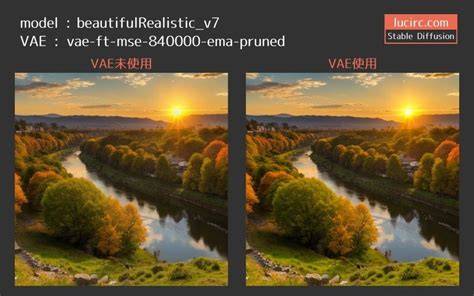
Stable Diffusion's diffusion-VAE approach enables efficient high-resolution generation by leveraging a compact latent representation. The VAE’s role is central to translating latent variables into realistic image content, making the subtle improvements from EMA or MSE meaningful for many creative tasks.
AutoEncoder to Diffusion (For Beginners)
In summary, a VAE in Stable Diffusion provides a principled way to compress and reconstruct images via a structured latent space, enabling improved image quality, smoother latent manifolds, and practical benefits for editing and downstream tasks. Whether you’re aiming for crisper eyes, better texture, or more controllable variations, incorporating an appropriate VAE variant can be a worthwhile step in your diffusion workflow.
| Aspect | VAE Variant | Typical Effect |
|---|---|---|
| Quality | EMA | Sharper details, crisper rendering |
| Smoothness | MSE | Smoother textures, may reduce micro-contrast |
| Compatibility | All major SD versions | Depends on checkpoint integration |