Premium features unlock the full potential of Lightroom on mobile, including Premium Presets, Healing brush, selective adjustments, geometry tools, raw editing, and more when you subscribe to the Lightroom for mobile premium plan. Edits sync seamlessly across devices, ensuring your changes stay up to date whether you’re editing on mobile, web, or desktop.
Core premium capabilities
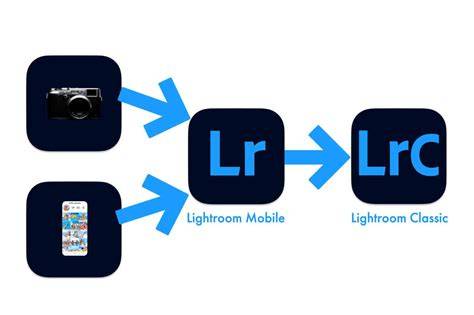
Premium features include cloud storage, sync across devices, healing brush, masking, geometry tools, batch editing, raw editing, and Sensei-powered search. You can sync photos and edits between Lightroom for mobile and Lightroom or Lightroom Classic on desktop if you have an active Creative Cloud membership. If you have a perpetual license for Lightroom, syncing isn’t available.
Included Premium Presets offer hundreds of presets such as cinematic and portrait styles, enabling quick, consistent looks across shoots. The Healing Brush and Clone Stamp tool allow you to fix imperfections with precision, while a generative removal brush adds power for removing small to medium-sized objects, though usage may consume credits depending on your plan.
Selective adjustments let you apply edits to a specific part of a photo. You can adjust any area with your finger or stylus, applying enhancements with precision using the Brush Selection tool, Radial Selection tool, and Linear Selection tool. This is especially handy for portraits where you want to lighten a face to help it stand out or for localized corrections without affecting the whole image.
Perspective and geometry tools enable correction of distorted perspective. The Upright modes and geometry slider in the Geometry panel help fix lines that bow, tilt, or skew, which can occur when shooting up at tall buildings or using certain lenses.
Editing workflow and cross-device syncing
Lightroom’s cloud-based workflow means your edits are saved as instructions in the cloud, with original images preserved. You can view and edit your photos from iOS, Android, Windows, Mac, and Web, and edits sync across these platforms. Edits are performed on smart previews when full-resolution files are not downloaded, though you can download full-size versions when needed.
Web galleries let you showcase edited photos online with ease. The web edition is available for free, and premium features extend across the entire ecosystem. Your photos and edits automatically sync between mobile, web, and desktop once you’re signed in with an active Creative Cloud membership.
Storage, plans, and how subscriptions work
Lightroom Mobile is free to start, but Premium features require a paid subscription that includes cloud storage and cross-device synchronization. Plans vary by region and device, with options to subscribe for mobile-only use (often including 1 TB of cloud storage) or broader photography plans that bundle Lightroom with other Adobe desktop apps like Lightroom Classic and Photoshop.
For users who need more storage or desktop access, upgrading to a full Lightroom Plan provides access to Lightroom on mobile, web, and desktop, plus additional desktop applications and larger cloud storage quotas. The fundamental distinction is that Mobile Premium is cloud-driven and designed for seamless mobile-to-desktop work, while local storage-heavy workflows benefit from the desktop Lightroom Classic integration.
Practical tips for using Premium on mobile
Selective Adjustments: Use masks to apply adjustments to only a part of your photo. In 2021, masks gained automatic detection of sky and main subjects, enabling easier masking of regions with similar color or luminance ranges. Adaptive presets can be applied selectively to either the subject or the background to enhance composition without overprocessing the entire image.
Tips for precise edits: When adjusting sliders, you can tap the left label of a slider to decrease by small increments. The application marks clipping areas-white clipping appears in red and black clipping in blue-helping you avoid over-sharpening and blown highlights.
Workflow efficiency: The home screen presents multiple galleries and a library view where imported photos live. You can import photos via the built-in camera or the camera roll, and begin editing by selecting a photo and entering editing mode. The toolbar at the bottom groups sliders by topic, and a drawer reveals adjustment controls for detailed tuning.
Frequently discussed considerations and caveats
There are differences between Lightroom Mobile Premium, Lightroom Web, and the desktop Lightroom Classic. While most editing tools are available across platforms, some features such as Photomerge or Enhance may be limited or unavailable in specific editions. If you rely on strict local storage and offline access, a desktop-only workflow through Lightroom Classic might be preferable, with occasional use of mobile or web versions for on-the-go edits.
Additionally, the pricing and feature set of Adobe photography plans can change over time. Subscriptions may bundle multiple products and services, and the exact credits, storage allowances, and accessibility of premium features can vary by plan and region. It’s advisable to review current offers in the Adobe store or your device’s app store for the latest terms.
What you can expect with premium access
Premium access enables: cloud-based storage and sync across devices, healing brush and masking tools, selective adjustments with precise masking, geometry and perspective correction, raw editing, and premium presets for rapid styling. It also includes the ability to share web galleries and work seamlessly across mobile, web, and desktop environments as part of an active Creative Cloud membership.
2026 LIGHTROOM MOBILE TUTORIAL | Everything you need to know
Glossary of key capabilities
<- Premium Presets: Pre-built looks that you can apply instantly for consistency and speed.
- Healing Brush and Clone Stamp: Remove imperfections and duplicate texture to blend with surrounding areas.
- Selective Adjustments: Target edits to specific regions with brushes, radial, and linear masks.
- Geometry Tools: Upright modes and geometry slider for perspective correction.
- Raw Editing: Non-destructive, flexible editing for RAW files.
- Sync and Cloud Storage: Cross-device synchronization and cloud-backed storage for edits and originals.
- Web Galleries: Share and showcase edited photos online from Lightroom.
Whether you’re a mobile-first creator or a photographer who works across devices, Lightroom Mobile Premium aims to provide a coherent, cloud-driven editing workflow with powerful local adjustment capabilities and robust organization features.