For the past four years, I’ve been using Serif’s Affinity suite as my primary tools for bitmap editing, vector graphics, and publication design. I own licenses for both V1 and V2 of the software and have paid Serif a total of $324.96 CAD - a HECK of a bargain considering that for the same period of time, at their current prices, Adobe Creative Cloud would cost $4,419.48 CAD at their annual prepaid rate! I think a lot of creative professionals (and amateurs) chose Affinity for these cost savings, but I was equally attracted to some of the ways it excels over Adobe’s offerings.
Affinity’s 32-bit colour and OCIO support is unmatched in the vector editing space, and their non-destructive filters and effects are a big step up from Adobe’s tools. Recently however, the deal has been altered. After Canva’s acquisition of Serif in 2024, the new V3 release of Affinity will be integrated into their existing offerings, and moving forward it’s going to be free!
On October 6th Canva announced that they’d be setting the Affinity forums to read-only and moving the community to Discord. My girlfriend also uses Affinity and had recently created some social media templates in Designer for a client. She was supposed to onboard that client to the software last month, but instead of being able to set her client up with a license or trial, she had to tell her client that they were just shit out of luck until the 30th when something was supposed to happen. I don’t know how I would have handled this better short of processing refunds for every customer that bought it that month (which is what I assume they were trying to avoid) and I can also understand wanting to avoid rug-pulling your customers who just bought the software as you discontinue the release train to offer the next version for free.
Alright, so we’ve waited a month! Well, Affinity is free now, or more accurately “freemium” - a pricing model where the core features of the software are offered for no charge with others available as paid add-ons. The term “AI” is so broadly scoped these days it’s almost meaningless. Canva has chosen to break down the complexity of the machine learning algorithms they’re using in the tooltips as “Gen AI” or “ML”. “Gen AI” features so far are processor intensive text-to-image diffusion models that run in the cloud and are presumably trained off of a vast corpus of other people’s work, while their machine learning (ML) counterparts all use less complex and finely scoped individual models that run locally on your device.
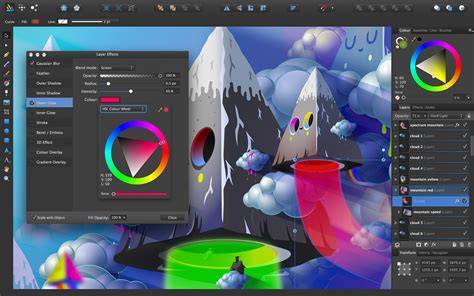
All of the features in the above list are paywalled behind a $19 CAD / month Canva Pro subscription. To really hammer this point home: Machine learning models (generative models included) are simply compute processes. Outside of these “AI” features though, the core tooling remains pretty much the same but all with the tools from all three apps integrated into one interface. There’s an image trace feature now which is nice, but still no blend tool. The new Live Glitch filter is neat and brings Affinity closer to replacing some of the things I use Nuke for today. I assume the built in Canva export feature will only get better over time and I’m excited to see what the future of that holds.
One day after release, Canva’s Chief Product Officer Cameron Adams released a short two minute video attempting to answer some questions people understandably had about this change. Because we believe that every designer deserves access to tools that respect their craft. Because the industry needs a shift from gatekeeping to generosity. Really? Lets be very clear: Canva is a business, not a charity. While the exact acquisition price was not disclosed, Forbes Australia reported the amount to be ~$516 million CAD at the time. Affinity’s new pricing model was announced on the final day of Adobe Max 2025 and Canva undoubtedly bought this software to expand their value offering into more professional tools that will allow them to compete directly with Adobe. This is good! Commendable even, but to take their statement - that they’re all about generosity and love you very much - purely at face value is to be a massive chump.
This might just be the kick in the pants Adobe needed to spur some real competition. Affinity Designer launched in 2014 with Photo in 2015 and Publisher in 2019, and in that time Adobe has continued to dominate the market with Photoshop, Illustrator, and InDesign. While I don’t believe in his flowery language, Adams’ principal statement of “we already make our money with our core business offering” rings true to me, and I think plenty of Canva’s customers will be better served by Affinity’s tooling, especially if they continue to improve the handoff between Affinity and Canva. I also remain hopeful that the larger pool of resources that Canva has access to can drive them closer to feature parity with other software packages.
…But what happens once they become the dominant player in the market? Or leadership changes? Or a new product manager at Canva is tasked with delivering more value for Canva Pro users? Only time will tell, but I suspect any truly negative repercussions of this move will only start to surface after a few years at least. The requirement to log into Canva for what is supposed to be a free local application is ridiculous. Prompt people to do that when required to access payment-gated or collaborative features! This reeks of future enshitification plans and lets Canva shut down your access to their (currently) free software at any time on their terms.
Currently the program appears to invalidate licenses if the date computer’s date is set to a year from now meaning that even if you log in today, you will need to do something (update the app, log in, etc) in a year to validate your free “license”! What I think I’ll miss most in this shift is losing my license to the software. Under the previous agreement, I owned a thing! Now I no longer have the opportunity to own new versions, they are just provided to me by Canva on an ongoing basis (because they’re generous, or so I’m told). Because of this license, I get to continue to use my V2 Affinity apps until they shut down the license server which will inevitably be annoying. Despite all my grumbling, I’m going to keep using it! I continue to own my license for V2 and V3 changes so little that I might just keep using it until they come up with some compelling reasons for me to switch.
I don’t plan on purchasing a Canva Pro subscription - I’ve found that generative AI isn’t all that useful for the visual work that I create and I’m wary of the currently untested copyright implications. Specifically, I’m reminded of YouTube creator EndVertex’s excellent video essay on for-profit creative software and the conclusion they arrived at. Creative software is complex: It is hard and time consuming to develop, and learning to use it is equally involved. I want an escape hatch and because Canva doesn’t seem to want my money anymore I’ve decided to give Graphite $140 CAD - the previous upgrade cost that I paid for V2 of the Affinity suite. Graphite is an open source, Rust-based 2D graphics package built with procedural workflows at its core.
Technically this would be $5,099.40 CAD because in order to get their best rate here you need to pay up front for the whole year and we’re four months over the 4 year mark. I’m trying to be charitable for the sake of comparing these expenses and dividing that rate by 12 to get the average monthly cost of that plan. At release, Affinity requires users to sign in with a Canva account. Within Affinity, by default Canva opts-out their users from sharing interaction data. In Canva however, by default user data is opted-in for training. This (currently) explicitly covers data uploaded to Canva and interaction usage within Canva - Affinity continues to use local files and based on some cursory firewall analysis, doesn’t appear to be sending them anywhere, though I suspect the game changes if you use the generative cloud-based “AI” features within Affinity which are explicitly labeled as “Canva AI”. If you want to turn these permissions off, you can do so within Canva’s privacy settings.
Cheeky, I like it. Start small, do the file format! Make something that lasts! Change the industry forever! I highly recommend giving this a look if you have an hour and really want an overview about how artists and creatives view the state of their professional tools. It might take a few minutes to get into, but stick with it, it’s a great watch.
The all-in-one creative app, with everything you need to craft designs, edit images, and lay it all out, without ever leaving your document or paying a thing. To download Affinity, sign in with your Canva account (or create one for free). One powerful app. No cost. From vector to pixel to layout, Affinity has all the studio-grade tools you need under one roof. Mix and match your favorite tools to build your very own creative studios. Experiment as much as you want, keep your original files intact. Full control over how your work leaves the app, whether it’s by object, slice, or doc.
With Affinity, you’ll get all the professional tools you need for your design, photo editing, and page layout projects, free of charge. If you’re on a Canva premium plan, you’ll also be able to unlock Canva AI tools directly in Affinity for a super-powered workflow. Design workflows include access to all vector design, photo editing, and page layout tools in one app, and you can customize your workspace with floating toolbars and studio presets. Real-time performance engine enables ultra-smooth editing and non-destructive editing across layers, filters, and adjustments.
Import PSD, AI, PDF, SVG, IDML and more with high fidelity, and export with one-click presets or custom slice-based output. Quick export direct to Canva, powerful photo editing, live filters and adjustments with instant preview, full RAW editing, tone mapping, and lens correction. Advanced retouching such as inpainting, healing tools, dodge and burn, plus batch processing and HDR/mosaic capabilities expand what you can accomplish in a single app.
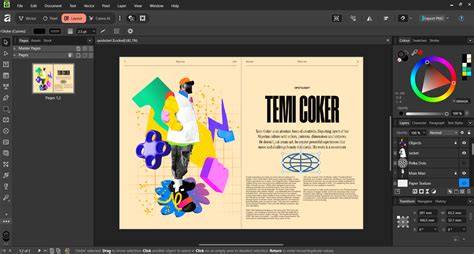
From the vector side, Affinity’s curve editing, shape builder, and image trace offer powerful control. The Stock tab in the panel lets you find images from Pexels for free content. A comprehensive page layout toolkit provides Smart Master Pages, linked text frames, and reusable layouts, enabling scalable publications. Overall, Affinity moves toward unity: vector, raster, and layout tools under one roof, with deep non-destructive editing and a focus on performance.
Canva AI Studio integration brings Generative Fill, Expand, Remove Background, and other AI-assisted tools directly into Affinity for Canva Premium users. The claim that “Affinity is now completely free, forever” centers on a broad freemium model where core tools are accessible without payment, while advanced AI features are gated behind Canva Pro. The ongoing availability of licensing servers for V2 and V1 depends on continued support, but a future shift to fully cloud-based access remains part of the conversation. Regardless, Affinity’s core strengths-non-destructive editing, real-time previews, and cross-platform compatibility-continue to serve many professionals well, even as ownership and licensing models evolve.
| Aspect | Before Canva | After Canva Freemium |
|---|---|---|
| Pricing model | One-time licenses (V1, V2) + upgrades | Freemium core; paid AI add-ons via Canva Pro |
| AI features | Limited to non-cloud features | Gen AI in cloud; ML locally; AI Studio integration |
| License ownership | Own licenses (V2, V1) | No ownership of new versions; access via Canva account |
| Platform availability | Windows, macOS; iPadOS later | Windows, macOS; iPad coming; cloud-connected workflows with Canva |
Yes. Affinity is now free for individuals, with Canva premium unlocking advanced AI features inside Affinity via the Canva AI Studio. Yes. Affinity is now brought to you by Canva, and your Canva account gives you access to Affinity and other Canva products and features. No. You can access all of Affinity’s vector, layout, and pixel tools for free with just a free Canva account. If you’d like to unlock Canva AI tools within Affinity, however, you will need a premium Canva plan.
This is a brand-new product that gives you advanced photo editing, graphic design, and page layout tools under one roof. It includes highly requested features such as Image Trace, ePub support, mesh gradients, live glitch filter, and allows rearranging panels and combining tools to build your own studios. Plus, with a Canva premium plan you can unlock AI tools like Generative Fill, Generative Expand, and more - directly in Affinity. The promise remains that Affinity’s core tools stay fast, precise, and deeply integrated, with Canva’s resources driving feature parity and reach.