Designers can now modify production code directly from Figma, blurring the line between design tools and engineering workflows. The Gist Integrated design-code workflow enables teams to visually edit production code in Figma Make, enhancing collaboration and speeding iteration.
Enhancements in Figma Make bring direct visual editing, annotation-based prompting, Git workflow support, and pull request creation. The update, rolled out in limited beta for Mac desktop users, lets designers connect to their company’s codebase, select elements, adjust properties, and have an AI agent locate and modify the relevant code. The beta will not consume AI credits during testing, with pricing details expected later. The update targets designers who already have codebase access, and Figma is working to simplify setup for non-technical users over time.
Feature Breakdown: What launches in the beta
- Direct visual editing: Select elements and adjust properties; AI agent edits underlying code.
- Annotation-based prompting: Annotate on-screen elements to describe interaction or animation changes.
- Git workflow support: Create branches, revert commits and manage version control within Make.
- PR creation: Open pull requests so engineering teams review changes through standard processes.
- Canvas-to-code loop: Copy screens from Make to Figma Design canvas, then sync edits back to code.
The features are designed to close the gap between design and code tools, enabling designers to connect directly with a company’s codebase, select elements, adjust their properties, and allow an AI agent to locate and modify the relevant code. This approach aims to accelerate iteration speed and empower designers who have codebase access to influence shipped product without leaving the canvas.
According to Figma, the update is part of a broader push to push designers deeper into engineering territory, integrating code-editing capabilities into the familiar design environment. The limited beta for Mac users will help refine workflows before broader deployments. Figma notes that it is working to simplify setup for non-technical users over time, underscoring a long-term vision of broader designer-into-code collaboration.
Context: Figma Make and the evolution of design-to-code workflows
Figma Make is an AI-powered prototyping tool designed to blur the boundaries between design and code. The update expands Make’s capabilities to include direct visual editing of production codebases, annotative prompts, and Git-based collaboration. The “canvas-to-code loop” enables designers to move smoothly from design screens to code edits, then push changes back into the production environment, reinforcing a unified workflow from idea to shipped feature.
Figma has historically evolved from a purely design-centric platform into a broader AI-enabled product company. Its trajectory includes acquisitions, public markets activity, and a suite of integrations that support a wider set of workflows, including developer tooling and CMS features. The company’s broader strategy emphasizes real-time collaboration, version control, and developer-oriented capabilities that complement design work.
How designers interact with code and workflows
With the new capabilities, designers who have codebase access can select elements in the Figma canvas, adjust properties, and rely on an AI agent to locate and modify the underlying code. Annotation-based prompts allow designers to describe the intended interaction or animation changes, guiding the AI in the code modification process. Git workflow support brings professional version control directly into Make, enabling branches, commits, and pull requests to be integrated with existing development processes.
Open PR creation and standard engineering review flows allow teams to maintain governance while enabling rapid iteration. The ability to copy screens from Make to the Figma canvas and then push edits back to code creates a seamless loop between visual design and production code. This approach is particularly beneficial for teams that value tight coupling between design intent and implementation, reducing the risk of drift between visuals and behavior.
Implications for teams and workflows
Designers with access to the codebase can directly influence shipped features, potentially accelerating iteration cycles and reducing handoff friction. The integrated workflow supports more immediate validation of design decisions in production environments, enabling faster learning and alignment among design, product, and engineering teams. By embedding code-editing capabilities within Figma, teams can experiment with design changes and see real production impact more quickly than with traditional handoffs.
Figma’s broader product strategy includes deepening AI-assisted capabilities and expanding collaboration across roles. The company’s activity-including recent acquisitions and integrations-signals a commitment to unifying design, content management, and development workflows under a single, browser-based platform. For teams already using Figma, these updates promise a more cohesive experience where design decisions and code outcomes are visible in a shared context.
Related developments and company trajectory
Figma has rapidly evolved from a design collaboration platform into a broader AI-powered product company. It acquired payload, an open-source headless CMS, in June 2025, and later pursued a public listing on the NYSE in July 2025, highlighting significant growth and investment interest. The company reported strong revenue growth and expanding user engagement into 2025 and 2026, with Make playing a central role in bridging design and engineering workflows. Beyond Make, Figma has integrated Claude for diagram generation, Weavy for AI-native media capabilities (rebranded as Figma Weave), and ongoing collaborations with AI models to enhance design-to-code iterations. These moves reflect a strategic push toward a unified platform that supports design, prototyping, CMS, and production tooling in a single environment.
Figma’s ecosystem includes a broad range of users-from startups to Fortune 500 companies-who rely on real-time collaboration, versioning, and live embeddings. The platform’s browser-based nature enables cross-OS access and reduces the friction previously associated with traditional design-to-code handoffs. With features like Dev Mode for design-to-code workflows and a robust API ecosystem, Figma continues to position itself as a hub for integrated product development workflows, where designers, engineers, and AI agents co-create in a single canvas.
Practical considerations for adoption
Adopting the new Figma Make capabilities will require consideration of access control, security, and governance. Since the update targets designers who already have codebase access, organizations should review permission practices and ensure that code editing through Figma aligns with security policies and change-management processes. For non-technical users, phased rollouts and guided onboarding can help minimize risk while exploring the benefits of integrated design-to-code workflows. Over time, tooling refinements aim to broaden accessibility beyond highly technical roles and foster wider designer participation in code-related decisions.
As teams experiment with canvas-to-code loops and annotation-based prompts, they may discover new patterns for collaboration, such as embedding design intent more deeply into code changes and using AI-assisted prompts to capture nuanced interactions. The integration of Git-based version control within Make also invites design and engineering teams to co-manage branches, commits, and code reviews in a unified environment, potentially reducing misalignment and accelerates delivery cycles.
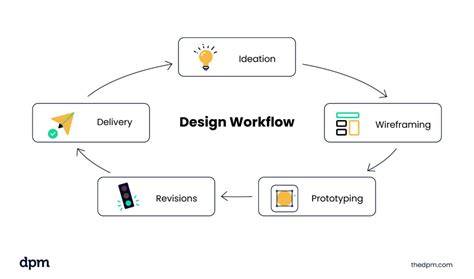
In addition to workflow changes, Figma’s ongoing emphasis on AI-assisted capabilities and platform integrations suggests a future where developers and designers collaborate more fluidly, leveraging shared contexts and unified tooling to ship features faster and with improved fidelity to design intent.