AI-powered Face Expression Changer is an advanced AI face editor app that lets you seamlessly edit facial expressions, swap faces, and retouch skin with professional realism. Whether you want to change expression on photo, fix an awkward smile, or alter hair and eye color and style, this all-in-one face changer and photo face enhancer makes creating stunning selfies easy. Looking for a fast photo editor for face smooth and reshaping? Switch between effortless auto-enhancements and precise manual adjustments to design your photos exactly how you want.
Key Features and Capabilities
Change Expression on Photo Modify facial expressions naturally. Shift any face to look happy, cute, confident, calm, or dramatic with smart AI tuning.
Realistic AI Face Swap Experience seamless face swapping with natural lighting alignment and advanced skin tone blending.
Smart Face Changer (Manual Editing) Our face editor automatically detects eyes, eyebrows, nose, lips, jawline, and face shape, allowing you to manually refine every detail with pixel precision.
Facial Feature Sculpting & Reshaping Resize, reshape, and refine facial profiles. Balance asymmetry and sculpt features while preserving your natural identity.
Hair & Eye Color Changer Experiment with realistic hair color options and vibrant eye shades using intelligent color-matching filters.
Skin Relighting & Tone Correction Fix poor lighting conditions, smooth out harsh shadows, and achieve an even skin tone naturally.
AI Photo Face Enhancer Get a smooth, sharp, and glowing look. Free online face expression editor - change face expression in photos in seconds or drag & drop your image (100MB max).
How It Works
- Upload a face photo Start by uploading any clear photo with a visible face. The AI will automatically detect facial features and prepare the image for editing.
- Tweak expressions in real time Use sliders to adjust every detail-from eye gaze and eyebrow height to smile. Instantly see the results as you fine-tune expressions.
- Download your edited image Save your edited face photo with one click. Perfect for avatars, profile pictures, or creative projects.
Note: You can also use the platform’s tutorial and explore use cases to see the broad range of scenarios-from avatars to thumbnails and social posts-where AI-driven expression changes can be applied.
Representative Use Cases
- Adjust facial expressions, eye gaze, and head pose with sliders for consistent avatars and thumbnails-without Photoshop.
- Turn a neutral or off-timing face into a confident smile or targeted gaze in seconds using real-time controls.
- Fine-tune eyebrows, eyes, mouth, and head angle with precision, often saving substantial editing time per photo.
- Make portraits look intentional and on-brand across profile photos and posts at scale.
- Preview, adjust, and regenerate multiple moods quickly to select the best variant for marketing or creative projects.
Editing Experience and Realism
The editor preserves lighting, skin tone, and texture while changing only the expressive musculature around the eyes, brows, cheeks, and mouth. This yields photorealistic results that keep identity intact, even across skin tones and age groups.
Backgrounds, hair, clothing, and overall photo composition remain unchanged, ensuring the final image expresses the chosen mood without artifacts or unnatural alterations.
Practical Tips for Best Results
- Use high-resolution images with balanced lighting for natural results.
- Upload front-facing photos or three-quarter views to maximize expression accuracy.
- Avoid pre-applied beauty filters that could interfere with natural muscle movements.
- Provide simple prompts like "create a soft smile" or "make a neutral face" to guide the AI effectively.
- Keep backgrounds simple to reduce visual noise and help the expression stand out.
API and Privacy Considerations
Some solutions offer an API that enables fast, scalable expression changes, with a focus on preserving identity while delivering a broad palette of emotions. Data handling promises typically include deletion of uploads within a defined period, no training on user content, and secure processing. Plans may range from free trials to paid tiers with expanded limits and commercial use allowances.
For developers, an API-based approach often highlights features like multiple pre-set expressions (happy, surprised, neutral, serious, etc.), easy integration, and rapid processing times. Documentation commonly covers how to upload images, choose expressions, and download results, with notes about privacy, storage durations, and usage limits.
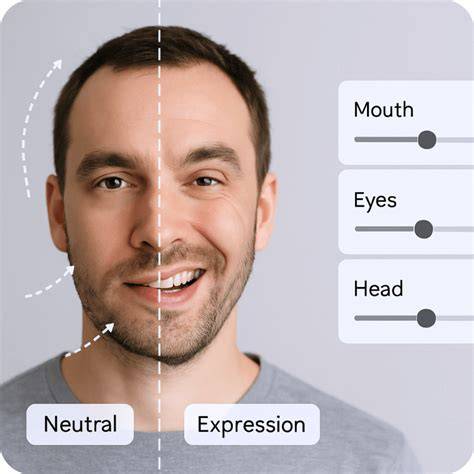
Sample Expressions and Interaction
20 AI-tuned expressions are commonly offered, including smile, laugh, happy, surprised, angry, confident, focused, mysterious, and more. Each preset targets specific muscle groups to achieve convincing emotions without a generic, one-size-fits-all smile.
Users can compare before/after results with sliders and download high-resolution outputs without watermarks in many cases, enabling quick iteration for avatars, thumbnails, or social posts.
How to change a characters facial expression with AI | Layer
Comparative Perspective: What Makes AI Face Expression Editors Stand Out
Compared to traditional filters or manual editing, AI expression changers rebuild aspects of the facial musculature rather than simply overlayting a sticker or filter. This leads to more photorealistic results and preserves distinctive identity features such as bone structure and skin tone.
In group photos, these tools can adjust expressions for one person without altering others, facilitating fixes for awkward expressions without reshooting the entire scene.
Potential Use Scenarios
- Creating diverse avatars and thumbnails with 10+ expressive variants for social media and branding.
- Producing campaign-ready visuals by adjusting model expressions to match a marketing concept.
- Assisting digital artists and character designers to visualize different emotions in portraits or illustrative work.
- Generating memes or short-form content with expressive reactions for entertainment or engagement.
Practical Guidance for Users
For optimal outcomes, consider experimenting with different expressions and viewports, and leverage the real-time preview to refine subtle micro-expressions. If needed, revert changes and iterate with alternate moods to identify the most authentic emotion for the image.
When publishing edited photos, ensure you comply with platform policies and licensing terms, especially for commercial use, as some tools specify usage rights and retention periods for the outputs.