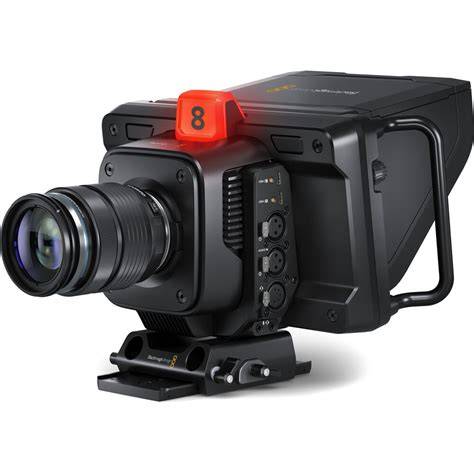
Introducing the world’s most advanced self contained studio camera! Blackmagic Studio Cameras have the same features as large studio cameras, miniaturized into a single compact and portable design. Plus with digital film camera dynamic range and color science, the cameras can handle extremely difficult lighting conditions while producing cinematic looking images.
The sensor features an ISO up to 25,600 so you can create amazing images even in dimly lit venues. It even works under moonlight! Advanced features include talkback, tally, camera control, built in color corrector, Blackmagic RAW recording to USB disks, live streaming and more!
While Blackmagic Studio Camera is designed for live production, it’s not limited to use with a live switcher! That’s because it records Blackmagic RAW to USB disks, so it can be used in any situation where you use a tripod!
The large 7" viewfinder makes it perfect for work such as chat shows, television production, broadcast news, sports, education, conference presentations and even weddings!
The large bright display with side handles, touch screen and physical controls makes it easy to track shots while being comfortable to use for long periods of time.
Design and Build: Portability Meets Studio-Grade Quality
Large broadcasters use expensive studio cameras that are extremely large, so they’re not very portable. The distinctive Blackmagic Studio Camera has all the benefits of a large studio camera because it’s a combination of camera and viewfinder all in a single compact design. It features a lightweight carbon fiber reinforced polycarbonate body with innovative technology in a miniaturized design.
The camera is designed for live production so it’s easy to track and frame shots with its large 7" viewfinder. The touchscreen has menus for camera settings, and there's knobs for brightness, contrast and focus peaking.
Sensor, ISO and Dynamic Range
In advanced cameras, ISO is a measurement of the image sensor’s sensitivity to light. This means the higher the ISO the more gain can be added so it’s possible to shoot in natural light, or even at night! The Blackmagic Studio Camera features gain from -12dB (100 ISO) up to +36dB (25,600 ISO) so it's optimized to reduce grain and noise in images, while maintaining the full dynamic range of the sensor. The primary native ISO is 400, which is ideal for use under studio lighting. Then the secondary high base ISO of 3200 is perfect when shooting in dimly lit environments.
Amazing sensors combined with Blackmagic generation 5 color science give you the same imaging technology used in digital film cameras. That means you can now use cinematic images for live production! Plus, when combined with the built in DaVinci Resolve primary color corrector you get much better images than simple broadcast cameras. The color corrector can even be controlled from the switcher. With 13 stops of dynamic range, the camera has darker blacks and brighter whites, perfect for color correction.
Resolution and Lenses
Great for both HD and Ultra HD production, the 4K models feature a resolution of 3840 x 2160 and the 6K model has a resolution of 6144 x 3456. With the popular EF or MFT lens mounts, Blackmagic Studio Cameras are compatible with a wide range of affordable photographic lenses. Photographic lenses are incredible quality because they're designed for use in high resolution photography. Plus, the active lens mount lets you adjust the lens remotely!
To eliminate the need to reach around to adjust the lens manually, the optional focus and zoom demands let you adjust the lens from the tripod handles just like a large studio camera! This means you avoid camera shake when adjusting the lens so you can track shots and operate the camera without taking your hands off the tripod!
Viewfinder and On-Screen Information
The large 7" high resolution screen will totally transform how you work with the camera because it's big enough to make framing shots much easier. The Pro models feature an HDR display with extremely high brightness, perfect outdoors in sunlight! On screen overlays show status and record parameters, histogram, focus peaking indicators, levels, frame guides and more. You can even apply 3D LUTs for monitoring shots with the desired color and look. The touchscreen also has menus and you can load and customize presets for different jobs.
Controls, Tally, and Talkback
Blackmagic Studio Cameras feature physical buttons and knobs as well as controls on the touchscreen. Knobs on the right side of the camera allow adjusting of the brightness, contrast and focus peaking. The focus peaking knob is incredibly useful as it lets you fine tune the detail highlight so you can get perfect focus as you zoom. The 3 function buttons on the left can have functions assigned to them, such as zebra, false color, focus peaking, LUTs and more! Plus you can change the function assigned to each button in the menus!
The Blackmagic Studio Cameras feature a very large tally light that illuminates red for on air, green for preview and orange for ISO recording. The tally light also includes clip on transparent camera numbers, so it's easy for talent to see camera numbers from up to 20 feet away!
The Blackmagic Studio Cameras support the SDI tally standard used on all ATEM live production switchers and the HDMI tally used on ATEM Mini switchers. This means that a director can cut between cameras and the tally information will be sent back to the cameras via the SDI program return feed, lighting up the tally light on the camera whenever it's on air. Unlike consumer cameras, Blackmagic Studio Cameras have SDI connections that include talkback so the switcher operator can communicate with cameras during live events. That means the director can talk to the camera operators to guide shot selection, eliminating the problem where all cameras could have the same shot at the same time!
Audio, Microphones and Sound
Blackmagic Studio Cameras include built in microphones so you get sound included in the design making setup much faster. Plus the built in microphones are shock and wind resistant, so you get great sound even in tough conditions! There’s also a 3.5mm audio input for connecting video camera microphones as well as a 3.5mm headphone jack. The professional 2 channel balanced XLR inputs support +24 dBu line level and have an ultra low noise microphone preamplifier with P48 phantom power alongside an equivalent input noise (E.I.N.) of -131 dBV(A). That’s followed by two 117 dB high dynamic range analog to digital converters, so you get the high end audio demanded by broadcasters and audio engineers.
Connectivity and Remote Workflows
All models feature HDMI and 12G‑SDI with talkback, tally, camera control and record trigger, perfect for ATEM Mini or ATEM SDI switchers! You also get headphone and mic connections, and 2 USB‑C expansion ports. The advanced Blackmagic Studio Camera Pro models are designed for broadcast workflows so have 10GBASE‑T Ethernet and balanced XLR audio inputs. The 10G Ethernet allows all video, tally, talkback and camera power via a single connection so setup is much faster!
Blackmagic Studio Cameras can be connected in lots of different ways! The HDMI supports video, tally, control and record trigger for a broadcast style workflow using a single HDMI cable. They also have 12G‑SDI so you can connect to SDI based switchers such as the ATEM Constellation. There's a 12G‑SDI connection for camera video, and one for program return. The program return also includes tally, talkback and remote camera control. Using the HDMI output, you can connect to switchers such as ATEM Mini! Use the SDI output and the SDI program return for 2 way talkback between the camera and any SDI ATEM switcher.
The 10G Ethernet connection allows all signals and camera power using a single Cat 6A copper Ethernet cable! You can even shoot without a switcher as the large screen makes the camera fantastic for shooting while recording to Blackmagic RAW on a USB flash disk. All Blackmagic Design ATEM switchers can control cameras via a protocol embedded into the camera's SDI video connections. Setup is easy because all ATEM switchers broadcast control commands from the switcher’s SDI program output to the camera via the SDI program input. The switcher can perform color correction, tally and lens control and these are sent to all cameras. All you need to do is select the correct camera number and it all works.
Even ATEM Mini switchers can control Blackmagic Studio Cameras because the HDMI output to the switcher has return data communication that can send control information back to the camera. The Blackmagic Studio Camera 4K Pro G2 and 6K Pro models support connecting cameras via a single Ethernet cable. It’s so simple, just plug in and you're ready! Traditional broadcast studio cameras use SMPTE fiber to communicate and power cameras, however SMPTE fiber is very expensive. Blackmagic Studio Camera Pro models have 10G Ethernet as an alternative to SMPTE fiber so it's much lower cost. The Ethernet includes all camera video, program return feeds, tally, talkback and also power.
The Blackmagic Studio Converter handles all video conversions at the switcher end plus adds power to the Ethernet cable. Blackmagic Studio Camera Pro models have 2110 built in so you can connect directly to 2110 broadcast systems using only a single Ethernet cable! Connect and power up to 4 cameras using the Blackmagic 2110 IP Converter 4x12G PWR, or connect to Blackmagic Studio Converters, to add SDI compatibility for existing equipment. That means all camera signals can be delivered over a single 10G Ethernet cable. That’s camera video, program return feeds, tally, talkback, camera control and even power. This eliminates the need for multiple cables, complex patching, or expensive SMPTE fiber equipment. Now you can place cameras remotely, anywhere in the world as the Blackmagic Studio Camera 4K Pro G2 and 6K Pro models have built in live streaming!
This means you can place a camera in a remote location and it can generate a H.264 HD live stream that is sent over the internet back to the studio. Simply connect the camera to the internet using the built in Ethernet connection, or you can connect a 4G or 5G phone to the USB-C port to stream via remote data! The live stream is received in the studio by an ATEM Streaming Bridge where it's converted back to video for connection to a switcher.
How To Livestream with Blackmagic Cinema Camera 6K Full Frame
The Blackmagic Studio Camera features a high speed USB-C expansion port that allows you to record to external disks, control the camera via a network or connect to a wide range of accessories. Plug in an external USB flash disk and the camera can record high quality 12-bit Blackmagic RAW files for later editing and color correction. That means you can just move the disk to a computer to work, and you don't need to waste time copying files. Or add a USB-C to Ethernet adapter to control your camera over a network via easy to use REST APIs. You can even copy files off the camera via the network!
Blackmagic RAW is a revolutionary new format designed to capture and preserve the quality of the sensor data from your camera. Some file formats such as H.264 are highly compressed, so add noise and artifacts, causing sensor detail to be lost forever. Blackmagic RAW eliminates this problem so you get stunning images with incredible detail and rich color throughout the whole post production pipeline. Blackmagic RAW also saves camera settings as metadata so you can change ISO, white balance and exposure later in DaVinci Resolve. Plus the files are small and fast, so editing responsiveness is incredible.
ATEM Integration and Control Panels
Blackmagic Studio Cameras include built in microphones and sound features, and compatibility with ATEM control ecosystems. The ATEM Camera Control Panel provides independent controls for up to 4 URSA Mini, URSA Broadcast, Blackmagic Studio and Micro Studio cameras from a single control panel. The ATEM Camera Control Panel is a professionally built broadcast camera control unit that extends the software features in ATEM Software Control to add high quality physical buttons and controls that are much faster to use.
ATEM Constellation 8K supports camera control when used with the Blackmagic Studio Cameras, URSA Mini Pro and URSA Broadcast cameras for full remote camera control. The control panel lets a single person monitor and adjust a wide range of camera parameters such as black levels, gain, color balance, shutter speed and more. This leaves your camera operators free to focus on more important tasks such as framing and shot composition. ATEM Constellation 8K works with the latest Blackmagic SDI cameras that have studio camera features that you can remotely control!
All control is via the switcher aux output connection to the camera PGM SDI input, allowing you to broadcast control commands from the switcher to the camera with a single SDI cable. That means you can remotely control settings in the camera plus focus, iris and zoom on supported lenses. The ATEM Camera Control Panel features 4 camera controllers in one panel, so you can simultaneously control 4 of your cameras at the same time. When used with a larger number of cameras, you can control more even on a single panel because it's very quick to change which camera you control on each CCU channel.
The top section on each camera control has settings for changing camera settings, plus it lets you save and recall scene presets. Getting remote access to important camera settings is vital when you are working in conditions where the light can change during your job such as daylight, and with these settings you can quickly adjust cameras based on changes in the scene. Color Bars: Select to output color bars for the selected camera. The center section features independent RGB controls for adjusting the camera color for the white and black parts of the image. Because the Blackmagic cameras with studio features have a full DaVinci Resolve primary color corrector built in, you have amazing control over the color in the camera. These red, green and blue controls for adjusting blacks and whites mean you can accurately match multiple cameras, which is vital for cutting seamlessly without color shifts. The bottom section features an LED camera number that indicates preview and on air status, along with a high quality professional joystick that's used to precisely adjust the iris and master black. Iris Control: Joystick for adjusting iris and master black.
Language and Power Options
The Blackmagic Studio Cameras are designed to be used worldwide so they support 13 popular languages! When setting up your camera, you can choose to work in English, German, French, Spanish, Polish, Portuguese, Italian, Russian, Turkish, Ukrainian, Chinese, Japanese or Korean. It’s easy to switch to another language simply by going into the menu settings. Blackmagic Studio Cameras have lots of different power options! All models have a common 12V DC locking power connector so the customer can choose compatible power sources.
Remote Production and Compatibility
The ATEM Camera Control Panel is incredibly fast to use as it features traditional broadcast CCU controls so you get the benefit of years of broadcast experience. You can use the knob on the LCD to set the camera number, which turns red when a camera is on the air. The main joystick control can be moved vertically to adjust the camera iris while the knob can then be rotated to change the master black level. Pressing down on the knob will let you monitor the camera you're currently controlling via the aux output of the switcher. Simply push the knobs to rapidly switch between cameras to ensure all your cameras match color.
Компатибельность с PTZ и другие решения
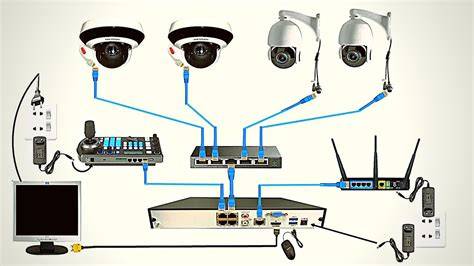
Telycam PTZ cameras integrate seamlessly with Blackmagic Design’s ATEM Mini switchers, enabling efficient single-operator, multi-camera production. Connect up to eight Telycam PTZ cameras via HDMI, switch between wide shots and close-ups in real time, and control precise pan, tilt, and zoom movements through PTZ controller. Enhance your Telycam camera feeds with DVE picture-in-picture, transitions, lower thirds, or virtual backgrounds - all inside ATEM Mini.
Setting up your Telycam PTZ camera with the Blackmagic Design ATEM Mini Pro is quick and straightforward. Use a high-quality HDMI cable to connect your Telycam PTZ camera to one of the ATEM Mini’s HDMI input ports. If you’re using a 4K PTZ camera, set your video output to 1080p - ATEM Mini Pro supports up to 1080p60. Add professional HD recording and monitoring to any camera. This model has the features of ATEM Mini Pro plus 5 record streams for clean feeds of all inputs.
Powerful live switcher with 8 HDMI inputs, built in streaming engine, multi-view, Thunderbolt for record/playback. Advanced 2 M/E live production switcher includes 20 standards converted 12G-SDI inputs, 12 x 12G-SDI aux outputs, 2 DVEs, 8 ATEM Advanced Keyers, 2 multi-views and a SuperSource for a total of 6 DVEs. Miniaturized deck records H.264, ProRes or DNxHD files onto SD/UHS-II cards or external USB disks in SD/HD formats to 1080p60. Includes features of the Mini model plus better transport controls, front panel headphone and speaker, 6G-SDI and fill and key out. Includes all the features of the Plus model, and adds 2 SSD slots as well as the 2 SD card slots. This extremely powerful Ultra HD model records and plays H.264/5, ProRes and DNx files in all SD, HD and Ultra HD standards up to 2160p60. Add professional HD recording and monitoring to any camera.
Итог
With a broad ecosystem that includes RAW recording to USB disks, native integration with ATEM switchers, advanced color science, and flexible network options, Blackmagic Studio Cameras offer a compelling blend of cinema-grade imaging and broadcast practicality. They are designed to be used worldwide, with robust audio, high dynamic range, and a portable, user-friendly form factor that scales from solo productions to full studio environments.
tags: #blackmagic #design #ptz #camera