In comic books, the speech bubble is most often oval, but it can also be rectangular or have a more unusual shape. Speech bubbles contain the texts spoken by comic book characters or their thoughts. This set includes 18 free vector custom shapes of speech balloons. They are perfect for making memes, comic strips, presentations, educational materials, and any project that needs dialogue or thought bubble elements.
Overview of Included Resources
The material describes a free resource pack that comprises 18 vector custom shapes of speech balloons. The shapes are available as .CSH files in a ZIP archive, designed for use in Photoshop via the Shapes panel (Import Shapes). The license is Creative Commons Zero (CC0), allowing commercial use without signup or paywall.
What’s included: 18 free vector custom shapes of speech balloons, suitable for dialogue or thought representations. The download format: ZIP containing .CSH files. After unzipping, use by double-clicking the .CSH file or via Window → Shapes → Import Shapes. The resource is positioned as a tool to create engaging word bubbles for images, memes, comics, and designs.
How to Use Cartoon Bubble in Photoshop
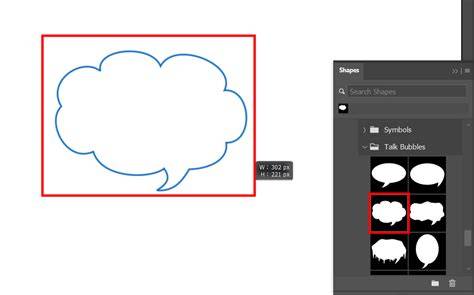
The guide emphasizes an effortless workflow to generate engaging word bubbles. Download the .CSH file and double-click it, or open Window → Shapes and choose Import Shapes from the panel menu. The plugin described provides intuitive controls and customization options for color, outline, shape, and indicator.
Intuitive controls for customization: users can adjust the color and thickness of both the bubble and its outline, transform shapes between ellipses or rectangles, and resize with bounding box handles. The speaking indicator is fully adjustable for precise placement and width. This enables clear visual communication in any scene.
Features and Benefits
- Elliptical, rectangular, and various shaped bubbles to fit different scenes.
- Easy customization of color, outline, and shape for cohesive visuals.
- Adjustable speaking indicator to clearly signal who is speaking.
- Presets Manager to save preferred styles for consistency across projects.
These features are designed to streamline the workflow: once a preferred bubble style is crafted, it can be saved as a preset for reuse, ensuring a cohesive visual language across multiple images or projects. The approach supports both dialogue and thoughts, enhancing narrative clarity in comics, memes, or educational content.
Workflow and Compatibility
The resource is described as compatible with various video and graphic software ecosystems, including Premiere Pro, After Effects, Final Cut Pro, Davinci Resolve, and more, though the primary workflow focuses on Photoshop through the .CSH shapes. The plugin concept emphasizes a quick, user-friendly experience with minimal friction to add engaging word bubbles to images.
To access the free plugin and shapes, users can follow the described steps, and a training video is available to explain how Cartoon Bubble works, providing a practical walkthrough for new users embarking on bubble creation.
Practical Applications
Cartoon Bubbles can be used to enhance memes, comic strips, presentations, and educational materials. They are well-suited for any project that needs dialogue or thought bubble elements. The CC0 license underpins broad commercial use, making it accessible for creators across various industries without licensing concerns.
Practical scenarios include adding speech or thoughts to character illustrations, crafting educational visuals with dialogue cues, and creating engaging social media memes that convey humor or commentary through bubbles.
Photo Manipulation Idea Photoshop Tutorial
Frequently Asked Questions Summary
Is "Speech Bubbles Custom Shapes" free to download? Yes, it is free to download from MyPhotoshopBrushes with no signup and no paywall, licensed under CC0 for commercial use. The download is a ZIP archive containing .CSH files, unzipped first, then imported via Photoshop.
How do I use it in Photoshop? Download the .CSH file and double-click it, or open Window → Shapes and choose Import Shapes from the panel menu. This enables the user to access the 18 speech balloon shapes for creative projects.
Table: Key Details at a Glance
| Item | Details |
|---|---|
| Format | .CSH (ZIP archive containing 18 shapes) |
| License | Creative Commons Zero (CC0) |
| Primary use | Photoshop shapes for speech and thought bubbles |
| Key features | Shape variety, color/outline customization, resizable, adjustable speaking indicator |
| Presets | Save and reuse preferred styles |