Halftone printing is a 20th-century technique that used fields of tiny cyan, magenta, yellow, and black dots to reproduce a full spectrum of colors. When grouped together, these dots create the illusion of continuous tones and shades on printed materials. Early color presses relied on CMYK inks, and printers developed halftone methods to expand the visible color range beyond what single-color printing allowed. The concept hinges on optical mixing: different dot sizes and densities in each color layer yield a broad palette from four ink colors.
Halftone is a foundational method in pop art, screen printing, and graphic design, evoking the aesthetic of bygone printing eras. The process relies on patterns of dots placed at specific angles and controlled by screen settings to prevent moiré patterns and to simulate gradations. As technology evolved, halftoning extended to lithography, imagesetters, and eventually digital workflows, while preserving the core idea: a matrix of tiny colored marks can recreate a wide range of tones when viewed at a distance.
What is a CMYK halftone?
CMYK halftone is a printing technique used to reproduce continuous tone images using four colors: Cyan, Magenta, Yellow, and Black. Photographs or complex color graphics are broken down into halftone dots of varying sizes and densities, which are then printed using the four ink colors. When the four color layers are combined, the eye blends them into a full-color image. This classic approach underpins offset printing and many modern reproduction methods.
Key concepts and parameters
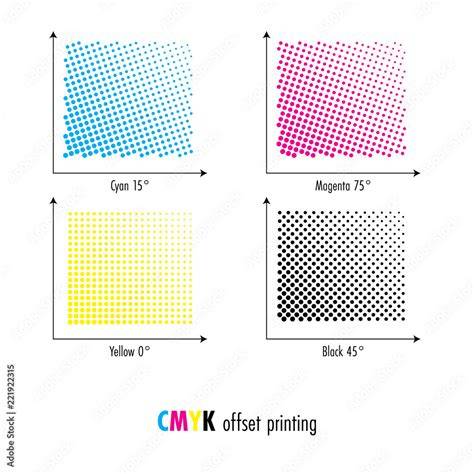
Halftone screens are defined by screen angles, dot size (radius), and dot placement. The Radius setting affects the size of halftone dots and the spacing between them, determining gradient smoothness and image blur. The Channel setting controls how dots are placed and how they overlap, with each channel typically assigned a Screen Angle. The angles for Cyan, Magenta, Yellow, and Black influence how the different dot grids interlock to minimize moiré effects. Standard offset printing angles (for four-color separation) are Cyan 15°, Magenta 75°, Yellow 0°, and Black 45°, chosen to avoid alignment of grids and reduce visible interference.
There are multiple dot shapes commonly used in halftoning: round, elliptical, square, and line (engraving style). Each shape offers distinct texture and readability across different image types. Round dots are versatile for skin tones and light imagery; elliptical dots suit complex compositions; square dots handle detail well but can be less ideal for subtle tonal ranges; line patterns can evoke engraving aesthetics. In digital and photomechanical workflows, amplitude modulation (dots with varying size) and frequency modulation (stochastic screening) are two foundational approaches to create tonal variation.
Historical development and milestones
Halftone printing emerged as a practical solution to reproduce photographs with limited printing technology. Before halftones, newspapers relied on woodcut or wood-engraving blocks, which were labor-intensive and offered limited tonal range. William Fox Talbot is credited with early ideas of halftone concepts, while Frederic Ives patented a commercial method in 1881. The German Georg Meisenbach (Autotypie) popularized autotype halftone processes in 1882, using cross-lined screens to achieve tonal variety. The adoption of halftone screens in lithography and image-setter technologies transformed image reproduction, enabling more faithful color and grayscale renditions on mass-printed media.
During the evolution toward digital workflows, the resolution of halftone screens (measured in lines per inch, or LPI) and the interplay between file resolution and screen ruling determined the level of detail achievable without posterization. As printing technologies advanced, halftoning adapted to photographic processes, laser printers, and modern software tools, while the underlying principle remained: discrete color dots replicate continuous-tone imagery through optical blending.
Practical creation of CMYK halftones
In traditional workflows, CMYK halftones are produced by separating an image into four color channels, each with its own dot pattern and angle. The combined plates print on top of one another, and the human eye blends the results into a full-color image. Digital halftoning uses raster or bitmap representations where each pixel is mapped to a dot pattern in each channel. The result can be previewed and adjusted by varying dot size, density, and angle per channel to control perceived color, contrast, and moiré potential.
For artists and designers seeking retro aesthetics, there are creative approaches that simulate halftone texture without printing: applying CMYK halftone effects to digital images, choosing dot shapes and screen angles, and controlling the balance of channels to emphasize specific tones. When working with printed outputs, descreening and careful registration help minimize artifacts and ensure faithful color reproduction. In education and craft contexts, halftone patterns can be realized with stencils or digital shaders that mimic the CMYK printing process.
Halftone in modern design and tools
Halftone patterns remain a staple in graphic design, pop art, and editorial visuals, referenced for their vintage printing look. In the digital era, tools and shaders emulate CMYK halftones to reproduce the tactile feel of analog printing. Modern sh aders and generators allow fine-grained control over per-channel angles, dot scale, and blending to achieve authentic print-style textures. Some workflows even simulate paper white backgrounds, subtractive blending modes, and ink bleed between dots to mimic real-world printing behavior.
Video and interactive tutorials illustrate how to achieve halftone aesthetics, showing how to select images, apply CMYK halftone effects, and adjust channel-specific parameters to craft high-contrast, retro poster looks. It is possible to export four plate separations (C, M, Y, K) as grayscale PNGs or vector SVGs for printing or stenciling, with additional options for print-preserving angles and misregistration to emulate authenticity. For motion graphics, halftone effects can be applied frame-by-frame to video, producing a vintage print-like cadence in moving imagery.
Applying halftone: considerations for artists and printers
When producing halftone work, consider the balance between dot size, screen angles, and paper stock. The choice of dot shape and the degree of dot overlap influence texture, legibility, and tonal range. In design systems, descreening and curve-based tone restoration can help recover or reinterpret halftone patterns for new media. Additionally, understanding the historical context-how halftone emerged to democratize color reproduction-can inspire authentic stylistic decisions in contemporary projects.
With digital shaders and modern software, artists can experiment with both classic round dot halftones and more organic line-based or engraving-style patterns, capturing the feel of early color presses while leveraging contemporary rendering capabilities. By controlling the interplay of C, M, Y, and K channels, designers can guide the viewer’s eye toward focal tones and contrasts, achieving bold retro statements or subtle vintage textures as needed. The result is a versatile bridge between historical print techniques and contemporary digital artistry.
Halftone CMYK Screen Printing 3 of 3
In summary, CMYK halftone printing represents a pivotal approach in graphic reproduction, transforming four-color ink into a rich spectrum of tones through dot patterns and screen angles. From early commercial presses to digital emulation, halftoning remains a powerful tool for achieving authentic print aesthetics in both static and moving images.
| Aspect | Traditional Halftone | CMYK Halftone (Digital Emulation) |
|---|---|---|
| Color channels | CMYK; four separate color plates | CMYK; per-channel control in software |
| Dot shape examples | Round, elliptical, square, line | Variable shapes with shader options |
| Angles | Fixed screen angles (e.g., 15°, 75°, 0°, 45°) | adjustable per channel angles to reduce moiré |
| Output | Printed presses, lithography | Digital images, video, or vector separations |