The Datacolor LightColour Meter combines the functionality of a traditional light meter and a color meter in a compact triangular puck that connects to the dedicated LightColour app via Bluetooth. It supports readings from both constant and flash light sources, and its mobile app runs on iOS and Android devices.
Hardware and form factor
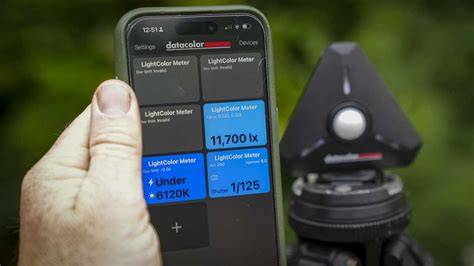
- The puck is a small triangular device powered by two AAA batteries and features a white dome at the center for incident readings. The dome can be raised for incident measurements or lowered for a narrower reading angle.
- Ports and mounts include a 2.5mm sync cord port, a power switch, a lanyard attachment bar, and a 1/4"-20 threaded socket on the bottom edge. A magnetic back allows attachment to included mounts for easy handling.
- Its dimensions are approximately 60 x 70 x 28 mm and it weighs about 52 g (77 g with batteries). The device is designed for portability and ease of use, with a straightforward magnetic clasp to secure the case back.
The accompanying app
- The Datacolor LCM app (LightColour) is free and available for iOS and Android. It enables instant Bluetooth pairing with the puck and exposes the full set of exposure and color-measuring features.
- In Still Exposure mode, you can set ISO (3-512,000), aperture (f/0.5-90), and shutter speed (30 minutes to 1/16,000 s), with optional exposure bias in 1/3-stop increments (-3 to +3 stops) and a 1/10-stop option in settings.
- When using flash, the app displays the ambient-to-flash ratio and can report flash duration for motion-free results.
- In Video Exposure mode, the shutter angle can be shown (and switched to shutter speed in settings), with an exposure bias range identical to Still mode. The meter can display two exposure variables with a blue scale, and the interface adapts for video work (e.g., “angle” instead of “shutter speed”).
Color metering modes
- Simple Color provides Kelvin color temperature and magenta/green (Duv) readings.
- Color Balance displays red, green, and blue as bar graphs along with Kelvin and tint, showing the excess or deficit of each color. It also presents CIE xy values relative to six reference colors (D65, D50, 6500K, 5500K, 5000K, and A tungsten) and allows sample value creation.
- Color Graph is particularly useful for gel-emulation work (RGB LED lights) with options to view the effects of Rosco, Lee, and Profoto gels on the metered light and a list of filtered light types.
- Chromaticity provides a technical readout of color purity independent of brightness; for instance, a 5600K bi-color LED reading of 5400K can guide white balance adjustments.
Overall capabilities and practical use
- The LightColour Meter integrates a dual-purpose tool: a reliable light meter and an accurate colorimeter, all connected to a smartphone for real-time feedback. It can read ambient, constant, or flash lighting and display a precise color temperature readout to match multiple lights from different manufacturers.
- In studio and field work, the meter helps dial in exposure for flash and ambient light, balance color temperature across multiple light sources, and set white balance to match the scene. The device’s small size and wireless workflow make it particularly convenient for on-site shoots and video interviews.
- Battery life and portability are strengths: the unit uses two AAA batteries, and the case is compact enough for camera bags. The magnetized back mounts to included hardware for easy handling during reads.
User experience and real-world performance
- In practice, the app’s interface adapts to the user’s aim-still photography or video-offering quick access to exposure meters and color information while keeping the experience intuitive and fast for on-set adjustments.
- Professional users note the value of color temperature measurements across mixed lighting scenarios, allowing changes to ensure consistent color balance and accurate post-processing.
- While some users initially consider the price high, the device’s versatility-coupled with its accuracy and compactness-positions it as an essential piece of photographic gear for both photo and video work.
Design, setup, and usage flow
- Triangular form factor with a central dome and three status lights keeps the unit visually simple yet functionally rich. When powered on, indicator lights confirm activity, and the dome can be moved to suit the measurement type.
- Setup is straightforward: install two AAA batteries, secure the back, and connect to the LightColour app. The smartphone acts as the control panel and delivers real-time feedback for adjustments to camera setup.
- Two common use paths emerge: quick readings on the main screen (illuminance, color temperature, and recommended exposure) and deeper dives into exposure or color information by tapping sections within the app.
Limitations and future improvements
- Suggestions include the ability to save presets for typical setups (e.g., a studio portrait configuration) so teams can replicate a known good reading, and a streamlined way to catalog different lighting equipment with their color-temperature characteristics to harmonize mixed gear.
- Despite any small feature gaps, the device remains a compact, highly capable tool that supports both photography and videography with fast, accurate feedback delivered through the companion app.
Related experiences and comparisons
- Compared with traditional meters like the Gossen in the studio, the Datacolor LightColour Meter can provide equivalent illuminance readings and color temperature checks, while adding color measurement tied to a smartphone interface.
- The integration with calibration and color tools from Datacolor reflects the brand’s history in calibration devices, extending the utility beyond a standard light meter.
In summary, the Datacolor LightColour Meter is a photographic light meter and colorimeter in one that works with a smartphone app to deliver fast, accurate exposure and color information for both photo and video workflows. Its compact form, dual functionality, and easy-to-use app ecosystem make it a standout tool for on-location shoots and studio setups alike.