Figma is a cloud-based design and prototyping tool that enables designers, developers, and managers to work together in real time, without the need for sizeable installations or complex configurations. The tool's clean interface, smooth rendering engine, and advanced collaborative functions make it perfect for interface design, user experiences, design systems, and interactive prototypes in professional environments. The Figma desktop app gives you access to the same features and functionality as using Figma in a browser.
Why choose the Figma desktop app?
Figma is completely cloud-based and supports real-time collaboration, allowing multiple users to edit the project file simultaneously and communicate through comments or annotations. This makes it possible for teams distributed across the world to work as if they were in the same room, accelerating creative processes. The desktop version mirrors this experience, ensuring you can work offline when needed and continue to stay synchronized whenever you’re online.
Key features that boost productivity
One workspace for your entire product development process ensures teammates and AI agents work in the same space with shared context. Generate new design directions, refine, and align-together. The platform is powerful and expressive, with incredibly precise tools to dial in details. Start with design context, build with consistency, and keep your context, codebase, and agents connected so what you design is what gets shipped. The products you love are designed in Figma, and everyone is able to influence, inspire, and give input without ever leaving the design file, creating a transparent and open process throughout the project.
Real-time collaboration and seamless workflow are among Figma’s strongest points. Multiple users can edit simultaneously, implementing changes in real time, and communicating through comments or annotations. Thanks to this, teams distributed globally can work as if they were in the same room, optimizing communication and accelerating creative processes. The ecosystem also includes plugins, widgets, and extensions that expand capabilities-from content generators and accessibility to integration with development tools and version control-making workflows more efficient.
Design tools and capabilities
Figma centers around an intuitive vector design system that offers precision and versatility, ideal for creating complex interfaces, illustrations, icons, and marketing graphics. Drawing tools, shapes, gradients, and typography are optimized to maintain fluidity even in large projects, and the layer structure helps organize visual content. Prototyping tools allow designers to create interactive, animated user flows without additional software, and version history helps revert changes easily to minimize risk.
Because Figma is browser-based, it runs smoothly on most modern devices. However, performance may suffer with complex files or weak internet connections. While feature-rich, some advanced editing tools found in traditional software like Photoshop or Illustrator may be absent. Compared to competitors, Figma’s pricing is reasonable, though the subscription model may not suit those seeking a one-time purchase.
Windows and macOS: how to get the Figma desktop app
Figma desktop apps are available for macOS and Windows. The version number is displayed under the version name, and you should identify the version under the Windows edition field. The application downloads to the configured location on your computer. Note that the Figma font installer, FigmaAgent, runs in the background with no user interface, and you may see related events in the console log or activity monitor. Desktop notifications, including haptic feedback for trackpads on macOS, keep you updated on activities and collaborations.
We recommend keeping the desktop app updated to the latest version. If you’re not on the latest version, the app will prompt you to update. For corporate-managed computers, you may need to contact your administrator to update. Support for previous versions is removed six months after release. A beta version of the desktop app is also available, allowing you to test bug fixes and performance improvements before public release. You can install and use the beta version alongside the stable release, and both versions share core features.
Exploring and organizing with the Figma desktop app
File browser lets you explore drafts, teams, and resources in your account. When viewing the Community through the desktop app, you can navigate back and forward with arrow keys. Tabs help you manage multiple files; you can pin, mute, or close tabs, and you can split tab view to access two files in the same window. You can open multiple windows and drag tabs between them for a flexible workflow. Notifications and integrations with Teams enhance collaboration by delivering file notifications, enabling comment responses, and embedding Figma and FigJam files as tabs in channels. These features enable rapid iteration and stakeholder feedback without leaving your existing collaboration platforms.
In addition to the core design tools, FigJam on the desktop enables teams to brainstorm in a whiteboard environment and then bring ideas into designs and prototypes. The Copilot Agent can generate flowcharts, diagrams, and Gantt charts in FigJam, and Microsoft 365 Copilot availability extends this capability within Teams for broader collaboration. A robust ecosystem of plugins and extensions continues to grow, expanding your design automation and workflow integration capabilities.
User data and privacy note
Data linked to your identity may be collected, including contact information, user content, search history, identifiers, usage data, and diagnostics information. This data helps improve features and provide a better user experience, but users should review privacy settings and permissions to understand what is collected.
Examples of practical use
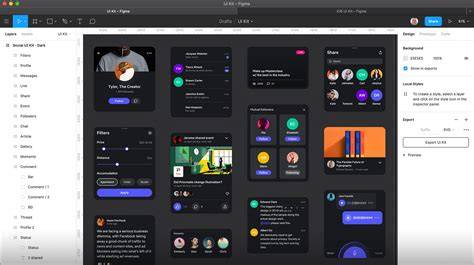
Figma supports UI kits, vector design, auto-layout, reusable components, and a broad plugin library, making it a strong choice for interface design, UX, design systems, and interactive prototypes in professional environments. Its real-time editing and intuitive interface are well-suited for collaborative design processes, ensuring stakeholders can participate without interrupting workflows. The browser-based nature ensures accessibility across devices, while the desktop app provides a consistent experience with additional window management capabilities.
Explore what you can do in Figma by browsing resources created by the community, experimenting with plugins, and leveraging the integrated workflow with Teams for collaborative meetings and reviews. The combination of design precision, collaboration, and prototyping capabilities helps teams produce polished UI/UX work efficiently.
tags: #download #figma #application