VideoPad Video Editor is a free video editing software. With this movie maker program, you can easily create stunning videos and perform basic editing tasks. If you often create videos for different social media platforms, or want to create videos for family and friends, VideoPad Video Editor will be a great choice. While it doesn’t have a wide variety of advanced features, the basic video editing functions suffice for beginners and video editing enthusiasts.
A good video editing tool for Windows, VideoPad Video Editor comes with a simple and clean interface, which matches the standard of most professional video editors. It features several important elements, such as the ability to preview clips, a function to preview an entire sequence, a double built-in screen, a timeline for audio and video tracks, and more. Is VideoPad Video Editor easy to use? Compared to MiniTool Moviemaker and other similar apps, VideoPad Video Editor is much easier to use. If you’ve ever used a video editor or movie maker program for Windows, VideoPad Video Editor will look familiar.
All you need to do is load the video clips, as well as the sound and image files to be included in the project. Does VideoPad Video Editor come with good features? VideoPad Video Editor has everything you need for basic video editing. The program features several video effects, primarily focusing on text snippets, color correction, and light balance. You can also work with three different transitions. VideoPad lets you add still images or screenshots to the composition. Once you have finished the project, you can click the ‘Create Movie’ button to export the project in a wide range of video file formats, including MPEG. While the program isn’t as powerful as Sony Vegas Pro and other professional editing software, it supports a wide range of file formats. The program comes with several exporting presets, which can be used according to the operating system you have.
VideoPad Video Editor comes with a range of transitional effects for moving between images and clips. There’s also a collection of filters to enhance videos. With just a single click, you can easily preview various filters and combine them to create a customized effect. There’s even a timer for transitions, giving you more control over their duration. VideoPad comes with various manual settings to refine color, saturation, and brightness. This is ideal for video clips shot in low-lighting conditions. With these features, you can give the entire video a consistent look. As mentioned earlier, the export functions are quite extensive and let you burn finished videos to Blu-Ray, DVD, etc. While the program isn’t as powerful as professional editing software like Camtasia Studio, this alternative is great for those starting out in video editing.
Does VideoPad Video Editor have any drawbacks? Like every other program, VideoPad Video Editor comes with a few drawbacks. For instance, while the interface is intuitive and clean, it’s not very appealing to the eyes. Moreover, the program lacks a few cutting-edge features, which are available in competing titles. Apart from automation and curation features, VideoPad Video Editor also doesn't have some niche features like multi-camera editing. Having said that, while these features may be useful for professionals, NCH Software understands the target audience and doesn’t overlook any basic features in the program. If you want to create simple videos for social media channels or family and friends, VideoPad Video Editor will let you do the job without much hassle.
Does VideoPad Video Editor have advanced features? VideoPad Video Editor has a huge library of plug-ins and tools, which make it more powerful than a basic video editing platform. Most of the plug-ins and tools have been customized to support videos for YouTube. Within a couple of clicks, the program lets you add freeze-frame moments, transitions, and filters to enhance the appeal. Additionally, popular social publishing features in the program include being able to complete several parameters, such as tags, description, metadata, title, etc. You can even upload YouTube videos directly from the application without using YouTube’s web publishing tools. This makes it easier for people without much technical knowledge and skills. Moreover, it saves a good amount of time shuffling between different tools and programs. When it comes to home video editing, VideoPad Video Editor offers a wide range of features and capabilities. However, it doesn’t support facial recognition, machine learning, and other cutting-edge technologies you might find with expensive or professional video editing software. Regardless, the program is a solid choice.
In terms of price, VideoPad Video Editor offers a free version with some limited capabilities. For instance, social publishing features like those mentioned above are only available in the paid version. However, the free version can do just the trick for stunning home videos. A powerful program for video editing, VideoPad Video Editor is a feature-packed editing tool for creating amazing videos within minutes. This software comes with more than 50 transitions and visual effects. You can finally add a professional touch to your videos. Moreover, it has a fast video stream processor and support for social publishing. The drag-and-drop feature lets you easily edit a wide range of videos, apply transitions and effects, adjust speed, and more. You can effortlessly burn videos to Blu-Ray, DVD, or export them online within a couple of clicks.
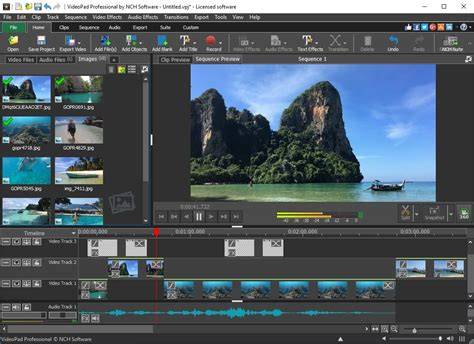
VideoPad can import a wide variety of audio and video formats including .avi, .wmv, .3gp, .divx and many others. It supports input from DV camcorders and other external devices like VHS players, webcams, and more. You can capture video by connecting the camera to your computer, pressing record, and then stopping when finished. The program also allows you to edit audio with tools such as fade in/out and volume adjustments, and you can change the speed or reverse playback of clips. In addition, VideoPad supports burning or exporting to multiple platforms, including DVD and Blu-Ray, and it provides options for social publishing directly from the app.
VideoPad Free Version includes support for some of the most popular video compression formats and can create end videos with the included effects and transitions. The overall layout looks professional and can be compared to paid solutions for end users. Even professionals might find useful features for quick edits. The latest information indicates that the free version is intended for non-commercial use, with a trial period for the full feature set. The software works on Windows 10, Windows 11, and other newer Windows versions, with compatibility tested on Windows 7 and 8 as well. It remains a solid entry point for budding editors aiming to publish on YouTube or deliver personal projects to family and friends.
For those seeking expanded capabilities, VideoPad offers plugins and add-ons, including tools for color manipulation, stabilization, and advanced transitions. To maximize usability, the program supports drag-and-drop editing, quick application of effects, and straightforward export options. If you want a straightforward, beginner-friendly editor that can produce polished social media-ready videos without a steep learning curve, VideoPad is a practical choice.
- Plan your project by importing video, audio, and image files.
- Apply transitions and visual effects to enhance storytelling.
- Adjust color, brightness, and saturation for a consistent look.
- Export or burn the finished video to preferred formats or discs.
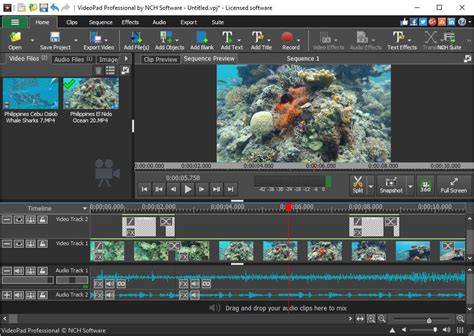
VideoPad Video Editor | Getting Started Guide and GUI Overview
Supported Input Formats: VideoPad supports a wide range of input formats and devices, including DV camcorders, HDV, and popular file types like avi, wmv, mp4, divx, and more. It provides a robust toolkit for creating home videos, tutorials, or clips for social platforms. The software emphasizes ease of use, direct publishing to YouTube, and a collection of gentle visual effects to elevate ordinary footage.
Tips for Getting the Most from VideoPad
- Start with simple projects to learn the interface and basic editing workflow.
- Leverage the drag-and-drop feature to organize clips efficiently.
- Experiment with transitions and filters to develop a distinctive style.
- Utilize the color correction and light balance controls for consistent results.
For creators who want to share content quickly, VideoPad’s direct publishing to YouTube saves time by avoiding multiple steps in separate tools. While it doesn’t replace high-end editors for professional workflows, it remains an accessible option for beginners and hobbyists aiming to produce quality videos for friends, family, or social media.