There are a few computers that photographers reach for by default. The 15-inch M4 MacBook Air might be the smartest computer purchase a photographer can make right now, and I suspect most of you aren't even considering it. Photographers have developed a Pavlovian response to the word "Pro." We see it on a product, and we assume it's the one we need. But here's the thing: Apple Silicon fundamentally changed the equation. When I reviewed the M2 MacBook Air back in 2022, I was genuinely surprised by how capable it was for photography work. That machine could handle 45-megapixel Canon EOS R5 files without breaking a sweat, and slider movements in Lightroom registered instantly. The problem with that 13-inch model wasn't power; it was screen real estate. At 13.6 inches, you could absolutely edit photos, but you were constantly fighting for space between Lightroom's palettes and actually seeing your image. The 15.3-inch display on this MacBook Air feels genuinely spacious in a way that the 13-inch model never quite achieved. You can have your editing tools open, your filmstrip visible, and still see your image at a reasonable size without constantly zooming in and out.
Here's something that often gets lost in the Air versus Pro discussion: the 15-inch MacBook Air actually has a larger screen than the 14-inch MacBook Pro (obviously). We're talking 15.3 inches versus 14.2 inches, which translates to noticeably more workspace. If screen real estate matters to you for editing, and it should, the larger Air gives you more room for your image and tools than the smaller Pro. What makes this particularly compelling is how Apple managed to increase the screen size without making the machine feel cumbersome. The 15-inch Air weighs 3.3 pounds, which is barely heavier than the 2.7-pound 13-inch model. More surprisingly, it's actually lighter than the 14-inch MacBook Pro at 3.4 pounds. When you pick it up, it feels less like holding a laptop and more like holding a rigid magazine. For photographers who are already hauling camera bodies, lenses, and lighting equipment, every ounce matters, and the 15-inch Air delivers a big screen without the weight penalty you'd expect. The thinness contributes to this feeling as well. One of the things I appreciated most about the M2 Air was its completely passive cooling system. No fan means no noise, no dust accumulation, and no spinning distractions when you're trying to focus.
The conventional wisdom is that passive cooling means you'll suffer from thermal throttling during intensive tasks, and that's technically true. Under sustained maximum load, the M4 Air will eventually dial back its performance to manage heat, typically losing a noticeable but manageable amount of peak performance. But here's the critical question: how often do photographers actually sustain maximum load for extended periods? In my experience, we work in bursts. We import a batch of images, which takes a few minutes. We cull and rate, which is almost entirely limited by our decision-making speed rather than the processor. We make adjustments to individual images, which involves short bursts of computational work as we move sliders and apply changes. The M4 chip handles all of these tasks exceptionally well. Lightroom runs smoothly even with large Raw files, and Photoshop filters apply quickly. For day-to-day photography work, you genuinely won't notice a difference between this machine and a MacBook Pro. The scenarios where the Pro pulls ahead involve sustained heavy workloads like long video exports, batch processing hundreds of images with AI-powered denoise, or 3D rendering. If that's your primary work, or if you're a wedding photographer regularly running AI denoise on thousands of images, the Pro's active cooling makes sense. But for photographers doing standard editing work, the Air's performance is more than sufficient.
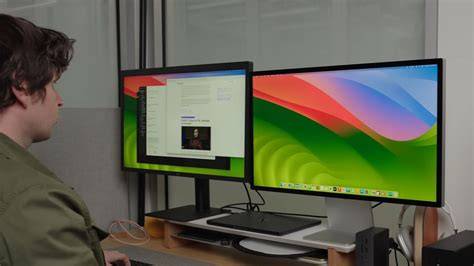
The Neural Engine in the M4 chip has become increasingly relevant to photography workflows. Features like Adobe's AI-powered Denoise and the various masking tools in Lightroom benefit from machine learning acceleration, and the M4 handles these tasks well. It's worth noting that Adobe's implementation doesn't always use Apple's Neural Engine directly; some tasks lean more heavily on the GPU. When I reviewed the M2 MacBook Air, my biggest complaint was the single external display limitation. You could connect one monitor and use it alongside the built-in display, but if you wanted to work in clamshell mode with multiple monitors, you were out of luck. The M4 Air fixes this. Apple now officially supports two external displays regardless of whether the lid is open or closed, and the built-in display remains active. This is a genuine improvement over previous models, which required you to close the lid to drive two displays. This change fundamentally alters how you can use this computer. You can now dock the Air at your desk with a true dual-monitor setup alongside the built-in display, then unplug it and take the same machine on location. You get a true desktop-class experience at home and genuine ultraportability on the road, all from one computer.
I want to be honest about the trade-offs here because no laptop is perfect for everyone. The 15-inch Air uses Apple's Liquid Retina display, which is excellent by any reasonable standard. It offers P3 wide color, 500 nits of brightness, solid uniformity, and wide viewing angles. However, the gap between the Air's display and the Pro's display is worth noting. The MacBook Pro uses a mini-LED panel that delivers 1,000 nits sustained brightness for HDR content and up to 1,000 nits for SDR in outdoor conditions, compared to the Air's 500-nit SDR brightness. That's potentially double the brightness for working outdoors or in bright studio environments. The Pro also offers 120 Hz ProMotion refresh, deeper blacks thanks to local dimming, and a nano-texture glass option that reduces glare. I genuinely love nano-texture, particularly for working in my sunlit living room. For photographers preparing work for print or standard digital delivery in controlled lighting, the Air's screen is perfectly capable. But if you frequently work in challenging lighting conditions or you're doing HDR video work, the Pro's display has real advantages.
The port situation is where the Air shows its consumer-oriented roots most clearly. You get two Thunderbolt 4 ports on the left side and a headphone jack on the right, plus the MagSafe charging connector. The MacBook Pro, by contrast, adds a third Thunderbolt port, an HDMI port, and an SD card slot. For photographers, that SD card slot is significant. With the Air, you'll need a dongle or hub for card reading, and if you're connecting to a client monitor or projector on set, you'll need an adapter for that too. This is where the 15-inch Air becomes compelling, though the math requires some honesty. Apple made an important change with the M4 generation: the base configuration now includes 16 GB of unified memory instead of the previous 8 GB starting point. However, the base 15-inch Air still ships with only 256 GB of storage. You'll almost certainly want to configure up with 512 GB (which has always been my sweet spot) at minimum, which brings the price to $1,399. That $200 savings is still meaningful, and it becomes more significant if you catch the Air on sale. But the value proposition is really about what you get for that $200 difference. With the Pro, you're paying for a better (albeit smaller) display, more ports including the SD card slot, active cooling for sustained workloads, the newer M5 chip, and longer battery life. With the Air, you're getting a larger screen, a lighter and thinner chassis, and silent operation.
The base M4 chip in the Air features a 10-core CPU and 10-core GPU, which is plenty of processing power for photography work. You can configure up to 24 GB or 32 GB of unified memory if you need it, and storage options go up to 2 TB. The 15-inch M4 MacBook Air represents a compelling option that I think many photographers overlook simply because it doesn't have "Pro" in the name. It offers excellent performance for photography workflows, a spacious screen, support for dual external displays with the lid open, all-day battery life, and a lightweight design that makes it genuinely portable. If you genuinely need the MacBook Pro's brighter mini-LED display, or you work frequently in challenging lighting conditions, or you're doing enough sustained heavy processing that active cooling would help, or you want the newer M5 chip, or you need the Pro's SD card slot badly enough to avoid dongle life, then the Pro remains the right choice. But I suspect that describes fewer photographers than you might think. For the rest of us, the Air isn't a compromise. It's a larger screen in a smaller package at a lower price.
Beyond Air vs Pro: What Works for Photo Editing
Hello everybody, currently I plan to update my MacBook and would like to get some recommendations / feedback from you. My current setup is 15-Inch MacBook Pro (2017) with 2.9 GHz Quad-Core Intel Core i7 (Radeon Pro 560 4GB) with 16GB Memory & 512GB SSD, macOS Ventura 13.7.8. Main camera is a Canon 5D Mark IV (30 Mega Pixel 6720x4480). I run Lightroom Classic 14.5.2 and Photoshop 27.3.0 and Apple Photos. This is also in the Lightroom Classic Community, but maybe somebody here has some insight on this topic. Currently I consider the 14-Inch MacBook Pro with 1TB SSD in these options: M5 Chip with 10-Core CPU, 10-Core GPU, 16-Core Neural Engine and 32GB Memory; M4 Pro Chip with 12-Core CPU, 16-Core GPU, 16-Core Neural Engine and 24GB Memory. Both options would cost 2,549 Euros.
From there, the discussion includes various experiences comparing MBA, MBP, and newer M4/M5 configurations. The consensus across many voices is nuanced: for casual editing, an MBA can suffice; for longer-term use and more demanding workflows, a well-specced MBP tends to deliver a noticeably better editing experience, especially in display quality, color accuracy, and sustained performance. The core takeaway is that upgrading for photo editing should be guided by your typical workload, screen needs, and how much you value silent operation, portability, and future-proofing against software demands.
When selecting the best MacBook for photo editing, consider the following: the processor, RAM, storage, screen size and quality, color accuracy, and ports. The latest M-series chips (M3, M4, and upcoming M5) offer impressive performance and energy efficiency. RAM is crucial because MacBooks cannot upgrade RAM after purchase, so plan ahead. Storage should be ample to accommodate RAW files, previews, and catalogs. A larger screen improves editing accuracy and reduces eye strain, and HDR-enabled displays with wide color gamuts help achieve truer color grading. For external workflows, a robust set of ports and a fast external storage option matter for photographers who routinely offload large shoots.
Display and Color: What Really Matters for Photographers
Apple's display technology has long been a differentiator for photography work. The M4's nano-texture option and higher 1000-nits SDR brightness improve field usability in bright environments, while ProMotion and deep blacks in Pro models offer smoother motion and better HDR representation. For on-location editing in bright light, the Pro's extended brightness and local dimming can be meaningful, whereas for controlled studio or home workflows, the Air's display remains more than capable. Color accuracy, after calibration, remains a strong suit across these devices, with occasional slight biases that can be mitigated through profiling.
In terms of practical workflow, the M4's Neural Engine accelerates AI-based denoise and masking tasks in Lightroom, while some tasks still rely on the GPU. This means photographers may see faster results in typical edits, but the exact boost depends on their software and plug-ins. With the two external displays support in the M4 generation, you can achieve a true desktop-like setup on a portable machine, which is a significant productivity enhancement for editing sessions away from the studio.
Pricing and Configurations: What to Buy
The base configuration trade-offs are notable. The 15-inch Air starts with 16 GB RAM and 256 GB storage, with options to upgrade to higher RAM and larger SSDs. The Pro variants bring more ports, a larger number of external connections, and an active cooling system, along with the potential desire for the newer M5 chip. If you need the SD card slot for on-set workflow, or rely on long bursts of heavy processing, the Pro may justify the extra cost. If you prioritize screen real estate, silent operation, and lower price, the Air provides a compelling value proposition for many photographers.
In summary, for standard editing work, the MacBook Air M4âs combination of a spacious display, silent operation, dual external display capability when docked, and ample processing headroom makes it a strong choice for photographers who value portability without sacrificing performance. If your work routinely pushes the envelope with sustained heavy processing, HDR video, or extensive AI-based denoising on thousands of frames, the Pro remains the safer bet. But for the majority of photo editors, the Air represents the maximal balance of screen real estate, weight, battery life, and cost.
NEW M4 MacBook Air | The Ultimate Budget Laptop for Creatives (Honest Review)
Storage strategy matters as well. Storage is the best place to cut cost: it is the most expensive option and the only upgrade you can make after purchase. Sandisk Extreme Portable for up to 8TB, Samsung T5 EVO 8TB, Vectotech 8TB are common choices among professionals, with Thunderbolt SSDs offering superior speed at higher cost. A CalDigit TS4 dock can simplify connectivity, turning a single cable into a full workstation with monitor, storage, Ethernet, and peripherals. For on-site work, an external HDR monitor can be valuable if youâre not relying solely on the built-in laptop display.
In the end, the M4 MacBook Air represents a compelling option that often gets overlooked due to branding alone. Its combination of screen size, weight, silent operation, and solid performance for Lightroom and Photoshop tasks makes it a practical choice for many photographers. If the Proâs specific advantages align with your workflow needs, it remains a strong option, but the Air is not a compromiseâitâs a large-screen, portable workhorse that can keep up with most photo-editing demands.