First off we want to thank all the work put in by developers to maintain Krita, and the community that helps to fund and push Krita. At the risk of sounding really cliché, you all help to make our dreams, and many others' dreams, come true!
I work for Thor Media. It is a small partnership between my brothers and me, located in Salt Lake City, Utah, which focuses on video production, motion graphics, visual effects, programming, and a little bit of comic books on the side. We have always pushed for using open source software in our workflows, and it has certainly paid off for us. The work done with open source software has contributed to a large chunk of our income for four years now. This software includes various Linux distributions for our OS, Blender, Gimp, Inkscape, Scribus, Audacity and Krita. We do use some Adobe products and other operating systems for some video editing and simpler visual effects, depending on client needs. But this makes up a small percentage of the work done to get to a finished product.
Personally, I have been using open source software, specifically Gimp and Blender, in my drawing/painting and other projects for over a decade, that is, until I ran into Krita. I have been using Krita for about three years now, it has become my go-to application for any kind of painting and drawing, and we have made it a permanent part of our workflow for the ARC web comic. I still use Gimp regularly, but the tasks that I use it for have become much more specific (Graphic Design and other web graphics). When it comes to comics, Krita is better suited for our current workflow. We use Krita at just about every part of the comic’s workflow. Thumbnails, design, penciling, inking, coloring, and color correction for printing, these tasks are all handled with Krita. The only exception being lettering, which is done in Inkscape.
The reason why we use Inkscape for lettering is due to the vector and text tools not quite reaching the same level of usability as Inkscape. This may change in the near future though, as work is being done to make the text tools more usable in Krita. In our first issue, "Bunny Grade Wire Snippers", we also used Blender to quickly tackle some of the backgrounds for specific panels. This reduces the amount of time we spent on some backgrounds, but usually the perspective guides in Krita handle those tasks well enough for most comic book panels that needed accurate backgrounds.
As for why we started the ARC web comic. My talented partner, Michael Buhler, has always been interested in storytelling, and so have I. So, when we hired him on as an additional artist in the company, we wanted to find a vehicle for telling our stories on a budget, and a project to develop our skills on. Comic books have always been an interest that we have both had, and the medium has an easy to approach method for collaboration. Also, with Krita and other open source applications it wouldn’t cost more than just our time to produce. Now we just needed a story.
A couple of years ago I and my brothers, Jacob and Aaron, were discussing story ideas about a science fiction universe that had roots in historical events based around pioneers crossing the North American mid-west during the 1800s. Michael, Heather Zundel (a talented writer on our team) and I took these ideas and fleshed them out further. We are now putting our story into pictures. At this point we will be releasing digital issues as we finish them through Google Play, Amazon, and iTunes, with pages published on the official page every Friday for free. We hope to get to the point where we can print physical issues for those who want them through Patreon funding, and other digital sales. We hope to get the community more involved in the production, and the ARC story, as well. Through Patreon we want to do live Q&A and drawing sessions, using Krita of course. We welcome any good or bad criticism, as a story is only good if others enjoy and share it.
Info for Krita 5 users: The templates created by this tool seem to have issues with Krita 5. I don't know yet when I find some time to look into the issue so you might want to stick to an older Krita version or try to save them using an older version for now. This small tool can create comic pages for Krita with cutting marks and layouts to start with, similar to what Clip Studio Paint EX gives you. It allows you to set the paper size that's printed on, the bind (finish) size, the bleed width, the resolution and the orientation. It then generates a Krita image with nicely structured frames to quickly get started. Simply select the "Box" layer inside the frame and then add your layers in alpha inheritance mode on top of it. All frames are set up as rectangles on vector layers, which makes it easy to adjust them to your liking. The Comic Creator doesn't need to be installed. You can simply grab the executable below, mark it as executable (\"chmod +x\" or use your tool of choice) and run it. It's statically linked against Qt and packed with upx to reduce download size.
After a year of posting weekly comic strip on my social media, I wanted to film the making of the episode 53 published on the 20 May 2026 and build with all the 20 hours of video, a one hour tutorial on how to achieve this type of comic strip using Krita, from A to Z! This tutorial has longer chapter on the new comic panel tool (in 5.3) and explains a full setup on how to use it, even for more complex comic pages, and also I spend time on the creation of speech bubbles, text (also new features of 5.3) and consideration regarding the layout and composition. The fundamental stone of getting a comic easy to read! However, the inking and coloring chapter are a bit more lightweight, mainly because I already have many video on my channel about painting, shading, and line-art with Krita and I wanted to keep the video length under one hour. I'll certainly make more video about those specific workflow step later! I hope you'll like the video, the first one I record and video edit on Wayland (and it wasn't a challenge at all; everything worked just as expected).
Workflow: from thumbnails to printing with Krita
Thumbnails, design, penciling, inking, coloring, and color correction for printing, these tasks are all handled with Krita. The only exception being lettering, which is done in Inkscape. This separation helps keep the lettering workflow stable while Krita handles painting and layout tasks efficiently.
For backgrounds and complex perspectives, Krita’s perspective guides often replace the need for separate 3D or external software, though Blender can fill gaps for specific panel backdrops when needed. The kerning and text tools in Krita are improving, but for now Inkscape remains the preferred tool for speech bubbles and lettering at the production stage.
Comic pages can be generated with tools designed to create frames and layout guides. The “Comic Creator” tool can output a ready-to-use Krita project with framed regions, ready for alpha-inheritance layering. Users should select the Box layer inside each frame and then place their artwork on top, maintaining clean separation between structure and artwork.
Practical tips for a smooth Krita comic workflow
- Use Krita for thumbnails, line art, inking, color fills, shading, and color correction to prepare pages for print.
- Keep lettering in Inkscape for better vector text handling until Krita’s text tools reach parity.
- Leverage perspective guides in Krita for consistent background panels, reserving Blender for more intricate environments when needed.
- Experiment with Krita’s new panel tools (5.3) to improve layout and speech bubble integration during page construction.
- Consider creating an informal production timeline with weekly page releases to engage readers, as demonstrated by the ARC web comic plan.
Using community and open source to sustain a comic project
The ARC project demonstrates how open source tools can form a sustainable production pipeline for independent comic creators, combining Krita, Inkscape, Blender, and other tools, with distribution across Google Play, Amazon, iTunes, and Patreon for support and engagement.
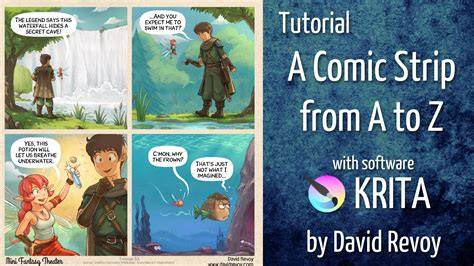
The tutorial series and behind-the-scenes content, including a one-hour tutorial on achieving a complete comic strip from A to Z using Krita, provide a deeper dive into panel creation, speech bubbles, and page layout, while acknowledging that inking and coloring chapters may be lightweight due to prior painting and shading videos.