SketchUp is a 3D modeling software platform used to create, develop, visualize, and communicate design ideas. The software is used by architects, interior designers, landscape designers, construction professionals, product designers, fabricators, and students.
Unlike heavier building-authoring platforms such as Revit, SketchUp is primarily valued for fast, flexible, direct 3D modeling. The direct modeling workflow makes SketchUp easier to approach than many complex professional modeling applications, which is especially helpful for beginners or hobbyists pursuing personal projects.
SketchUp for Web allows users to create, edit, and store models directly in a supported web browser. SketchUp Free provides access to core browser-based modeling capabilities, and it includes SketchUp for Desktop, SketchUp for Web, SketchUp for iPad, LayOut, PreDesign, Trimble Connect, and access to extensions. Users can place model views on sheets, control drawing scales, add dimensions and annotations, create title blocks, and organize multi-page drawing sets.
In personal use, you can search for furniture, equipment, building components, materials, landscape elements, and manufacturer-provided products, then place those assets directly into a SketchUp model. Model quality and complexity can vary, so professional users should review downloaded assets carefully.
The extension ecosystem is one of SketchUp’s strongest advantages, expanding capabilities beyond the core toolset. SketchUp includes native visual styles, materials, shadows, scenes, environments, and presentation tools. For more photorealistic rendering, users often rely on third-party or bundled rendering applications. Professional workflows may include DWG, DXF, IFC, PDF, image, and other model exchange formats, enabling interoperability with programs such as AutoCAD and Revit.
SketchUp models can be viewed on mobile and supported extended-reality devices, which is useful for on-site reviews or client demonstrations during personal projects.
SketchUp uses a subscription-based pricing model. SketchUp Go and SketchUp Pro may be available as annual or monthly subscriptions, while Studio and certain specialist plans are generally offered annually. Pricing can differ by country, currency, taxes, reseller, plan configuration, and promotional period. A SketchUp free trial is available for users who want to test the professional product ecosystem before purchasing. The Studio trial does not require a credit card and includes access to the applications and features included with SketchUp Studio.
For educational or hobby use, SketchUp Free is appropriate to learn the software or create basic personal models. SketchUp Go is better suited to users who work mainly through web and iPad devices, while SketchUp Pro is designed for professional and commercial work. Overall, SketchUp remains one of the most accessible and flexible 3D modeling solutions for personal use, thanks to its fast modeling pace, cloud tools, and easy-to-share presentations. However, teams or individuals should evaluate documentation, data management, rendering, and interoperability requirements before selecting the most appropriate subscription and workflow.
SketchUp is often used during early design stages to test concepts and communicate ideas visually to clients or collaborators. For personal projects, its approachable interface supports rapid exploration of forms, layouts, and finishes, while still offering the option to export to more specialized formats if needed.
Common Personal-Use Scenarios
Architectural concepts: test building forms, evaluate layouts, study façade options, and communicate early ideas to clients. Interior design: model rooms, furniture arrangements, lighting layouts, materials, and finishes. Small-scale landscapes or product concepts: create visualizations and mockups to refine ideas before moving to professional workflows.
Getting Started with SketchUp Personal Use
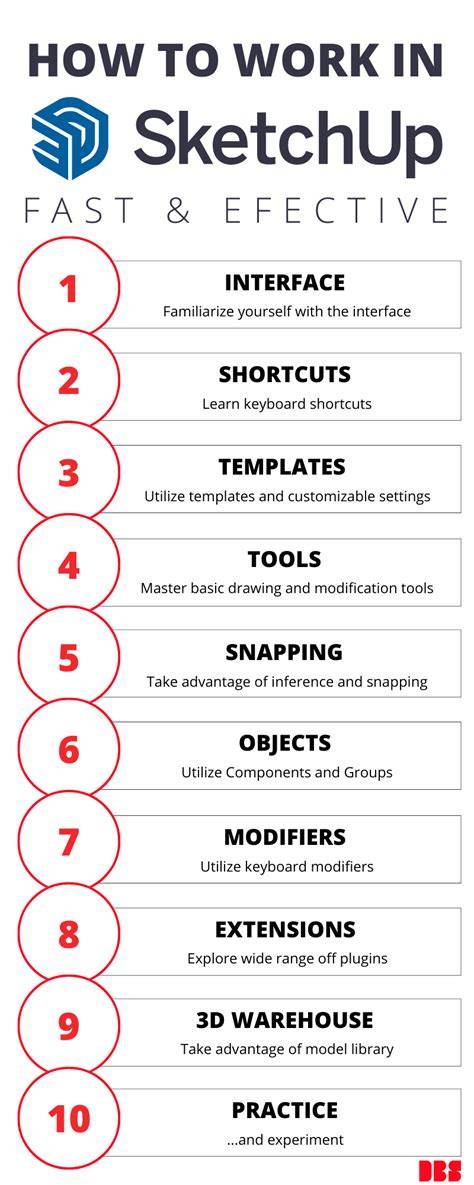
- Start with SketchUp Free in a supported web browser to explore core modeling tools without installing desktop software.
- Leverage 3D Warehouse content to populate your model with user-created assets, while carefully reviewing asset quality.
- Utilize LayOut and basic presentation features to organize views and annotations for simple project presentations.
- Experiment with visual styles, shadows, and scenes to develop clear, informative visuals for clients or personal review.
- Consider moving to SketchUp Pro or a similar professional tool only if your personal projects require advanced documentation or interoperability with other software.
- Draw simple geometries to block in volumes and forms, then refine with more detailed components.
- Apply materials and finishes to understand how different choices affect the overall look and feel.
- Place reference elements like dimensions and annotations to communicate scale and relationships clearly.
- Export models or screenshots for sharing, or send models to stakeholders via Trimble Connect if collaboration is needed.
In summary, SketchUp remains one of the most accessible and flexible 3D modeling solutions for personal and hobby use, offering fast conceptual modeling, essential presentation tools, and a rich ecosystem of extensions. Its browser-based Free option is ideal for learners and casual projects, while Go and Pro expand capabilities for more involved personal workflows. When evaluating options, consider your goals, required file formats, and whether you will need advanced rendering, data management, or interoperability with other CAD/BIM tools.