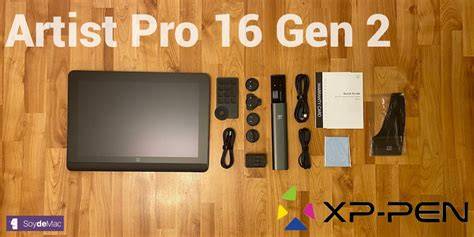
The XP-Pen Artist Pro Gen 2 introduces the Artist Pro 16 Drawing Display with the X3 Pro Smart Chip Stylus, promising a leap forward in CG technology and a more liberated creative workflow. It blends futuristic design with professional-grade color, precision, and ergonomic features to elevate the drawing experience.
Key specifications and highlights
- 16K pressure levels with an industry-first X3 Pro Smart Chip Stylus for hyper-nuanced lines and smoother shading.
- Life-like visuals on the X-Nature Display with 2560x1600 resolution and a wide color gamut (99% sRGB, 96% Adobe RGB, 98% Display P3).
- Fully laminated screen to minimize parallax and provide a natural drawing feel.
- TÜV SÜD certified low blue light for eye comfort.
- Built-in foldable stand, ergonomic X-Edge Wrist Rest, and dual USB-C ports for flexible setup.
- Pen Case and a compact design for keeping the stylus ready and organized.
- X-Remote Control for quick access to shortcuts and efficient workflow, with compatibility across Windows, macOS, Android, ChromeOS, and Linux.
Introducing X3 Pro Smart Chip Stylus, a truly breakthrough innovation that boasts industry-first 16K pressure levels, 100% higher than its peers. It delivers more precise and smooth lines and reduces lag, with an initial response around 90 ms and an accuracy of ±0.4 mm (center) to ±0.8 mm (corner). The device supports extended color-rich detail across the X-Nature Display and pairs with a wide gamut, including sRGB, Adobe RGB, and DCI-P3, enabling accurate color reproduction.
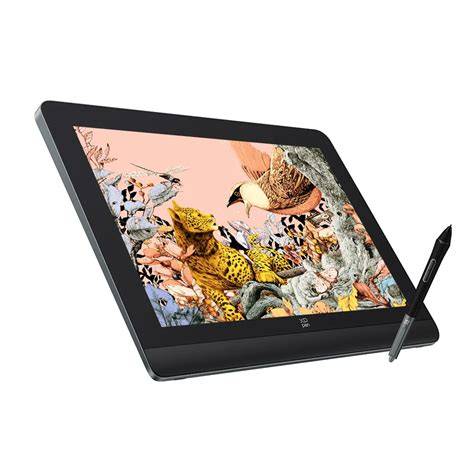
The Artist Pro 16 (Gen 2) features a 16-inch expansive workspace with a 16:10 aspect ratio and a fully laminated screen to eliminate parallax between nib and cursor. The display covers 99% sRGB with a broad color gamut, achieving Delta E values typically under 2.2 for color fidelity. A low blue-light profile certified by TÜV SÜD makes it easier on the eyes during long sessions.
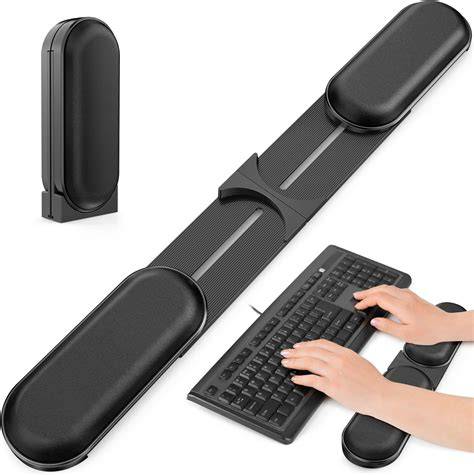
Designed for comfort and precision, the X-Edge Wrist Rest provides ergonomic support, while the foldable stand offers flexible positioning anywhere. The USB-C dual-port design supports a 3-in-1 cable arrangement for a clean, flexible workspace, with generous compatibility across operating systems and software suites such as Photoshop, Illustrator, Clip Studio Paint, Krita, Blender, and more.
Drawing experience and performance
In practice, the 16K pressure levels translate to highly nuanced shading and controlled strokes, though in real-world use, the difference from 8K devices is subtle for many artists. The stylus feels responsive, with minimal lag after calibration, and the driver software provides deep customization of pressure curves, working area, and shortcut mappings. Users can tailor the experience to personal preferences, adjusting brush dynamics and area mapping to suit individual workflows.
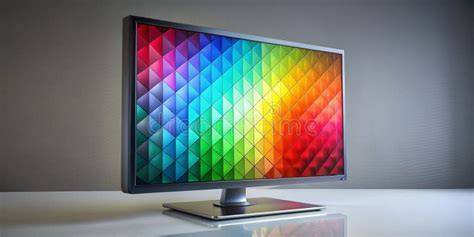
The built-in color pipeline and wide color gamut render vibrant, true-to-life artwork. The fully laminated display minimizes parallax, making lines align closely with the pen tip. The color accuracy and color-space switching (sRGB, Adobe RGB, DCI-P3, USER) help maintain consistency across different projects and devices.
Flexibility in workflow is enhanced by the X-Remote Control and the included Pen Case. The remote allows quick toggling of brush sizes, zoom, and other functions, while the pen case keeps the stylus and nibs organized. A few ergonomic considerations include the need for stable desk space due to the device’s size and weight, and the slight separation of shortcut controls from the display, which some users may prefer to on-board keys.
Setup, compatibility, and workflow
XP-Pen emphasizes broad compatibility: Windows, macOS, Android, ChromeOS, and Linux are supported. The system works with common creative software such as Photoshop, Illustrator, Clip Studio Paint, Krita, and Blender, among others. The setup process is straightforward, with driver installation, pen calibration, and color profile adjustment. The calibration wizard guides you through aligning the pen with the cursor to minimize parallax and ensure precise input.
The driver software provides extensive customization options: define working areas, assign keyboard shortcuts to pen buttons or the remote, adjust pressure curves, and tailor the express keys for frequently used actions. A practical note from reviewers is to ensure your USB hub or dock configuration doesn’t interfere with wireless keyboard or remote shortcuts, as wireless peripherals can conflict with menu access on some setups.
Two USB-C ports simplify connectivity, offering full-featured USB-C data and power delivery. The 3-in-1 cable option allows HDMI along with USB-C, reducing desk clutter. Dual port design also enables flexible placement in various workspace configurations, from studio setups to portable desks.
Related models and ecosystem
XP-Pen’s 19-inch Artist Pro 19 Gen 2 delivers a similar feature set with a larger screen and strong color performance, though it emphasizes different balance between portability and power. The 24 Gen 2 models extend into higher-end professional workflows with even larger displays and higher-end color management, appealing to studios and animators requiring ultra-wide color accuracy and high refresh rates.
Compared to other brands, the Artist Pro Gen 2 series offers compelling value: 16K stylus, fully laminated displays, and comprehensive accessory bundles at price points that undercut some rival pro pen displays. The design language emphasizes a blend of metal construction, a minimal bezel, and a practical, ergonomic workflow path that favors long drawing sessions.
How it compares for different users
- Beginners and students: Great value with robust color and precision, plus easy setup and extensive accessories.
- Mobile artists: Larger screens deliver desktop-like workspaces, though the device is less portable than smaller tablets.
- Professionals: Excellent color fidelity and a flexible accessory ecosystem, suitable for concept art, illustration, and design workflows.
Practical notes and recommendations
For those shopping on a budget without sacrificing performance, the Artist Pro Gen 2 line remains a strong contender due to its price-to-performance ratio, especially when bundled with a complete accessory set. If portability is a priority, consider lighter or smaller models within the family or standalone tablets like the Magic Drawing Pad for on-the-go work. For those who value touch input and gesture controls, some higher-end rivals may offer touch-enabled options, though the Gen 2 line focuses on pen precision and color accuracy with a discreet, professional aesthetic.
Overall, the XP-Pen Artist Pro Gen 2 series provides a well-balanced combination of high-precision input, rich color, ergonomic design, and flexible connectivity, making it a solid choice for artists across experience levels who want a capable, affordable pen display with a modern feature set.
XP-Pen Artist Pro 19 (Gen 2) - I Hope Wacom Is Paying Attention!
Mini data table: selected models and specs
| Model | Display | Resolution | Pressure Levels | Standout |
|---|---|---|---|---|
| Artist Pro 16 Gen 2 | 16 inch | 2560x1600 | 16K | X3 Pro Stylus, laminated display |
| Artist Pro 19 Gen 2 | 18.4 inch | 3840x2160 | 16K | Large color gamut, rich color |
| Artist Pro 24 Gen 2 | 24 inch | 2.5K (QHD) | 16K | 165 Hz refresh, extensive color management |