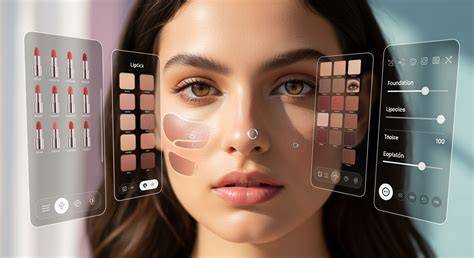
Traditional photo editing can look flat and artificial. Our AI-driven makeup editor uses advanced 3D face tracking and deep learning to ensure every product blends seamlessly with your unique skin tone and facial contours. Eye makeup, lips, and facial enhancements are designed to look natural yet impactful, helping men explore style options with confidence.
What AI Virtual Makeup Try-On Brings to Your Photos
AI Virtual Makeup Try-On offers a comprehensive all-in-one solution for trying makeup online. You can upload a photo where your face is clearly visible for optimal results, choose a makeup feature, and let the AI automatically recognize your facial features. The result is a professional makeup look that respects your individual skin tone and facial geometry.
Eyes: Customize your eye color, add colorful eyeshadow, apply eyeliner, voluminous eyelashes and define your eyebrows. Lips: Apply stunning lip colors with matte, gloss, or shimmer finishes. Face: Highlight your natural beauty with blush and contour, or create a flawless finish with foundation.
All-In-One Makeup Editor: Instanty Try Makeup Filters Online. You see it? You try it! Explore and experiment with stunning AI makeup filters from celebrities, influencers or even friends to see what makeup suits your face best.
Precise AI Makeup Filters: Transform your photos effortlessly with AI makeup editing tools. Just upload your picture, and let the advanced AI work its magic by precisely detecting your facial features like eyes, lips, face, and eyebrows. It will automatically add stunning makeup to your photo based on the beauty filters that you choose, giving you a flawless look.
AI Eye Makeup: Add Eyelashes & Eyeliner To Photos. Illuminate your eyes with AI magic, featuring custom eye colors and captivating lashes. Effortlessly explore a variety of eye shadow palettes and eyeliner styles and colors. No need to spend on expensive makeup to try out new looks!
Foundation, Blush, and Contour for a Radiant Complexion
Radiant Complexion: Add Foundation & Blush To Photos. Perfect your face photos with smooth foundation for clear, flawless skin. Achieve a glowing look with countless blush options. Highlight and contour your facial features for a professional makeup finish.
Lip Color and Texture Options
AI Lipstick: Try Enchanting Lip Colors. Transform your lips with vibrant shades perfect for any occasion. Choose from a variety of bold, natural, or glossy styles to match your mood and look.
AI Makeup Transfer: Try Any Look Instantly
AI Makeup Transfer: Instantly Try Any Makeup Look. With our AI makeup transfer feature, you can try any makeup look on your photo. Upload a reference photo of your favorite celebrity or trend, and our AI will instantly extract and apply that exact look to your face.
How to Use the AI Makeup Editor Online
- Upload Your Photo: Upload a photo where your face is clearly visible for optimal results.
- Choose a Makeup Feature: Select the makeup option you want to enhance - lip color, eyeliner, eye shadow, blush, etc. The AI will automatically recognize your facial features.
- Customize Your Look: Choose colors that match your style and adjust the intensity with the slider. Once you are satisfied, save your new professional makeup look.
FAQs: Practical Insights for Men Using YouCam Online Editor
- How can I edit my makeup in a picture? Upload your image to YouCam Online Editor's AI Makeup Photo Editor, explore 10+ makeup features, adjust colors and intensity, and save your new look.
- Is there a free AI photo editor for beauty online? Yes. YouCam Online Editor AI Makeup Editor offers free makeup filters and tools directly in your browser.
- Can I try makeup online for free? Yes. YouCam Online Editor allows you to upload a photo and experiment with dozens of makeup categories and full-face looks at no cost.
- Does the AI makeup editor work on all skin tones? Absolutely. The AI is trained on a globally diverse dataset to ensure that foundations, blushes, and lip colors appear vibrant and true-to-life on every skin tone and ethnicity.
- How accurate is the AI makeup try-on? Our AI makeup tool uses high-fidelity 3D rendering and patented face-tracking technology to ensure 99% accuracy in color and texture, simulating real-world lighting and product finishes for a professional result.
Additional Capabilities: Broad Range of AI Tools
YouCam’s platform also supports a variety of tools beyond makeup, enabling a cohesive editing workflow. These include AI Photo Enhancer for sharpening and upscaling, AI Object Remover to clean backgrounds, and AI Hairstyle Generator to preview multiple cuts and colors. All tools are designed for browser-based use, requiring no heavy downloads and preserving user privacy with secure cloud processing.
AI Makeup Transfer can be used alongside other features to recreate looks inspired by celebrities or trends on your own photo. The results are designed to be natural, with careful attention to the lighting, shadows, and contours of your face.
Practical Tips for Best Results
- Upload a well-lit, front-facing photo to help the AI accurately detect facial features.
- Start with subtle adjustments and gradually increase intensity for a natural look.
- Experiment with different tones to match your personal style or occasion.
- Combine makeup with light contouring to emphasize facial structure without appearing heavy.