Standard commercial terms apply to all subscribers. Companies earning more than $1,000,000 gross annual revenue must use Pro or Mega. Annual billing saves 20% and is paid upfront for the full year. This is the thing that makes Midjourney's pricing feel slippery to newcomers. A basic image prompt costs about 1 GPU minute. A batch of 4 HD videos costs 26 GPU minutes. Job type Approx. On Basic (200 Fast minutes): you get ~200 image prompts if that's all you do. Add upscales and variations and that number drops quickly. SD video? On Standard (900 Fast minutes): 900 pure image prompts in Fast mode. More practically, a mix of prompts, upscales, and some video - plus unlimited images in Relax mode that don't touch your Fast allocation at all. One more thing: Fast hours don't roll over. Unused time expires at the end of every billing cycle - monthly and annual subscribers alike. If you were on Standard and used 8 of your 15 Fast hours this month, the other 7 disappear on renewal day.
The Basic plan is an entry point, not a working plan. Basic is SD-only for video, limits you to one concurrent video prompt, and caps permutation runs at 4 jobs. Best for: First-time users who want to try Midjourney before committing $30/month. Standard is where most serious Midjourney users end up, and the reason is simple: unlimited Relax mode for images. "I burned through the cheap account quickly. The practical workflow on Standard: use Fast mode for urgent, deadline-driven work (client reviews, time-sensitive campaigns). Standard gives you SD and HD video access, though HD video still consumes Fast GPU time at 26 minutes per batch. What Standard doesn't include: Stealth Mode (your images are public), and unlimited SD video in Relax mode (that's Pro and Mega only). The jump from Standard to Pro costs $30/month extra. The main thing you're buying is Stealth Mode - private image generation. For commercial work, brand concepting, client deliverables, or anything proprietary, that's a real constraint.
From a personal perspective: "My Midjourney is cancelled. Paid through the 10th of January 2025, but I can't afford the ridiculous $60/month for 30 Fast hours... The frustration is understandable." Privacy is not a premium feature in most professional tools - it's a baseline expectation. Beyond Stealth Mode, Pro also doubles Fast GPU hours to 30 hours/month, adds unlimited SD video via Relax mode (Standard users pay Fast time for all video), and raises concurrent image prompts to 12 (Standard allows 3). One hard rule worth knowing: companies with gross annual revenue over $1,000,000 must use Pro or Mega for commercial use. The standard commercial terms that come with Basic and Standard only cover organizations below that threshold.
Turbo mode and queue dynamics shape real-world usage. Turbo mode accesses a high-speed GPU pool and generates images up to 4x faster than Fast. The cost: 2x the Fast GPU time per image. So on a Standard plan with 900 Fast minutes, switching to Turbo halves your effective capacity to ~450 minutes worth of generation. The Turbo burn-rate issue has caught plenty of people off guard. Early adopters have burned through their 'fast hours' unknowingly due to unclear UI prompts. Midjourney launched its video model in June 2025. The official framing from CEO David Holz on launch: "We'll be charging about 8x more for a video job than an image job and each job will produce four 5-second videos... Whether that's cheap or expensive depends on your baseline. In concrete terms: one SD video batch of 4 clips costs ~8 GPU minutes. One HD video batch costs ~26 GPU minutes."
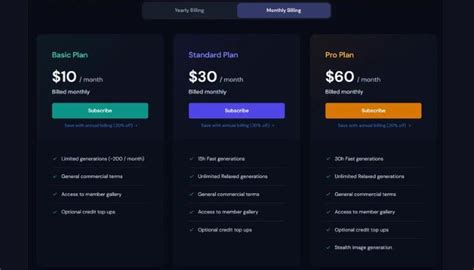
The four tiers and their core distinctions are summarized here: Basic, Standard, Pro, Mega. Basic is 3.3 fast GPU hours, no Relax Mode, no Stealth Mode, 3 concurrent jobs, no commercial rights. Standard opens 15 fast GPU hours, unlimited Relax Mode, Stealth unavailable, 3 concurrent jobs, commercial rights. Pro doubles fast hours to 30, unlocks Stealth Mode and 12 concurrent jobs, unlimited Relax Mode, and includes SD video. Mega doubles to 60 fast hours and 16 concurrent jobs, with Stealth and unlimited Relax Mode. Annual billing saves about 20% across all tiers.
How the plans actually work in day-to-day use
Fast hours are the default generation mode. Results arrive in roughly 1 minute for a standard image prompt. Relax mode is available on Standard, Pro, and Mega for images; Pro and Mega only for SD video. Jobs go into a queue - wait times range from 0 to 30 minutes depending on server load. Users who run Relax mode frequently get lower queue priority than lighter users. Relax mode cannot be used with permutation prompts, the --repeat parameter, HD video, or Max Upscale (legacy).
What about the relationship between plans and privacy? Stealth Mode keeps generated images private (not visible in the public Midjourney gallery). It’s a key feature for commercial work and brand confidentiality, and it’s included starting at Pro. If you’re operating under Basic or Standard, images are public by default. Annual billing offers the only explicit discount, with no promotions otherwise.
For video, Midjourney launched a video model and, per official framing, video generation consumes your Fast hours just like images and adds multiple video outputs per job. Pro and Mega unlock SD video in Relax mode (standard users pay Fast time for video). Basic is limited to SD video and one concurrent Fast video prompt. The practical takeaway: video generation is generally most feasible for Pro or Mega users with sizeable Fast hour budgets.
Practical guidance: which plan should you choose?
The Standard Plan at $30/month is the best balance for most users: Fast hours support regular image work, and unlimited Relax Mode helps with bulk testing, iteration, and non-urgent experiments. If you work with clients or need privacy and faster iteration for large projects, the Pro Plan at $60/month is the smarter choice-Stealth Mode for client work, higher concurrency, and full commercial rights. The Mega Plan at $120/month is primarily for production studios or agencies with high-volume needs and requires a sustained high workflow to justify the cost.
Unsurprisingly, for teams, Mega becomes appealing when concurrency and throughput are critical. If you’re a single creator or small team, Standard often suffices, while Pro belongs to those with strict privacy needs or frequent client deliverables. Basic remains the entry point for learning prompts and testing the water. Annual billing reduces costs, making the move to Standard or Pro more palatable for long-term use.
There are practical strategies to lower costs without sacrificing quality. Use Relax Mode for bulk experiments, save Fast Hours for urgent tasks, and consider annual billing. Subscription sharing platforms can provide reduced access, though you must account for licensing and policy considerations. If you’re evaluating alternatives, Banani AI or other engines may offer more favorable per-use economics for certain workflows, especially for UI/UX or rapid social visuals.
What you should know about free trials and real-world costs
Midjourney no longer offers a free trial. The 20% annual discount is the primary pricing incentive. By design, you pay for speed and privacy, not necessarily image quality. If your volume is modest, Basic may suffice, but for consistent commercial output, Standard or Pro becomes more sensible-even if the per-image cost appears higher at first glance due to fast-hour budgeting and non-rollover rules. Real-world spend depends on how aggressively you use fast hours and how often you rely on Relax mode or Turbo mode, which accelerates generation at the cost of faster burn.
In summary: for most solo professionals, Standard is the sweet spot; for privacy-centric client work, Pro is the right choice; and Mega is for high-volume production environments. Annual billing provides meaningful savings across tiers, and always account for the non-rollover policy of fast hours when planning monthly workloads.
Additional considerations and related comparisons
Compared to other AI image generators, Midjourney emphasizes artistic and stylized outputs with a distinctive flair. DALL·E 3 integrates well with ChatGPT for conversational prompts but often emphasizes realism, while Stable Diffusion offers open-source flexibility at the cost of setup complexity. Adobe Firefly integrates deeply with Creative Cloud but may not deliver the same signature Midjourney aesthetics. Bundling multiple tools can expand your creative range and optimize cost per deliverable.
For teams evaluating total cost of ownership, consider not only subscription fees but also the value of private, branded output, the costs of onboarding and training, and how often you need to generate large volumes under tight deadlines. If your usage scales, Pro or Mega may prove the most cost-effective path despite higher monthly bills.
tags: #midjourney #monthly #plan